Note:
Before starting the configuration, a new Module instance must be created. For more information, see Creating Module instances.
The first step is to configure the main Web Vision Module properties. These settings control session behavior, Designer locking, project identification, tag picker behavior, script execution limits, server access, HTTPS certificates, and login customization.
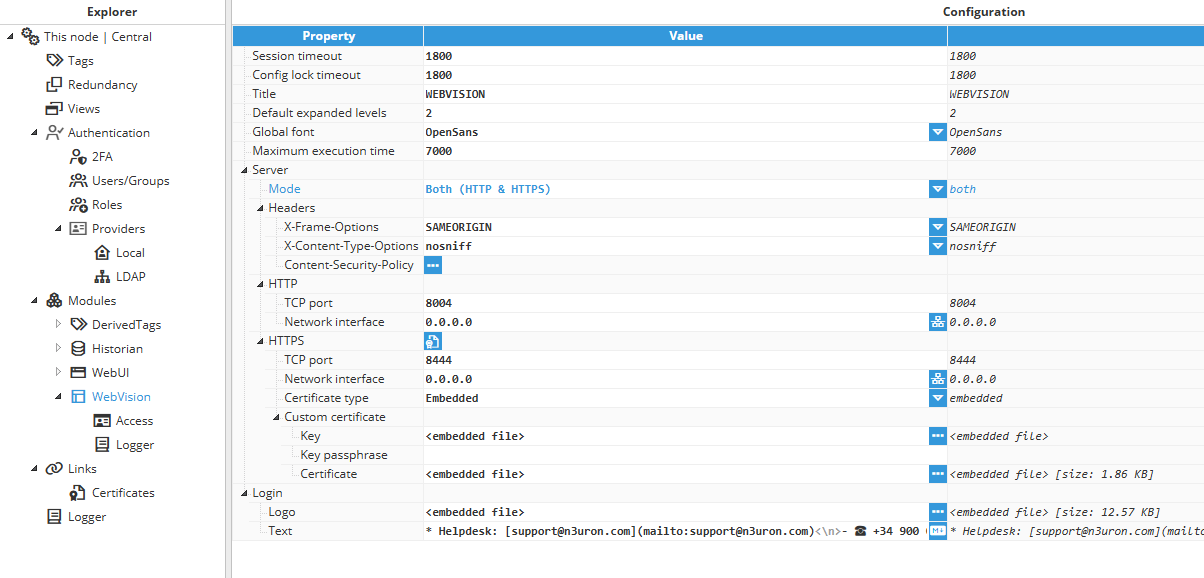
Session & Project settings
Property | Description |
|---|---|
Session timeout | Defines the period of user inactivity after which the session expires, expressed in seconds. A value of 0 disables the inactivity check, forcing the session to not be closed due to inactivity. If the users losses the connection, the session data will be retained in memory so that it can be recovered until the timeout elapses, or for 12 hours if the timeout is set to 0. |
Config lock timeout | Defines how long a user can keep the configuration locked without making modifications. The lock is automatically released when the user session expires. |
Title | Name displayed in the web browser tab for project identification. |
Default expanded levels | Specifies the depth of expanded levels for tag picker controls opened by default. |
Global font | Default font applied to visual components. |
Maximum execution time | Maximum execution time for expressions and functions before the executing script is automatically stopped to avoid infinite loops. This value is expressed in milliseconds. |
Note:
A configuration lock is also released when the user session expires. If the Config lock timeout is greater than the Session timeout, the lock may be released because of session expiration instead of lock expiration.
Server settings
Property | Description |
|---|---|
Mode | Defines whether Web Vision is exposed using traditional HTTP connections or secure HTTPS connections. |
Headers | Configures HTTP security headers sent by the web server to improve browser-side security. |
Note:
HTTP security headers are available from N3uron version 1.21.9.
HTTP security headers
Header property | Description |
|---|---|
Controls whether the page can be displayed inside a frame, iframe, embed, or object element in another website. | |
Prevents the browser from interpreting files with a MIME type different from the one specified by the server. | |
Adds a browser security layer that helps detect and mitigate attacks such as Cross-Site Scripting and data injection. |
X-Frame-Options values
Note:
The Content Security Policy HTTP header includes the frame-ancestors directive, which makes X-Frame-Options obsolete for modern browsers. It is still maintained for backward compatibility.
Value | Description |
|---|---|
SAMEORIGIN | Only allows the page to be displayed in a frame on the same origin as the page itself. |
DENY | Prevents the page from being displayed in a frame, regardless of the origin. |
Custom value / expression | Allows custom text or an expression, for example the deprecated ALLOW-FROM origin directive, which is ignored by modern browsers. |
X-Content-Type-Options values
Value | Description |
|---|---|
nosniff | Instructs the browser to follow the MIME types provided by the server and not alter them. |
Content Security Policy options
Property | Option | Description |
|---|---|---|
Directive | frame-ancestors | Specifies valid parents that may embed a page. |
report-uri | Instructs the browser where to send reports if the content violates the policy. | |
report-to | Sets a reporting group for sending violation reports. | |
upgrade-insecure-requests | Forces the browser to use HTTPS instead of HTTP when possible. | |
Custom value / expression | Allows custom text or an expression, for example block-all-mixed-content. | |
Value | none | Does not allow loading of any resources. |
self | Only allows resources from the current origin. | |
strict-dynamic | Applies a nonce or hash to script elements, granting trust to a script on the page and extending that trust to the scripts it loads. | |
report-sample | Requires the inclusion of a sample of the violating code within the violation report. | |
inline-speculation-rules | Allows the inclusion of speculation rules in scripts. | |
Custom value / expression | Allows custom text or an expression. For example, in the frame-ancestors directive, the value *.n3uron.com can be used to permit embedding of the page within any webpage under the n3uron.com domain. |
HTTPS settings
Property | Description |
|---|---|
TCP port | Specifies the port number used to open the web interface using HTTPS. Valid range: 1 to 65535. Default: 8444. |
Network interface | Specifies the interface through which the module is accessible using HTTPS. All interfaces are configured by default using 0.0.0.0. The browse button can be used to discover and select a network interface. |
Certificate helper | Facilitates the generation of custom self-signed certificates and provides control over the certificate generation process. |
Note:
Make sure the selected HTTPS port is not being used by any other application running on the same machine.
Note:
The Certificate helper is available from N3uron version 1.21.9.
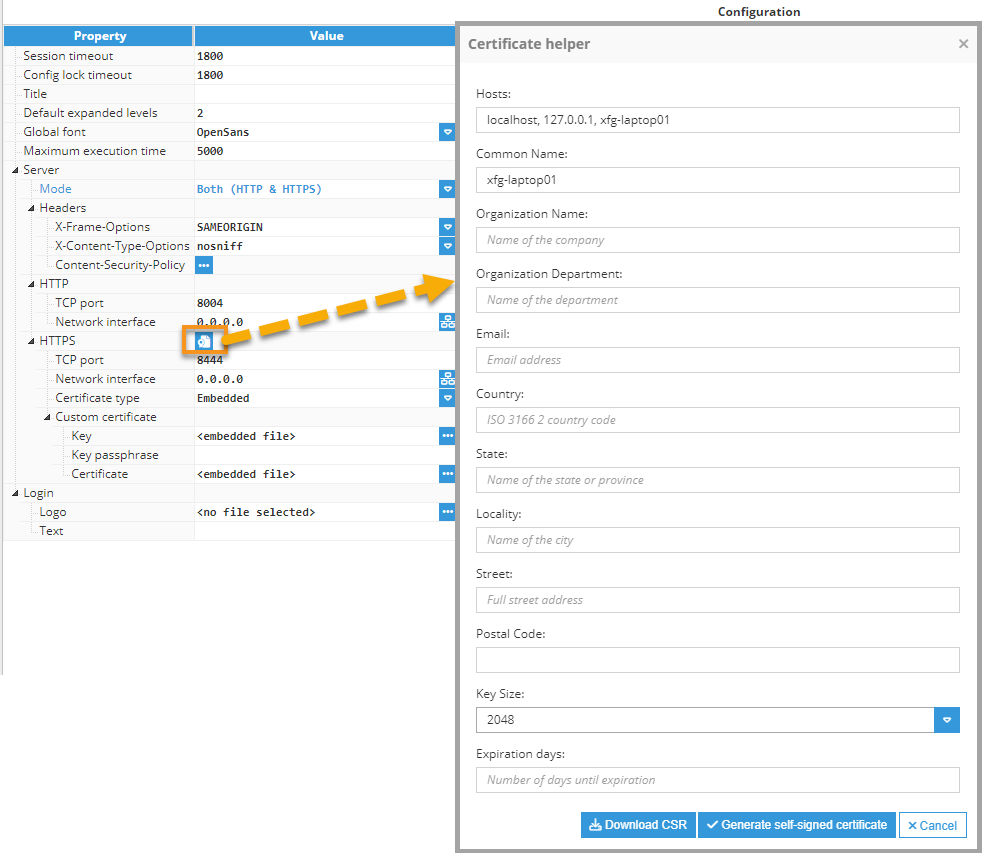
Certificate helper fields
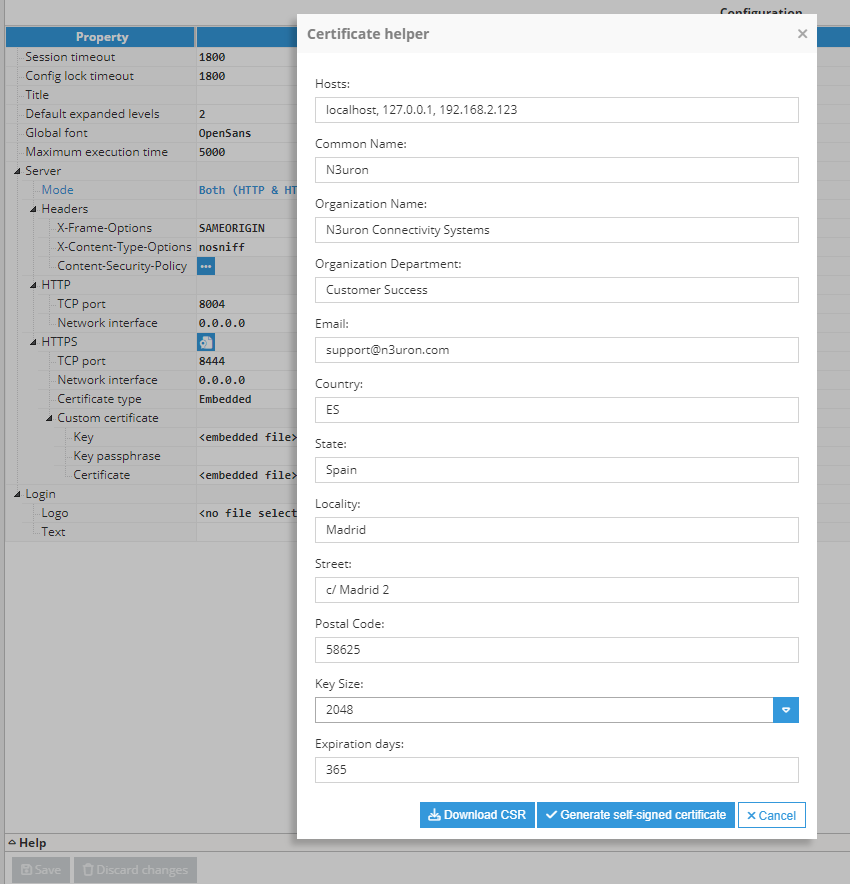
To open the self-signed Certificate helper, right-click the icon next to the HTTPS section and fill out the form.
Property | Description |
|---|---|
Hosts | Specifies the Subject Alternative Names for the certificate. This field can include multiple domain names, IP addresses, and other identifiers separated by commas. |
Common Name | Fully qualified domain name for which the certificate is being requested. This is typically the domain name of the server where the certificate will be installed. |
Organization Name | Legal name of the organization or company requesting the certificate. |
Organization Department | Department or division within the organization requesting the certificate. |
Email address associated with the organization or person requesting the certificate. | |
Country | Two-letter ISO code representing the country where the organization is located, such as US, CA, or ES. |
State | Full name or abbreviation of the state or province where the organization is located. |
Locality | City or locality where the organization is located. |
Street | Street address of the organization's physical location. |
Postal Code | Postal or ZIP code of the organization's location. |
Key Size | Size of the cryptographic key pair generated for the certificate, measured in bits. Common key sizes include 2048 and 4096 bits. |
Expiration Days | Number of days until the certificate expires. This defines the certificate validity period before renewal is required. |
Note:
The Hosts field is available from N3uron version 1.21.10.
When filling out the form to generate the CSR, make sure all information is accurate and matches the organization's official details. This information is embedded in the CSR and used to issue the SSL/TLS certificate.
Certificate type options
Certificate type | Description |
|---|---|
Self-signed | The server automatically creates and signs a certificate using an internal certification authority. The certification authority is valid for all module instances and must be imported into all systems and web clients used to access Web Vision using HTTPS. |
Embedded | The user provides both the key and certificate files directly in the configuration. |
File Path | The user specifies the paths for the key and certificate files relative to the data/<instance name>/cert folder. This option is suitable for automatic certificate renewal scenarios. |
Note:
Starting from N3uron version 1.21.9, the generation of self-signed certificates has been relocated to the Certificate helper.
Note:
The Embedded certificate type is available from N3uron version 1.21.7. The key for embedded certificate files is secure and cannot be downloaded.
Custom certificate fields
Property | Description |
|---|---|
Key | Private key certificate file used for secure connections. The file must be in .pem format. |
Key passphrase | Passphrase associated with the certificate key. Leave this field empty if the key was generated without a passphrase. |
Certificate | Certificate file used for secure connections. The file must be in .pem format. |
Reload Interval | Interval, in seconds, used to reload the certificate if changes are detected. Set this field to 0 to disable automatic reload. |
Note:
The use of a key passphrase for encrypted certificate keys is available from N3uron version 1.21.10.
Self-signed certificate hosts
Property | Description |
|---|---|
Certified hosts | Comma-separated host list, including domains, hostnames, and IP addresses, that will be included in the autogenerated SSL certificate. Hosts such as 127.0.0.1, localhost, and the system hostname are automatically added to the certificate. |
Note:
Starting from N3uron version 1.21.9, specifying certified hosts is no longer necessary in this field.
Login Page Customization
Property | Description |
|---|---|
Logo | Logo displayed in the login view. If no logo is selected, the default logo is loaded. |
Text | Informational message shown on the Web Vision login page before authentication. The content is written in Markdown and can be used to provide support contacts, documentation links, maintenance notices, or policy reminders. |
Note:
Login customization is available from N3uron version 1.22.0.
