Tag Aliases are used in Web Vision to simplify references or repeated N3uron Tag paths. They make projects easier to read, maintain, and reuse by replacing full Tag paths with shorter names that can be used inside screens, templates, bindings, expressions, and actions.
Aliases are especially useful in large HMI projects where the same path structure is repeated across many devices, areas, stations, or equipment instances.
Usage of Tag Aliases
Using tag aliases reduces visual complexity and makes bindings easier to understand at a glance.
Benefit | Description |
|---|---|
Simpler bindings | Short aliases make Tag references easier to read in properties, expressions, and actions. |
Reusable templates | Aliases allow the same template to be reused with different equipment or Tag path contexts. |
Easier maintenance | When path logic is centralized, changes are easier to apply without editing many individual visual elements. |
Cleaner expressions | Expressions become shorter and easier to review when they use aliases instead of complete Tag paths. |
Conceptual Example
Instead of referencing the same long Tag path repeatedly, an alias can represent the base path of a device, area, or equipment instance.
Reference | Example |
|---|---|
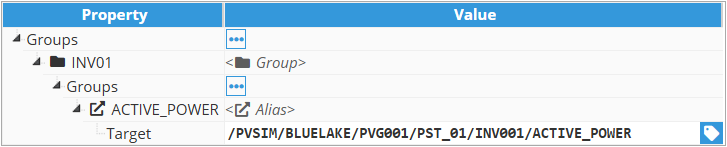
Full Tag path | /PVSIM/BLUELAKE/PVG001/PST_01/INV001/ACTIVE_POWER |
Alias Group | INV01 |
Alias Tag | @INV01/ACTIVE_POWER |
Concept:
The alias represents the repeated part of the path. The screen or template only needs to reference the name or path relative to that alias.

Recommended Naming
Use clear and consistent alias names. A good alias name should describe the object or context it represents without duplicating the complete path.
Use short names: For example, INV, PUMP, MOTOR, TANK, AREA, or STATION.
Keep names meaningful: The alias should indicate what type of object or path it represents.
Avoid hard-coded context: Do not include a specific station or device number in a reusable alias unless the alias is only intended for that instance.
Be consistent: Use the same naming convention across screens, templates, Datasets, and actions.
Recommendation:
Define alias naming rules before building large reusable components. Consistent aliases make templates easier to understand and reduce configuration errors.
Best Practices
Use aliases for repeated equipment structures, avoiding the duplication of full Tag paths for easily sustainable screens.
Keep the alias scope clear so designers know where each alias is valid.
Use aliases together with templates to maximize reuse and reduce maintenance work.
Avoid mixing full paths and aliases in the same reusable component unless there is a clear reason.
Document the purpose of each alias when the project contains many reusable objects or nested templates.