Note:
Create a module instance before configuration. See Creating Module instances.
Channel set up
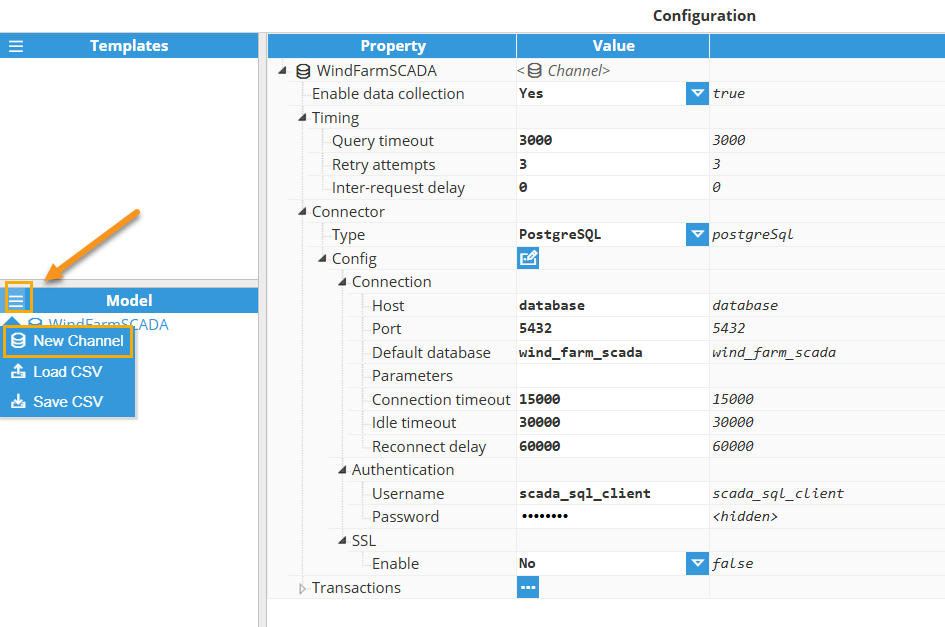
Create a new channel for each database connection and assign it a descriptive name. In this example, the channel is named WindFarmSCADA to identify the database connection.
N3uron versions prior to 1.22.8:
N3uron 1.22.8 and later:
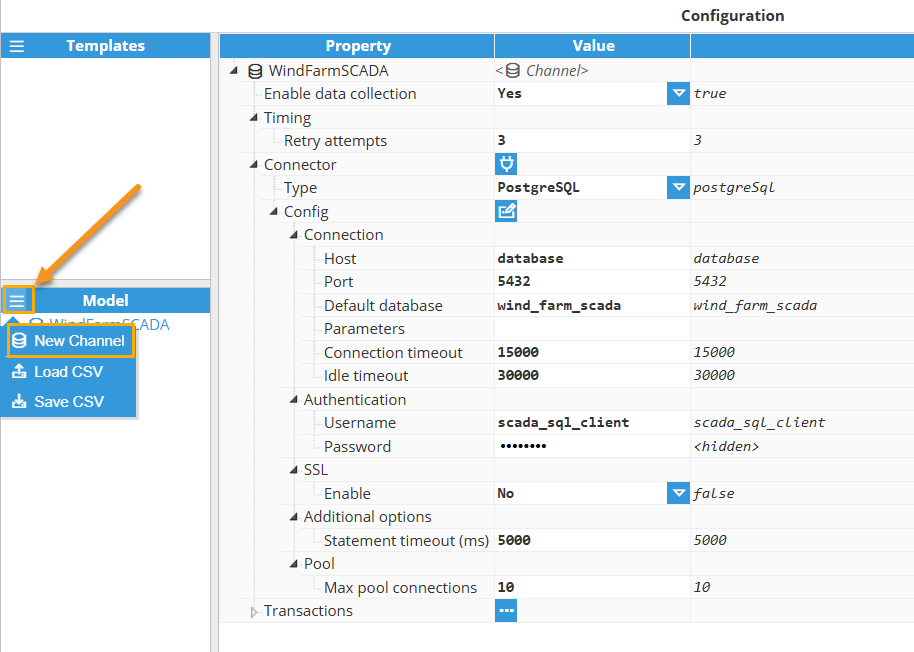 Each
Channel requires the following parameters to be set.
Setting | Description |
|---|---|
Enable data collection | Enables data collection for this channel. When disabled, no transaction on the channel executes. The default is Yes. |
Timing
Setting | Description |
|---|---|
Retry attempts | Number of retries for each Standard transaction run requested by a trigger. Retries apply to temporary database failures, such as a lost connection or driver timeout. They also apply when the database stops an operation to resolve a deadlock between blocked operations. The range is 0–1000 and the default is 3. A value of 0 disables retries. A value of 3 allows the first attempt and up to 3 retries. If these attempts fail, the transaction waits for the next trigger. History transactions retry buffered inserts until the database recovers. The limits for memory buffers and disk retention still apply. The wait between retries increases and includes a random variation. |
Query timeout | In earlier versions, Query timeout (also named Timeout) was the time to wait for a valid response before retrying or moving to the next transaction, in milliseconds. The range was 100–600000 ms and the default was 3000 ms.
|
Inter-request delay | In earlier versions, this was the delay between the end of one transaction and the start of the next, in milliseconds. It could reduce the query rate to an overloaded database. The range was 0–3600000 ms and the default was 0 ms, which sent the next request as soon as a valid response arrived.
|
Connector
From N3uron version 1.22.8, the Test connection icon on the Connector group checks the connection values currently in the editor, before saving. A successful check does not validate transaction queries, permissions on every table, or tag updates.
Setting | Description |
|---|---|
Type | Select the target database type: MySQL, MariaDB, SQL Server, PostgreSQL, OracleDB or TimescaleDB. The connection fields change with this selection. |
N3uron versions prior to 1.22.8:
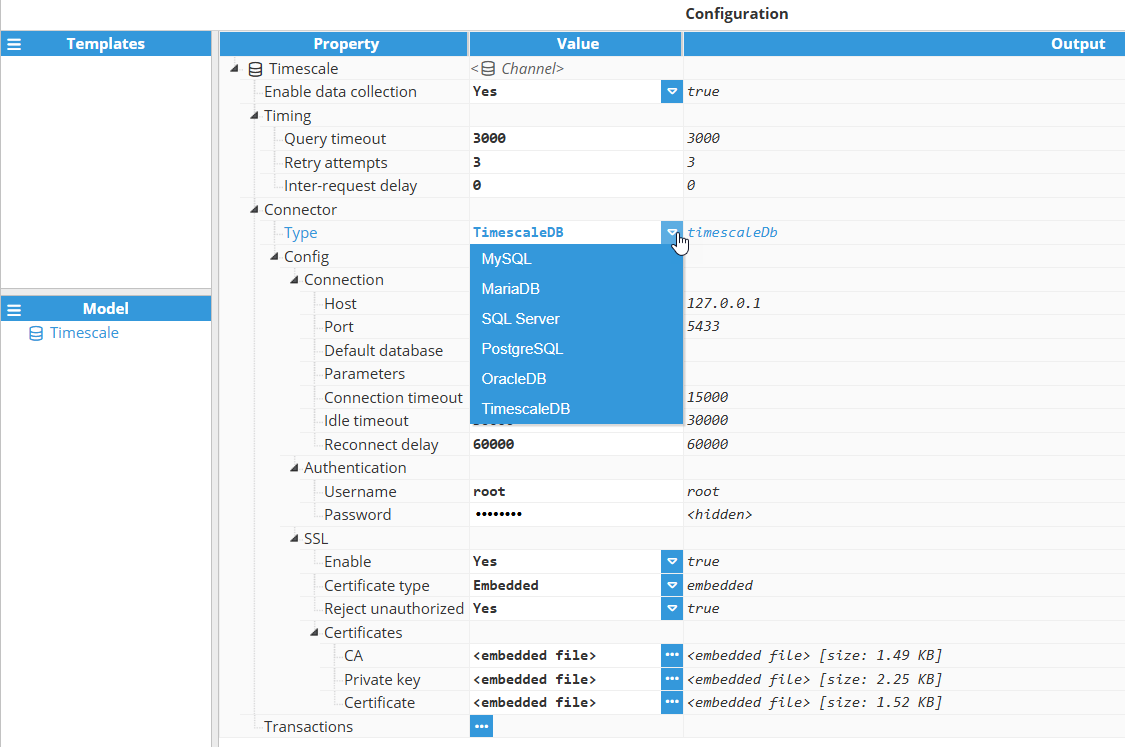
N3uron 1.22.8 and later:
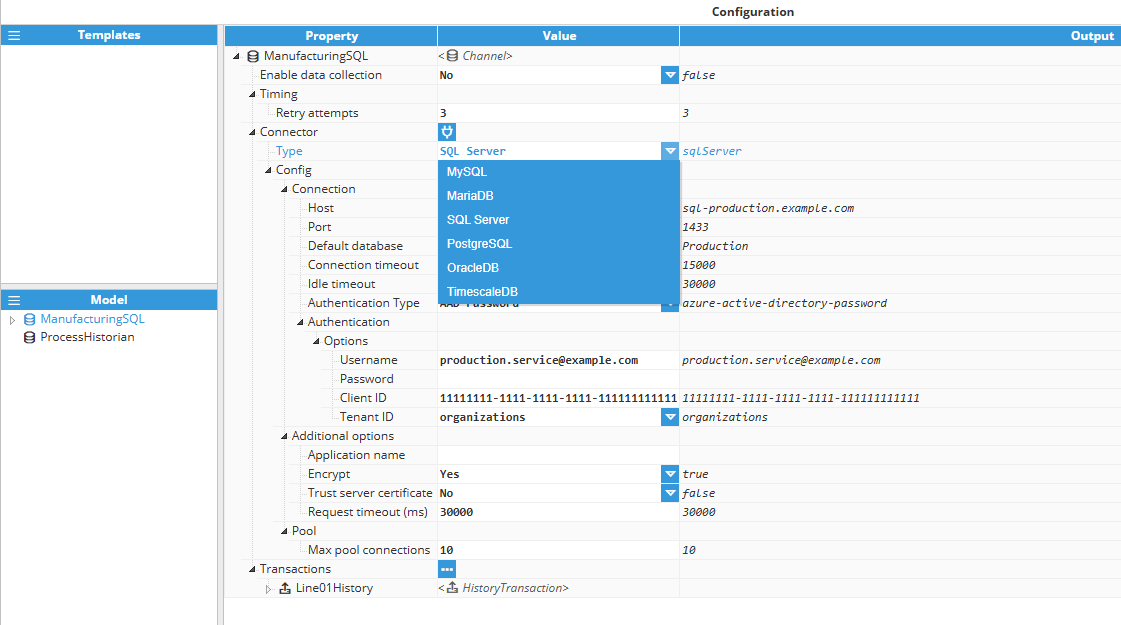
Connection String Helper lets you paste a connection string from a database tool or its documentation.
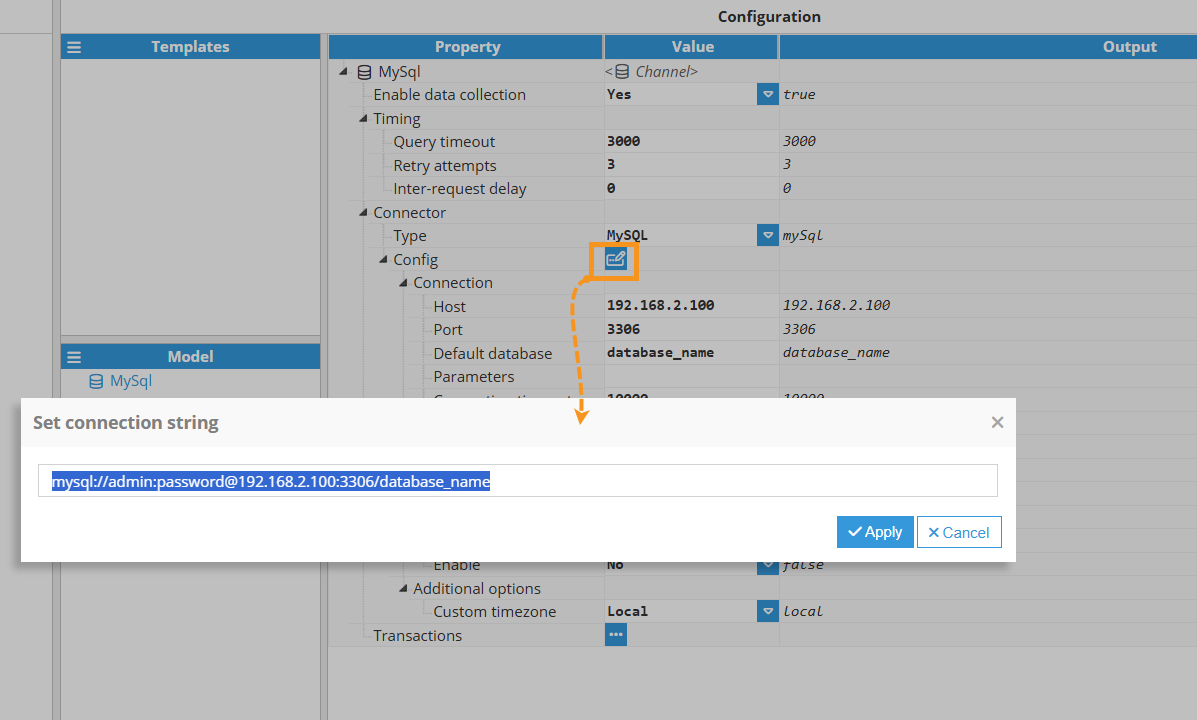
Connecting to MySQL and MariaDB
When connecting to MySQL or MariaDB, the following options are displayed.
N3uron versions prior to 1.22.8:

N3uron 1.22.8 and later: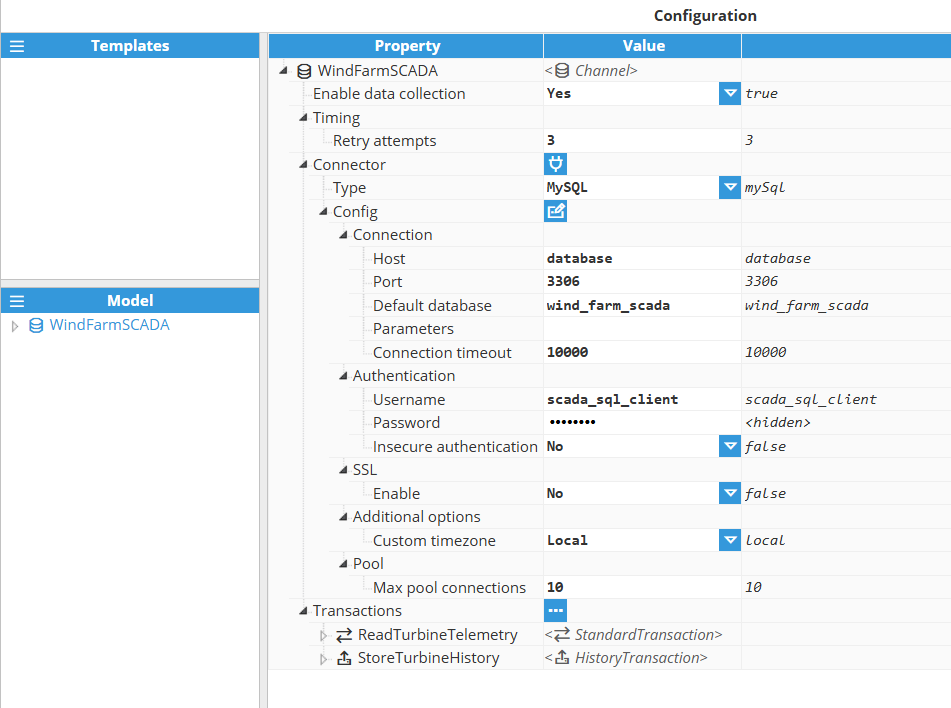
Connection
Setting | Description |
|---|---|
Host | Hostname or IP address of the target MySQL or MariaDB database. The initial value is |
Port | TCP port used to establish the connection. The range is 1–65535 and the default for MySQL and MariaDB is 3306. |
Default database | Database to use as the default. If left blank, all queries must use fully qualified table names in the form |
Parameters | Connection parameters in URL query format. For example, Values can contain
|
Connection timeout | Maximum time to establish a connection before it times out, in milliseconds. The minimum is 5000 ms and the default is 10000 ms. This timeout controls connection establishment, not statement execution. |
Reconnect delay | In earlier versions, this was the wait before a new attempt after a failed connection, in milliseconds. The default was 60000 ms.
|
Authentication
Setting | Description |
|---|---|
Username | Username used to authenticate to the database. The initial value is |
Password | Password used to authenticate to the database. |
Insecure authentication | Allows connections to MySQL instances that use the legacy authentication method. The default is No. |
SSL
Setting | Description |
|---|---|
Enable | Turns SSL on or off for this channel. The default is No. SSL encrypts the connection and can authenticate the module with a client certificate when the server requires it.
|
Certificate type | Select how to load the PEM certificate material. The default is Embedded:
|
Reject unauthorized | When Yes, reject a connection if the server certificate is not signed by a trusted Certificate Authority. Set No to allow a certificate without a trusted CA signature. The default is Yes. |
CA | CA certificate used to verify the signature of the server certificate. The file must be in PEM format.
|
Private key | Private key presented with the client certificate when the server requires client-certificate authentication. The file must be in PEM format.
|
Certificate | Client certificate presented when the server requires client-certificate authentication. The file must be in PEM format.
|
Additional options
Setting | Description |
|---|---|
Custom timezone | Select the timezone configured on the MySQL server. The module uses this timezone when converting date values to JavaScript Date objects. The default is Local. |
Connecting to SQL Server
When connecting to an SQL Server, the following options are displayed.
N3uron versions prior to 1.22.8:
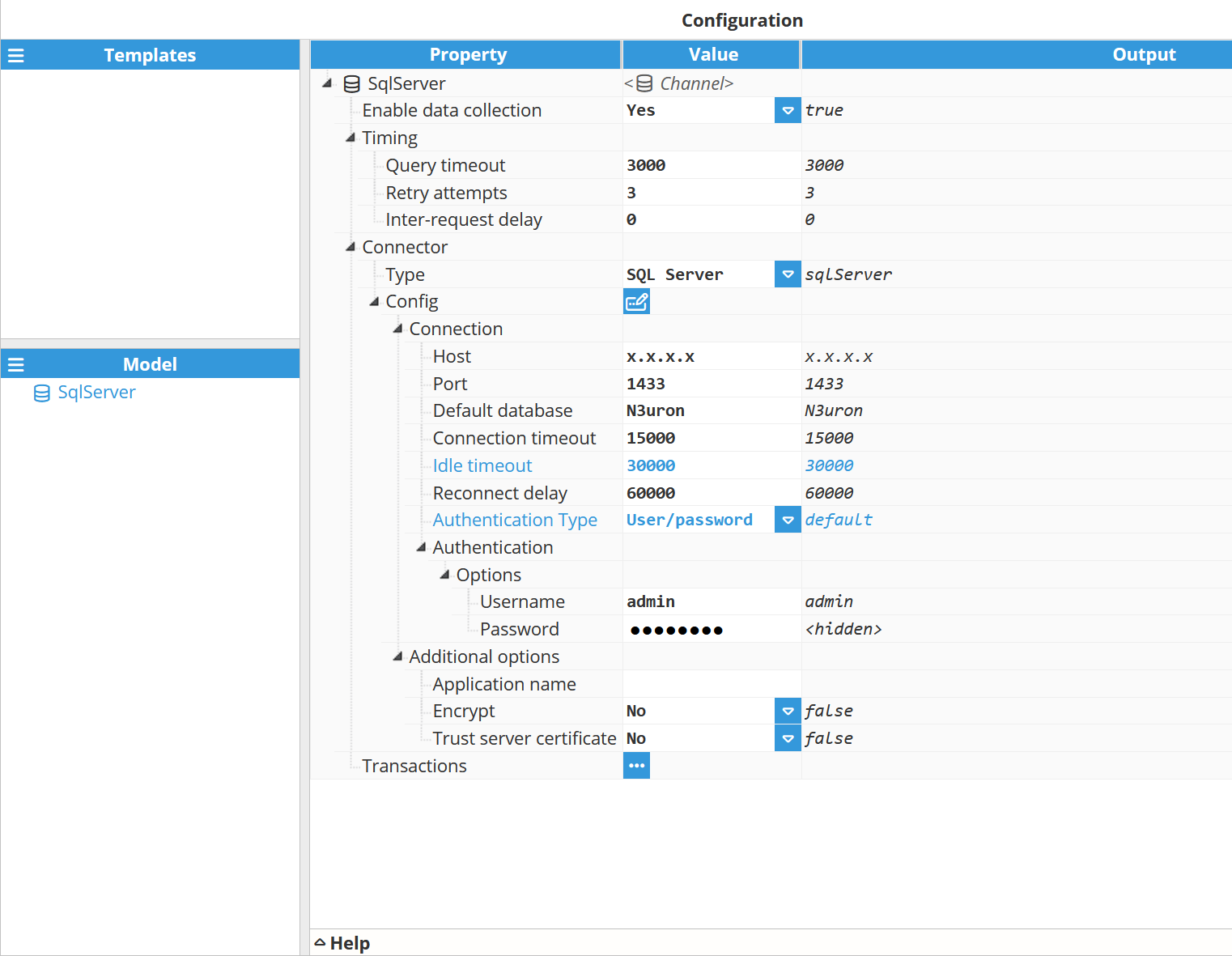
N3uron 1.22.8 and later:
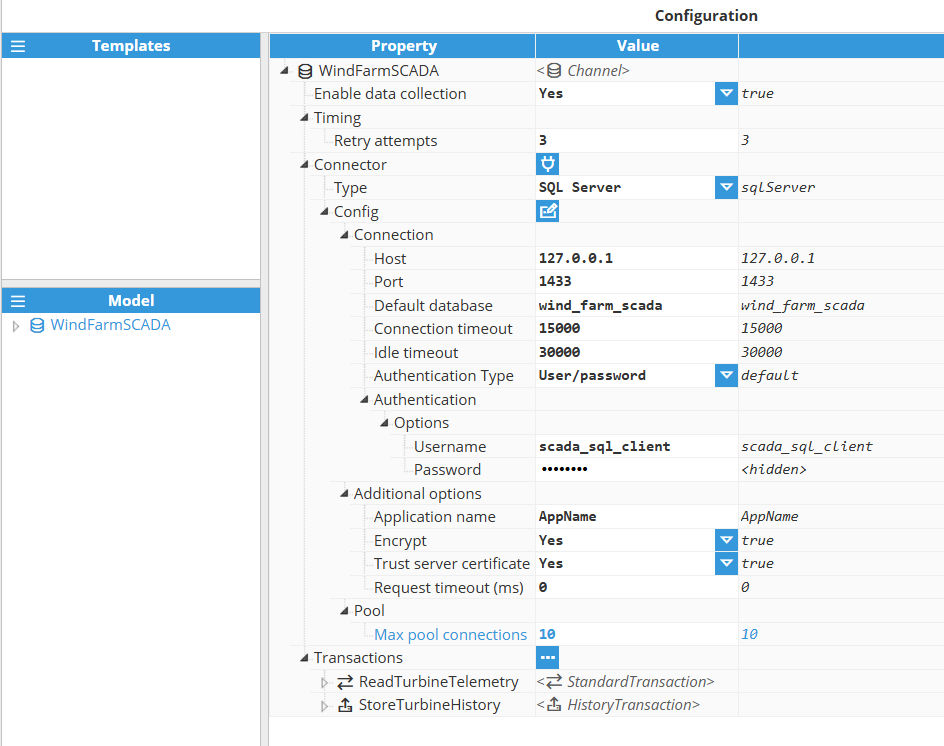
Connection
Setting | Description |
|---|---|
Host | Hostname or IP address of the target SQL Server database. The initial value is
|
Port | TCP port used to establish the connection. The range is 1–65535 and the default is 1433. |
Default database | Database to use as the default. If left blank, SQL Server uses the default database of the login. To access a table in another database, use |
Connection timeout | Maximum time to establish a connection before it times out, in milliseconds. The minimum is 5000 ms and the default is 15000 ms. This timeout controls connection establishment, not statement execution. |
Idle timeout | Maximum time a connection can remain idle before it is disconnected to reduce server load, in milliseconds. The minimum is 5000 ms and the default is 30000 ms. |
Reconnect delay | In earlier versions, this was the wait between new connection attempts after the current one failed.
|
Authentication
Setting | Description |
|---|---|
Authentication Type | Select the authentication method. Configure its fields in Authentication > Options:
|
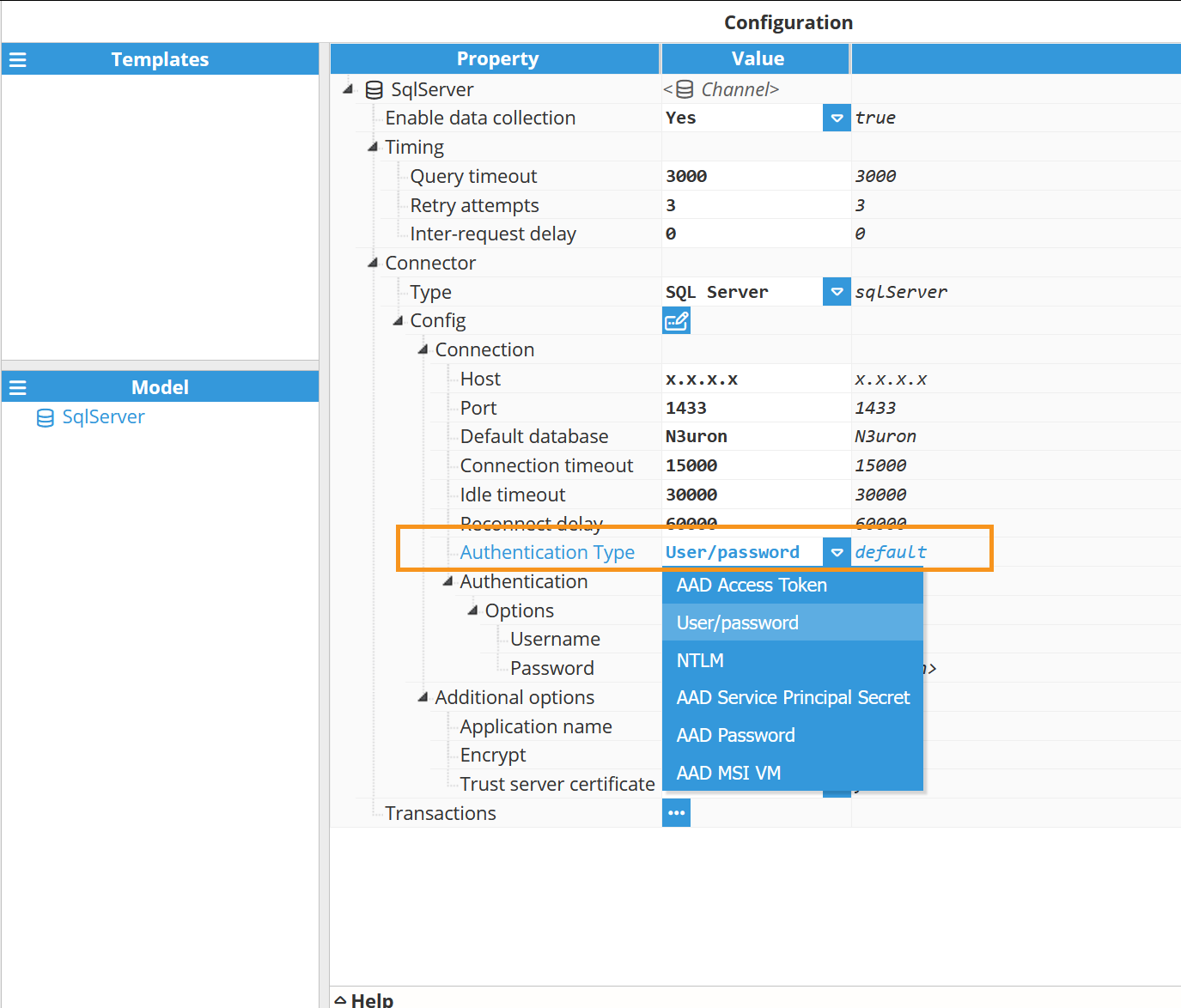
User/password (default) Authentication Type
Setting | Description |
|---|---|
Username | Username used to authenticate to the database. It can be a database user or a domain user. |
Password | Password used to authenticate to the database. |
NTLM
Setting | Description |
|---|---|
Username | Username used to authenticate to the database. It can be a database user or a domain user. |
Password | Password used to authenticate to the database. |
Domain | Windows domain used for authentication. Leave blank to use a database user instead of a domain user. |
AAD Service Principal Secret
Setting | Description |
|---|---|
Client ID | Application Client ID of the Azure app. |
Client Secret | Client Secret of the Azure app. It is stored encrypted in the configuration from N3uron version 1.22.8. |
Tenant ID | Select an authentication endpoint or enter a custom Tenant ID. The default is
|
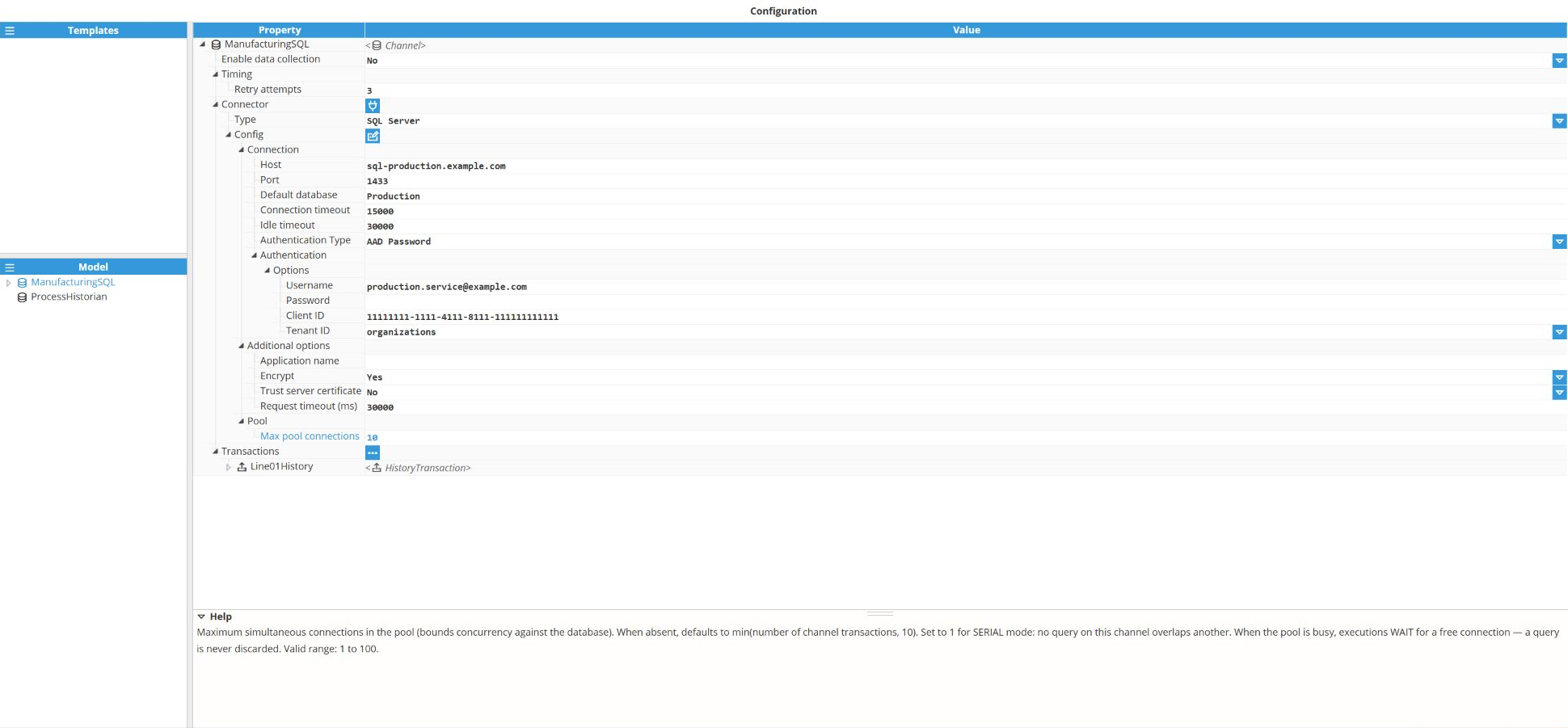
AAD Password
Setting | Description |
|---|---|
Username | Azure Active Directory username used for authentication. |
Password | Password associated with the username. |
Client ID | Application Client ID of the registered Azure application used for authentication.
|
Tenant ID | Select an authentication endpoint or enter a custom Tenant ID. The default is
|
AAD Access Token
Setting | Description |
|---|---|
Access Token | Access token used to authenticate to the database. It is stored encrypted in the configuration from N3uron version 1.22.8. |
AAD MSI VM
Setting | Description |
|---|---|
Client ID | Client ID associated with the managed identity created on the Azure app. |
MSI Endpoint | MSI app service endpoint. |
Tenant ID | Select an authentication endpoint or enter a custom Tenant ID. The default is
|
Additional options
Setting | Description |
|---|---|
Application name | Application name used for this connection. |
Encrypt | Enables encryption for this connection. Encryption is required for connections to Microsoft Azure. The default is No. |
Trust server certificate | Trusts the server SSL/TLS certificate without validating it against a trusted Certificate Authority. The default is No. |
Setting | Description |
|---|---|
Request timeout (ms) | Maximum time a statement can run, in milliseconds. The default is 0, which means no limit. With a positive limit, SQL Server cancels a request that exceeds it and the connection remains usable.
|
Connecting to PostgreSQL and TimescaleDB
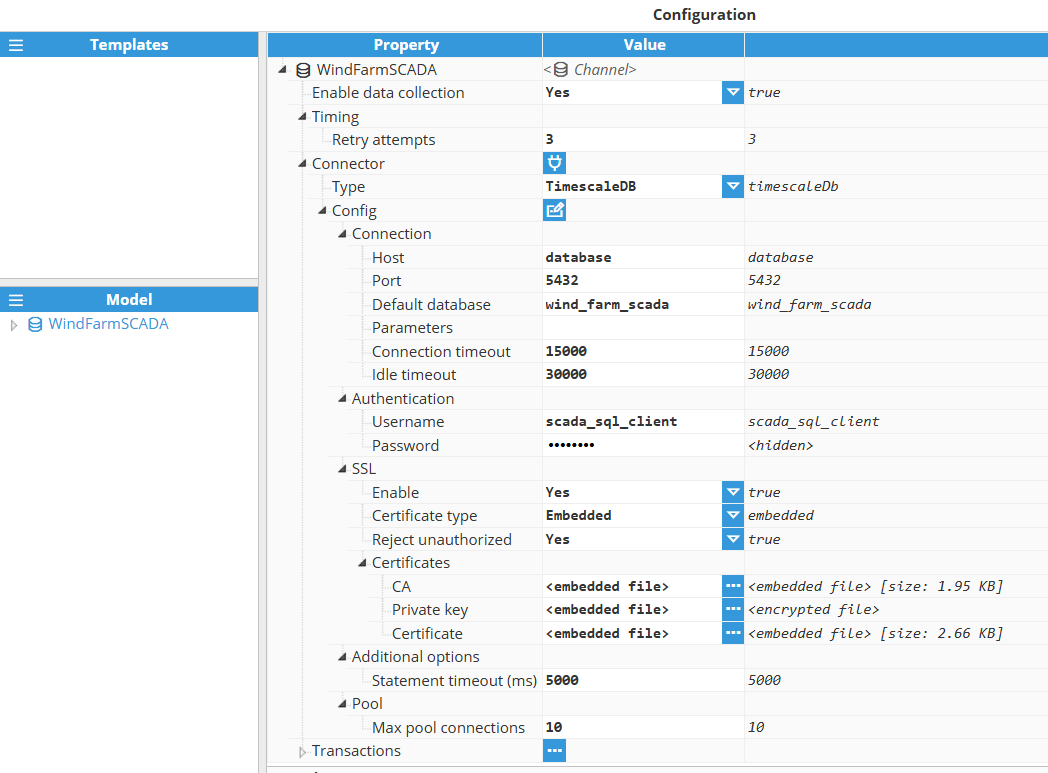
When connecting to PostgreSQL or TimescaleDB, the following fields are displayed.
N3uron versions prior to 1.22.8:
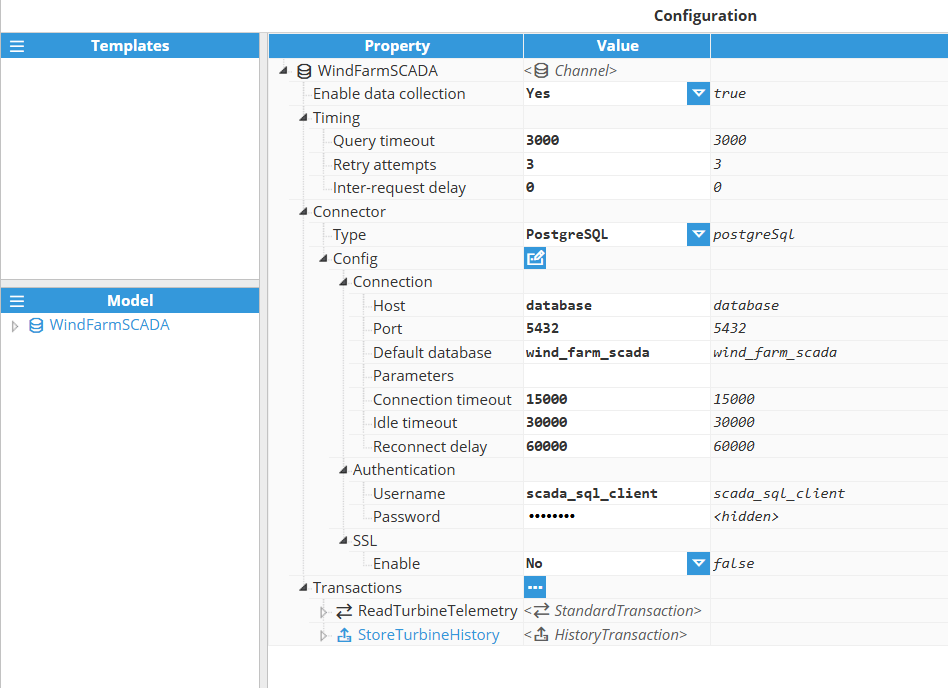
N3uron 1.22.8 and later: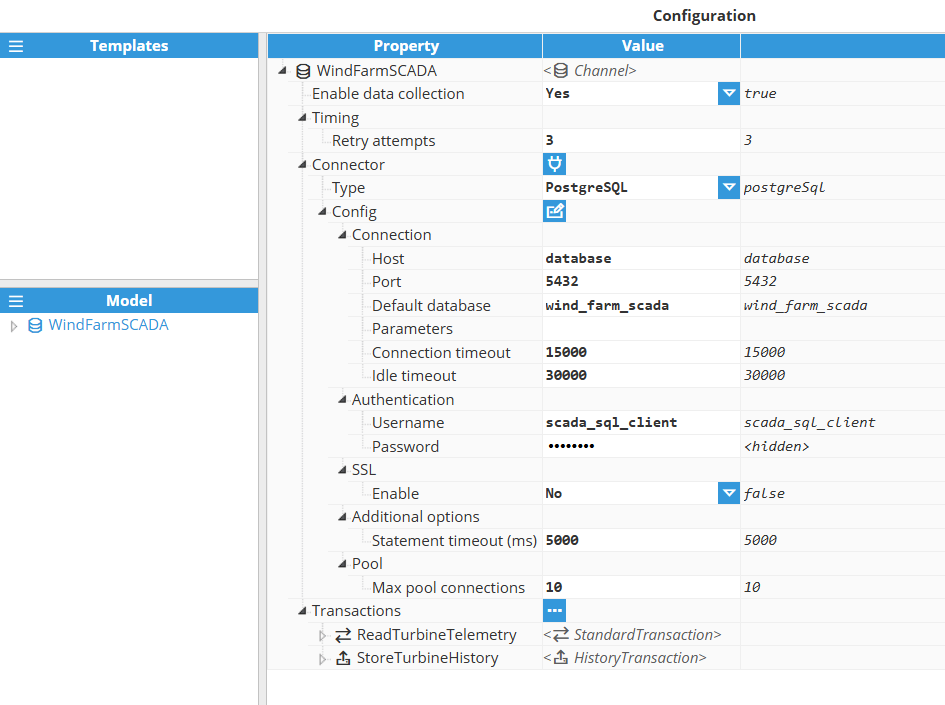
Connection
Setting | Description |
|---|---|
Host | Hostname or IP address of the target PostgreSQL or TimescaleDB database. The initial value is |
Port | TCP port used to establish the connection. The range is 1–65535 and the default is 5432. |
Default database | Database opened by the connections. A PostgreSQL connection works on one database only; a query cannot access another database by name. To access a table in another schema, use |
Parameters | Connection parameters in URL query format. For example, Values can contain
|
Connection timeout | Maximum time to establish a connection before it times out, in milliseconds. The minimum is 5000 ms and the default is 15000 ms. This timeout controls connection establishment, not statement execution. |
Idle timeout | Maximum time a connection can remain idle before it is disconnected to reduce server load, in milliseconds. The minimum is 5000 ms and the default is 30000 ms. |
Reconnect delay | In earlier versions, this was the wait between new connection attempts after the current one failed.
|
Authentication
Setting | Description |
|---|---|
Username | Username used to authenticate to the database. The initial value is |
Password | Password used to authenticate to the database. |
SSL
Setting | Description |
|---|---|
Enable | Turns SSL on or off for this channel. The default is No. SSL encrypts the connection and can authenticate the module with a client certificate when the server requires it.
|
Certificate type | Select how to load the PEM certificate material:
|

Setting | Description |
|---|---|
Reject unauthorized | When Yes, reject a connection if the server certificate is not signed by a trusted Certificate Authority. Set No to allow a certificate without a trusted CA signature. |
CA | CA certificate used to verify the signature of the server certificate. The file must be in PEM format.
|
Private key | Private key presented with the client certificate when the server requires client-certificate authentication. The file must be in PEM format.
|
Certificate | Client certificate presented when the server requires client-certificate authentication. The file must be in PEM format.
|
Additional options
Setting | Description |
|---|---|
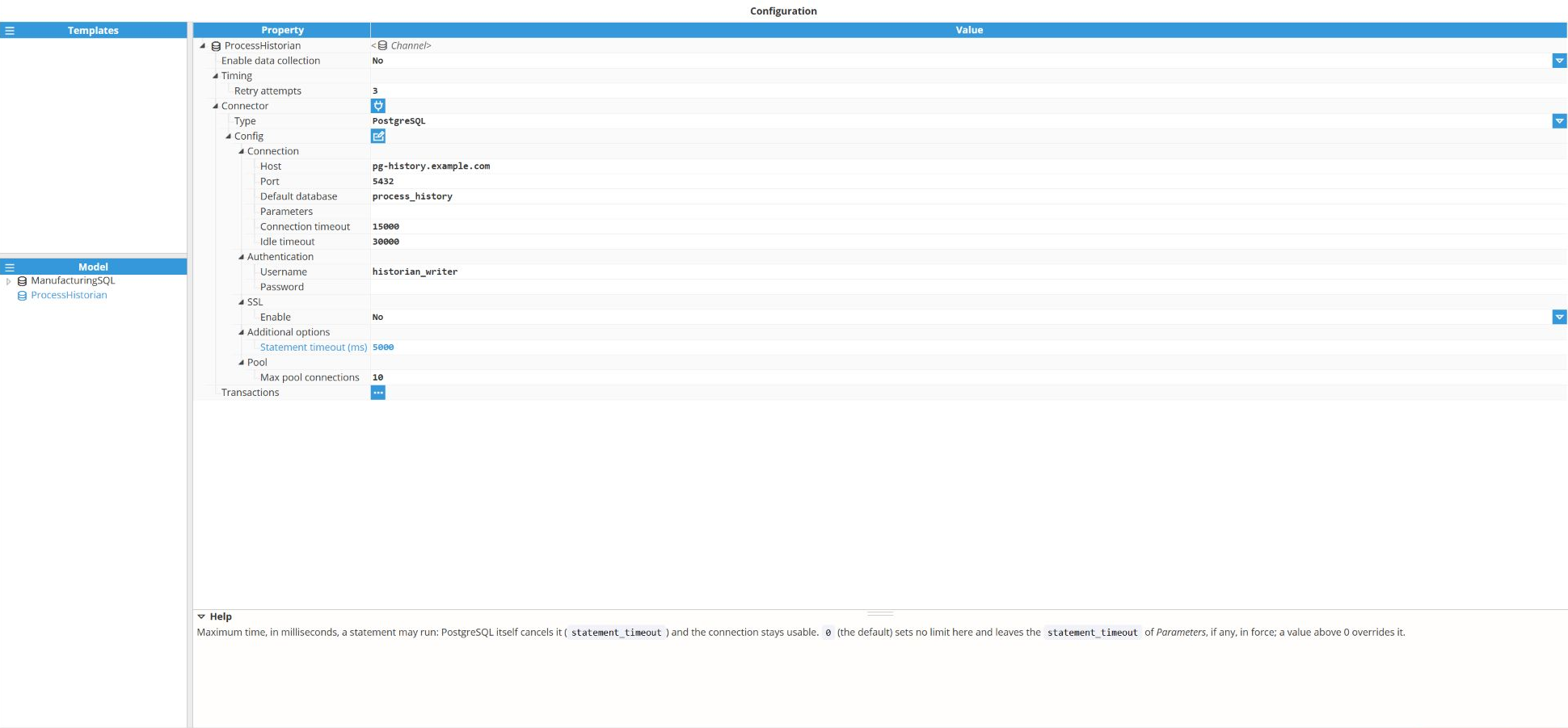
Statement timeout (ms) | Maximum time a statement can run, in milliseconds. PostgreSQL cancels a statement that exceeds this limit and the connection remains usable. The default is 0, which sets no limit here and leaves any |
Connecting to OracleDB
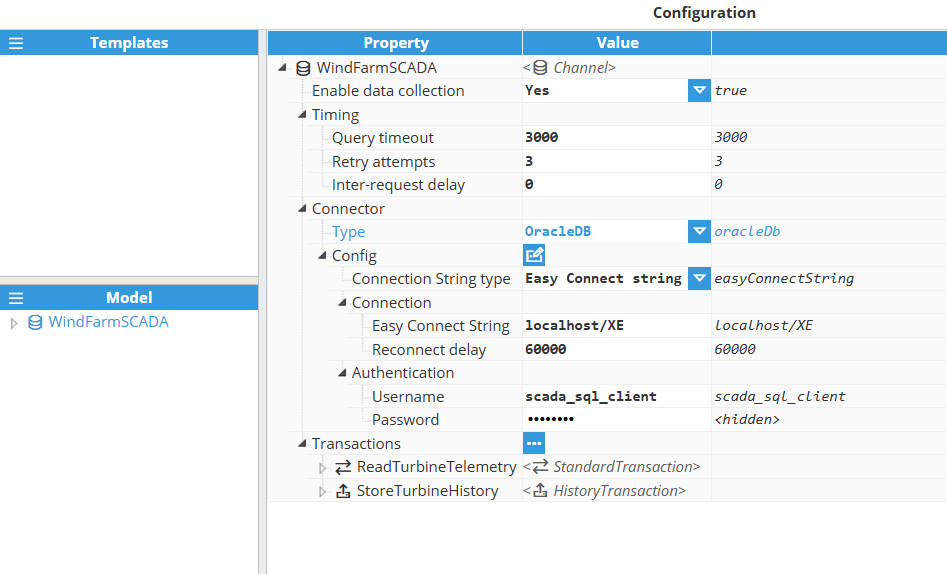
When connecting to an OracleDB, the following options are displayed.
N3uron versions prior to 1.22.8:
N3uron 1.22.8 and later:
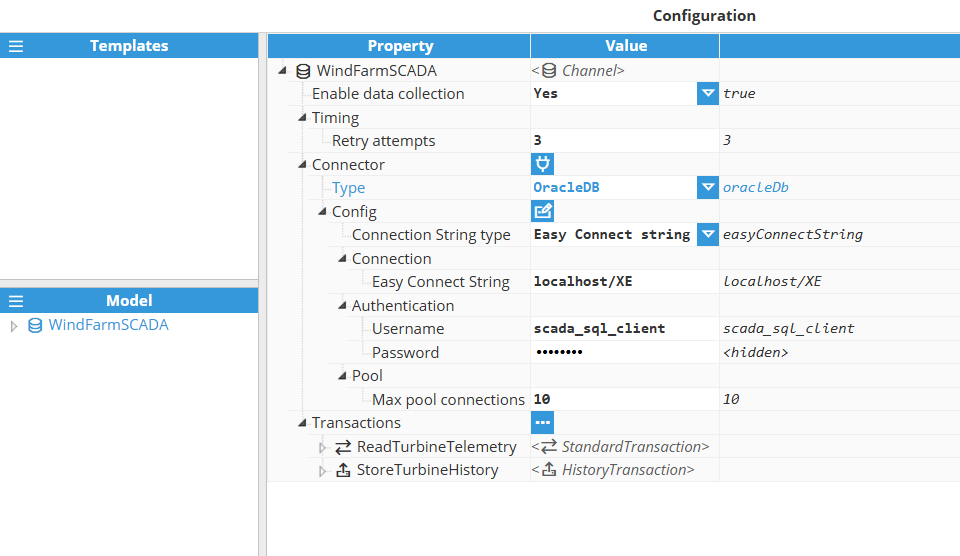
Connection
Setting | Description |
|---|---|
Connection String type | Select the Oracle connection string type: Easy Connect string or Embedded Connect Descriptor string. The initial selection is Easy Connect string. |
Easy Connect String | String used to establish the connection to the Oracle database when Easy Connect string is selected. The initial value is Earlier versions use the Connect String field. |
Reconnect delay | In earlier versions, this was the wait before another connection attempt after a failure, in milliseconds. The minimum was 5000 ms and the default was 60000 ms.
|
Authentication
Setting | Description |
|---|---|
Username | Username used to authenticate to the database. The initial value is |
Password | Password used to authenticate to the database. |
Connection Pool
Setting | Description |
|---|---|
Max pool connections | Maximum number of connections used at the same time by all transactions on the channel. The range is 1–100. The editor initially sets 10. If the configuration does not contain this value, the module uses the smaller of the transaction count and 10. If all connections are busy, execution requests wait for a free connection in the order they arrive. The module does not discard these requests.
|
Transactions
A channel can contain StandardTransaction and HistoryTransaction instances. A Standard transaction runs database queries. Its Parser can convert the results into tag updates. A History transaction collects tag events and prepares data to insert into the database.
Transactions share the channel connection pool and can run at the same time, up to the pool limit. Within each transaction, the steps run in order.
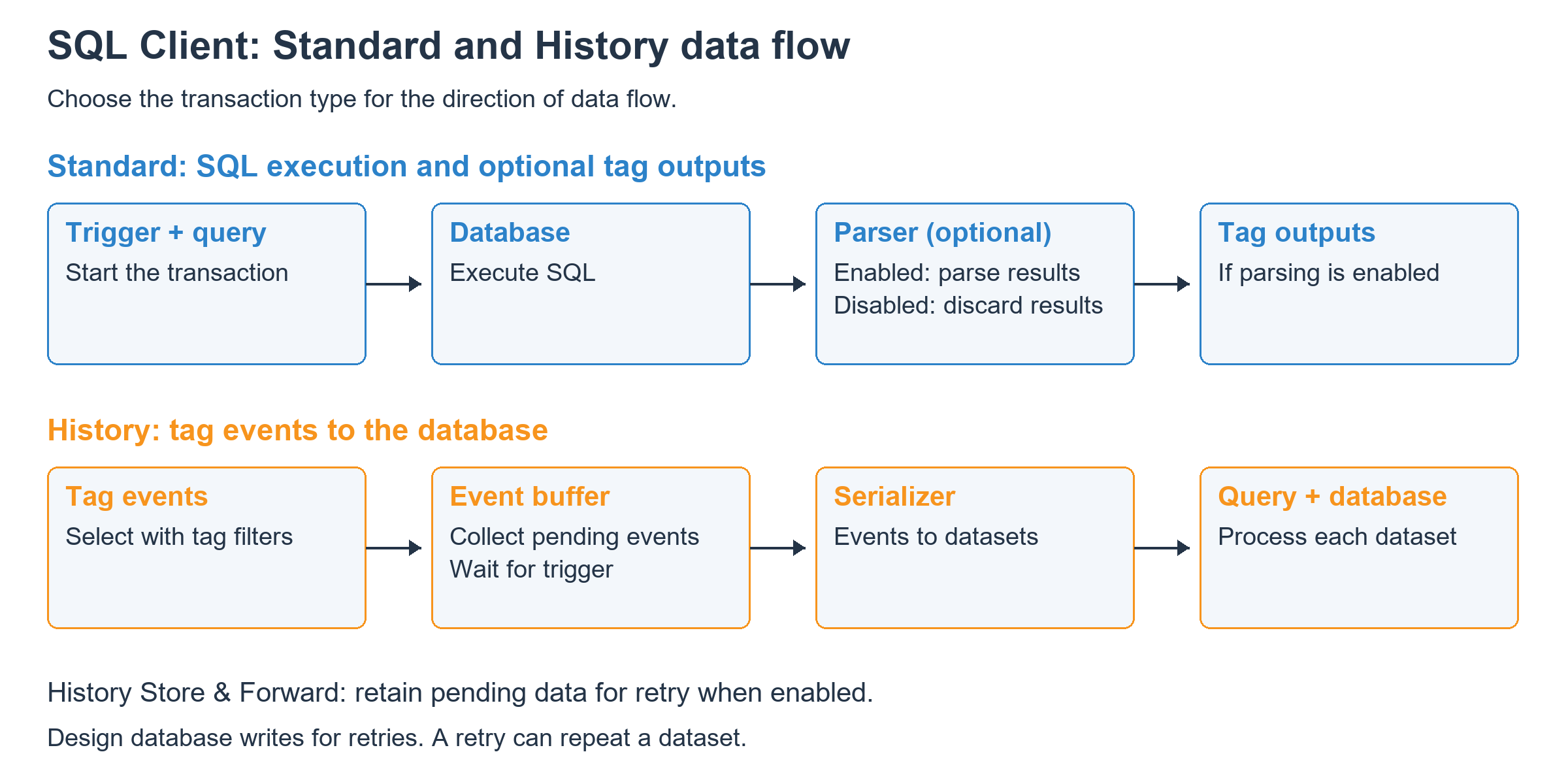
StandardTransaction
Use a StandardTransaction to retrieve data from a database, insert or update database values, or transfer recipe values between a database and a PLC. Its Parser can update tags supplied by SQL Client or write to tags supplied by another driver, such as ModbusClient or SiemensClient. The following screenshot shows the earlier configuration layout.
From N3uron version 1.22.8, a failed Standard transaction changes only the quality of its own tags to BAD_DEVICE_FAILURE. Their values remain. An unreachable database does not put the whole module offline.
N3uron versions prior to 1.22.8: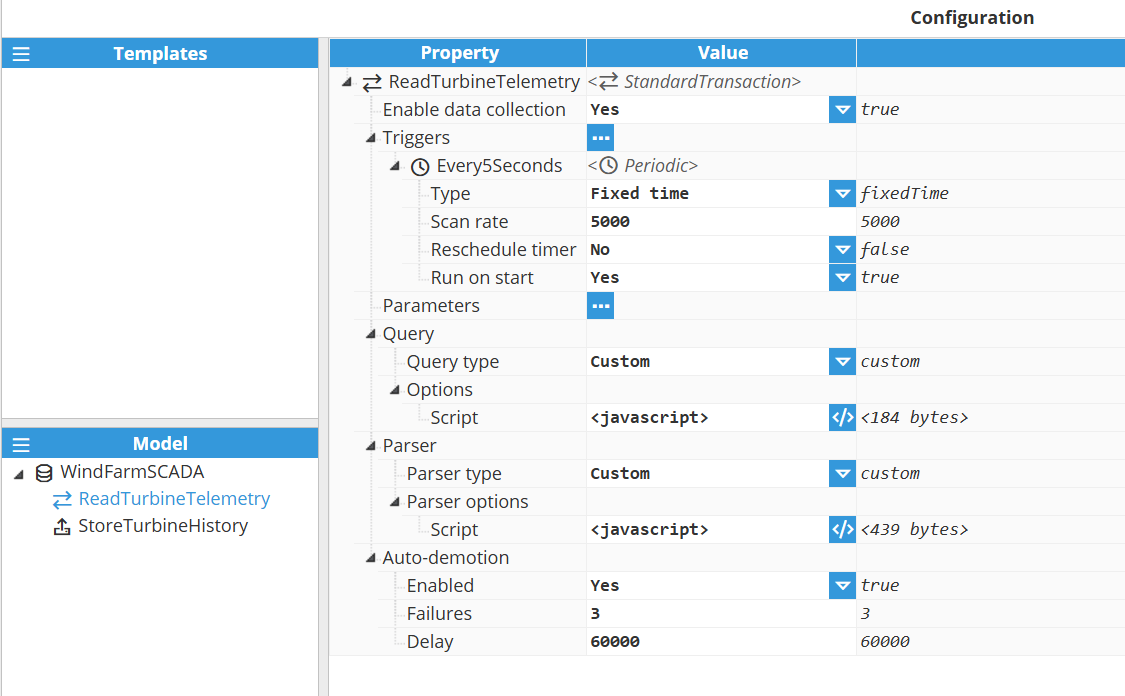
N3uron 1.22.8 or later:
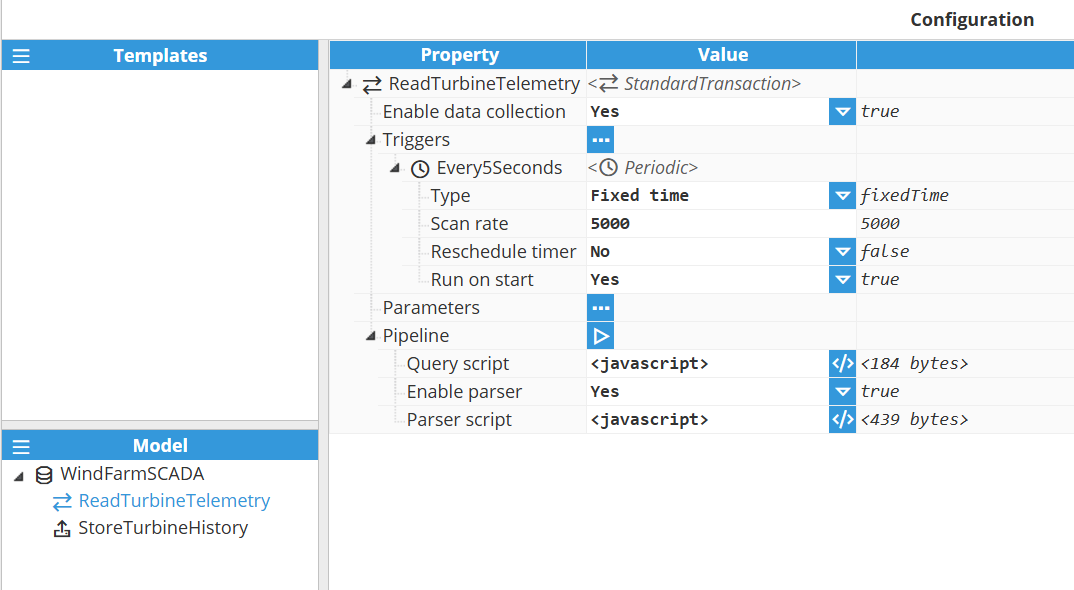
Setting | Description |
|---|---|
Enable data collection | Enables this transaction. The default is Yes. When disabled, the transaction does not execute. |
Triggers | Choose when this transaction runs. Each trigger requests a run. Requests received while the transaction runs are combined into one pending run. See Triggers. |
Parameters | Define the tag values that the scripts can read. See User-defined scripts. |
Pipeline
The scripts run in the order shown below.
Note:
Starting with N3uron 1.22.8, transaction configuration has been simplified and standardized around the Pipeline concept, providing a consistent approach across Standard, History, and Query methods.
Each method retains its specific configuration options, while sharing a unified pipeline structure that makes it easier to configure, manage, and test the complete processing sequence using the Play button.
In earlier versions, Query type supported custom JavaScript only; Parser type offered None or Custom.
Setting | Description |
|---|---|
Query script | This script builds the SQL statement that the transaction sends to the database. See User-defined scripts.
|
Enable parser | Enables the Parser step. The default is Yes. When disabled, the query result is discarded and no tag is written. Use this for a transaction that only writes to the database. |
Parser script | This script converts database results into tag updates. See User-defined scripts. |
HistoryTransaction
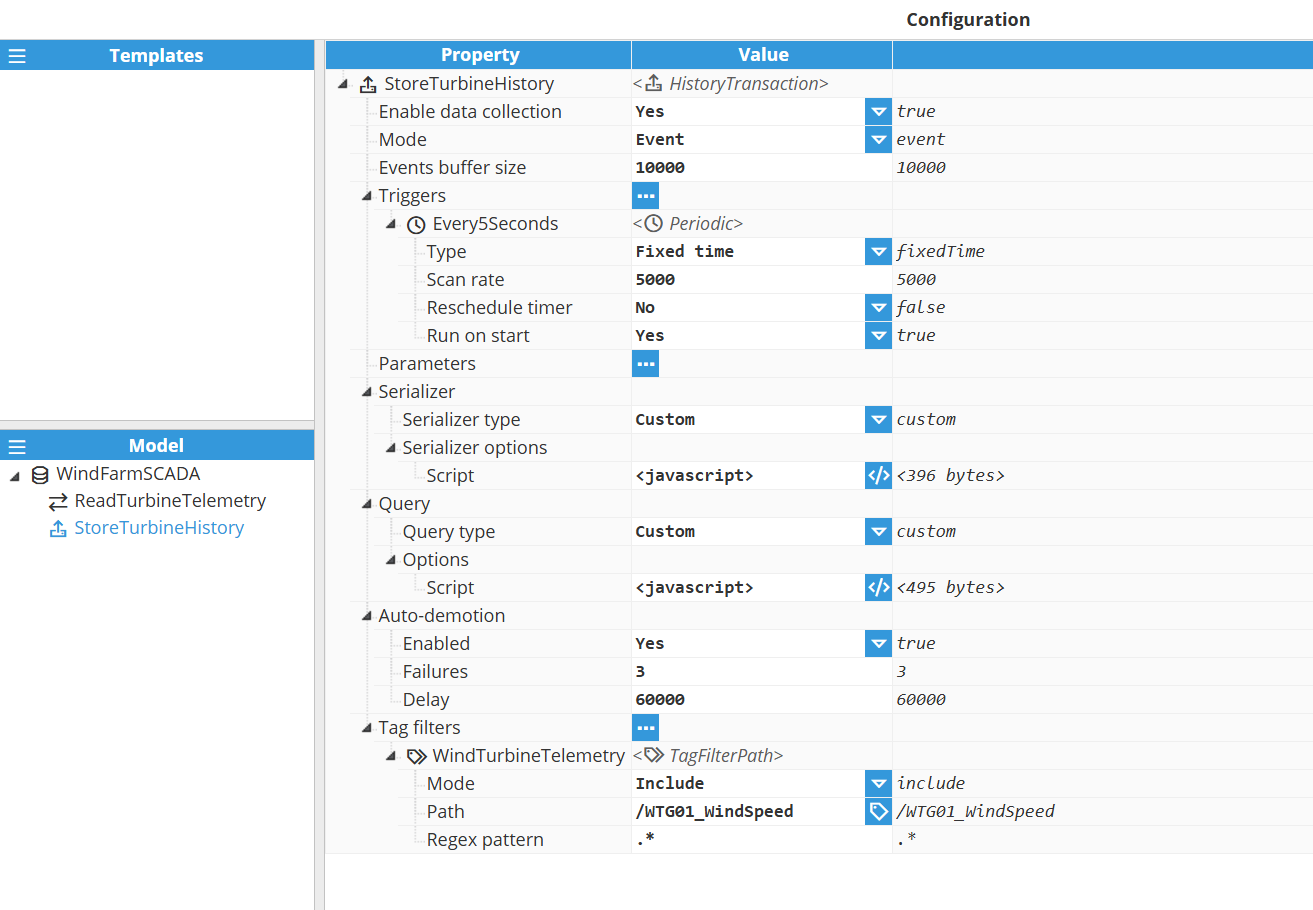
Use a HistoryTransaction to store historical tag data in a database. It collects the events selected by its filters and inserts them when triggered. The following screenshot shows the earlier configuration layout.
N3uron versions prior to 1.22.8:
N3uron 1.22.8 or later: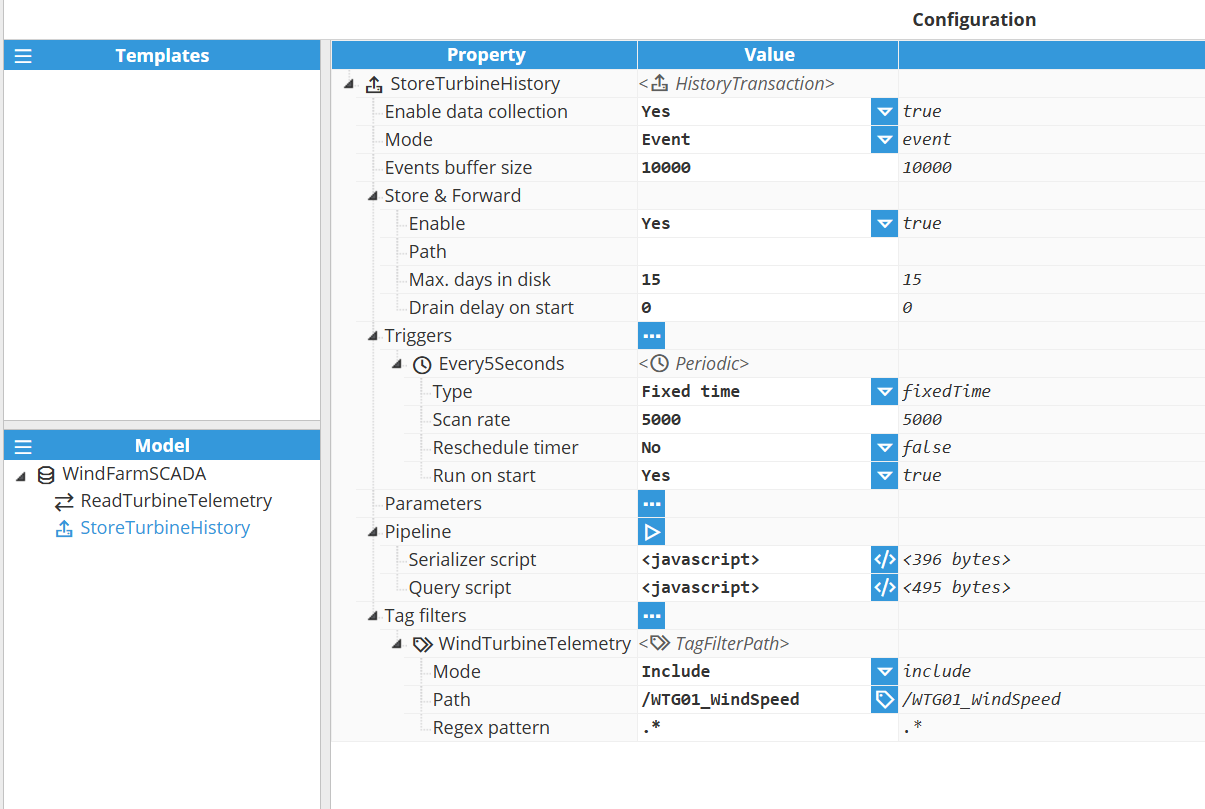
Setting | Description |
|---|---|
Enable data collection | Enables event collection and delivery for this transaction. The default is Yes. When disabled, the transaction does not buffer or send data to the database. |
Mode |
|
Events buffer size | Sets the delivery batch size in Event mode. The minimum is 10 and the default is 10000. With Store & Forward disabled, memory holds up to Events buffer size events in Event mode or 100 snapshots in Snapshot mode. If the memory buffer is full, the oldest data is discarded. Snapshot delivery sends one snapshot at a time. This setting does not limit disk storage. Max. days in disk controls disk retention. |
Store & Forward
From N3uron version 1.22.8, Store & Forward can save buffered History data to disk while the database is unavailable. A batch counts as delivered only after all its rows are inserted. The module retries buffered batches until the database recovers. The limits for memory buffers and disk retention still apply. The wait between retries increases and includes a random variation.
Setting | Description |
|---|---|
Enable | Enables and disables the Store & Forward mechanism. When enabled, buffered events are persisted to disk and survive module restarts. When disabled, events are held in memory only and the oldest are discarded when the buffer is full. |
Path | Sets the path where the S&F files will be saved. If left blank, the files go to <installationFolder>/data/<instance name>/sf/<channel>/<transaction>/ . An absolute path is used as is, and a relative one is resolved against the <installationFolder>/data/<instance name>/ folder. The channel and transaction names are always appended, so several transactions can share the same path. In a redundant pair only a blank or relative path is copied to the other node: the files under an absolute path stay on the node that wrote them. |
Max. days in disk | Sets the maximum number of days to store in the disk when S&F is enabled. Once the maximum is reached, old events will be deleted. |
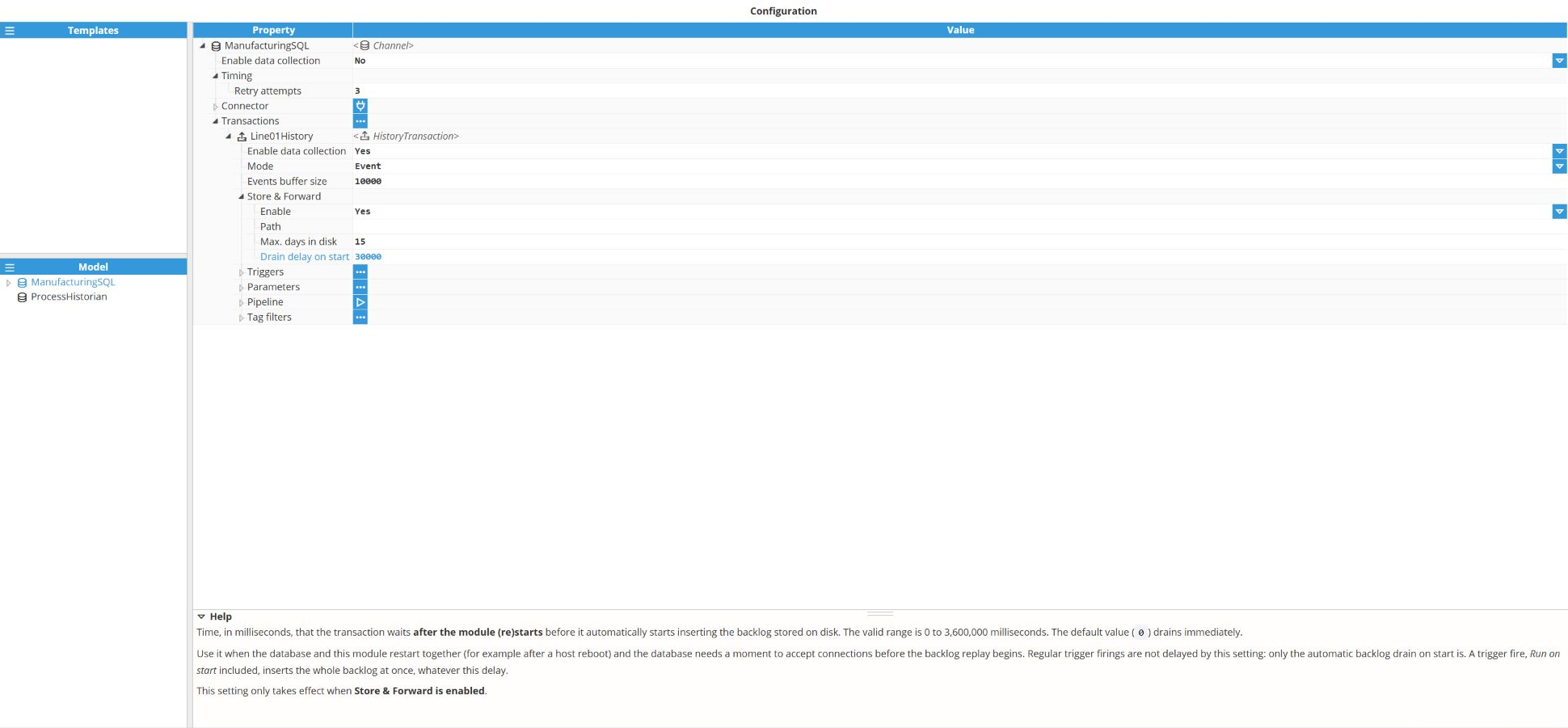
Drain delay on start | Time, in milliseconds, that the transaction waits after the module (re)starts ) drains immediately, before it automatically starts inserting the backlog stored on disk. The valid range is 0 to 3,600,000 milliseconds. The default value 0. Use it when the database and this module restart together (for example after a host reboot) and the database needs a moment to accept connections before the backlog replay begins. Regular trigger firings are not delayed by this setting: only the automatic backlog drain on start is. A trigger fire, Run on start included, inserts the whole backlog at once, whatever this delay.
|
Triggers and parameters
Setting | Description |
|---|---|
Triggers | Defines when the SQL Client HistoryTransaction executes: - Periodic: At configured intervals or according to a schedule. - Tag condition: When a specified tag condition is met. - Tag change: When a monitored tag property changes. - Buffer size: When the buffered event count reaches the configured threshold (Event mode only). In Event mode, each execution processes buffered events, including any disk-backed backlog. In Snapshot mode, a snapshot is collected upon execution instead of buffering events. Triggers received during an ongoing execution are consolidated into a single subsequent execution. |
Parameters | Defines the tag values available to the Serializer and Query scripts through $.parameter, using each parameter's name. Values are captured as a read-only snapshot immediately before each transaction execution. See User-defined scripts. |
Pipeline
The scripts run in the order shown below.
Note:
Serializer type and Query type are replaced by Pipeline controls from N3uron version 1.22.8.
In earlier versions, Serializer type and Query type supported custom JavaScript only.
Setting | Description |
|---|---|
Serializer script | This script prepares tag data for the Query script. See User-defined scripts. |
Query script | This script builds the SQL statements that store the collected tag data. See User-defined scripts. |
Tag filters
Setting | Description |
|---|---|
Tag filters | Selects the tags whose events are buffered. A tag must match at least one include filter and no exclude filter. See Tag filter.
|
Auto-demotion in earlier versions
Setting | Description |
|---|---|
Auto-demotion | In earlier Standard and History transactions, Enabled temporarily stopped the transaction after the configured number of consecutive Failures. Failures had a minimum of 1 and a default of 3. Delay set the wait before another attempt, with a minimum of 1000 ms and a default of 60000 ms.
|
Test a Pipeline in the Editor
From N3uron version 1.22.8, the Run icon on the Pipeline header opens a test window for the scripts currently in the editor, before saving. The window waits for an explicit action. No test writes tags, and History tests do not read or consume the pending Store & Forward backlog.
In the test results, a Dataset is a table of data.
Setting | Description |
|---|---|
Parameters | Values (JSON) uses supplied test values, preloaded with the declared parameters. Live values of this transaction uses current tag values and requires the configuration to be saved and the module restarted. |
Events | For History tests, Events (JSON) supplies an array of tag events. The default quality is 192; an omitted timestamp uses the current instant. Live values of this transaction supplies one current event for each subscribed tag and requires a saved configuration and a restarted module. |
Event ts | Timestamp used for the trigger event in this test, in UNIX epoch milliseconds. If blank, the test uses the current time. See User-defined scripts for how scripts use this timestamp. |
Build statement | For Standard tests, runs only the Query script and displays its SQL and bound values, without database access. |
Execute (rolled back) | Executes the generated statements inside a database transaction that is rolled back, subject to the limits in the Note below. Standard tests display returned rows; History tests display the Dataset prepared by the Serializer. PostgreSQL and SQL Server support rollback for many CREATE, ALTER, DROP and TRUNCATE operations. Support depends on the database and the statement.
|
Execute and parse (rolled back) | For Standard tests, executes the statement once and parses the returned rows. Displays resolved tags, values, quality, timestamps and rejection reasons without writing tags. PostgreSQL and SQL Server support rollback for many CREATE, ALTER, DROP and TRUNCATE operations. Support depends on the database and the statement.
|
Serialize and build | For History tests, runs Serializer and Query scripts without database access. Displays statements and bound values for each Dataset, and the first Dataset with its columns and declared types. |
The test log shows script logger messages and each execution duration and affected row count.
In this example, ReadTurbineTelemetry reads telemetry for three wind turbines. The Standard test displays the returned rows and two valid Parser events for /WTG01_ActivePower and /WTG01_WindSpeed. The test does not write these events to the tags.
The StoreTurbineHistory example uses two supplied test events. The History test displays the Serializer dataset and reports two affected rows. The insert is rolled back.
Triggers
A trigger requests a transaction run. A transaction can have more than one trigger. Each trigger requests a run when its condition is met. From N3uron version 1.22.8, requests received while the transaction runs are combined into one pending run. The pending run starts after the current run ends.
Periodic
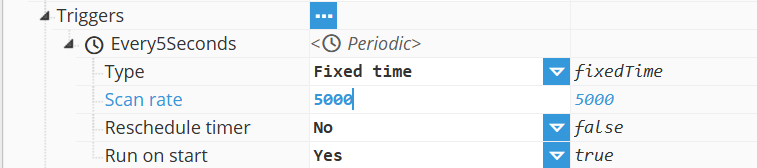
This type of trigger becomes active after a specified period has passed. It is configured as per the example below:
Setting | Description |
|---|---|
Scan rate | Specifies the period between each time the trigger is activated, displayed in milliseconds. |
Type | Select how the trigger uses the scan rate:
|
Reschedule timer | Applies only to Fixed time when the transaction has multiple triggers. If enabled, another trigger resets the periodic timer. For example, a 30-second timer last activated at 12:30:17 is due at 12:30:47. If another trigger activates at 12:30:29, the timer is rescheduled for 12:30:59. |
Run on start | When enabled, the transaction will be launched once the module starts. |
TagCondition
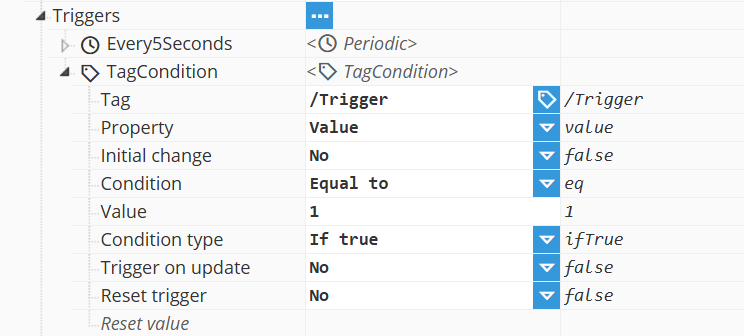
This type of trigger activates whenever a tag-based condition is met. It is configured as per the example below:
Setting | Description |
|---|---|
Tag | Path to the tag used in this tag condition trigger. |
Property | The property of the tag used to trigger the transaction (Value, Quality, or Timestamp). |
Initial change | If enabled, the transaction will be triggered by the initial subscription to the tag events as soon as the module is started (or whenever the tag model changes). Otherwise, the initial event won't be considered for the tag condition. |
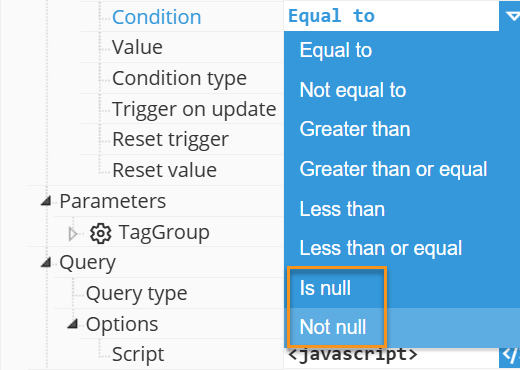
Condition | Condition that activates the trigger. String values are compared alphabetically. For example, |
Value | Specifies the value used in the condition. It can be a number, a string, or a Boolean.
|
Condition type |
|
Trigger on update | If true, the transaction will fire whenever a new tag update still satisfies the condition. This option is only used when the condition type is if true or if false. Otherwise, it will only trigger once until the condition becomes false again. |
Reset trigger | If enabled, the trigger will be reset to the given value after each completed transaction. |
Reset value | Selects the reset value of the trigger when it resets after a transaction. |
Period | The period between executions when the condition is set to While true or While false, displayed in milliseconds. The minimum value is 1000 ms. |
TagChange
Activates when the selected property of a tag changes: value, quality or timestamp. The following screenshot shows the configuration.

Setting | Description |
|---|---|
Tag | Full path to the tag monitored by the trigger. A change in its selected Property activates the transaction. |
Property | Select Value, Quality or Timestamp. A change in the selected property requests a transaction run. |
Initial change | Select whether the transaction runs when it first subscribes to the tag. |
BufferSize
Starts delivery when the History Transaction buffer reaches the configured event threshold. This trigger does not set the buffer capacity. It applies only to Event mode. The following screenshot shows the configuration.

Setting | Description |
|---|---|
Buffer limit | Maximum number of tag events before the transaction is executed. The minimum value is ten events. |
Tag filter
Tag filters select the tags whose events are buffered by a History Transaction. A tag must match an include filter and no exclude filter. Add an include filter even when the complete tag model is required. With no include filter, nothing is buffered. The following screenshot shows the configuration.

Setting | Description |
|---|---|
Mode | Selects whether the filter must include or exclude tags. Include filters are applied first; exclusions override the result. |
Path | Specifies the path of the tag or group of tags to be filtered. |
Regex Pattern | Regular expression used to filter tags. The default |
Tag configuration
Tags supplied by another driver: A Standard transaction can transfer values between a database and field devices, such as PLCs. This is useful for recipes. SQL Client writes values to these tags, but their source driver controls quality and timestamp. Examples include ModbusClient, SiemensClient and OpcDaClient.
Tags supplied by SQL Client: Select SqlClient as the tag source. The database then supplies the data. SQL Client controls the tag value, quality and timestamp. Configure the source as shown below.

Source
Setting | Description |
|---|---|
Enabled | Enables database updates for this tag. The default is disabled. If disabled, database values do not update the tag and it acts as a memory tag. If enabled, the tag receives updates from the database. |
Module type | Select SqlClient. If it is missing from the list, the SQL Client driver is not installed on this machine and must be installed. |
Module name | Selects which instance of the SQL Client module will provide the data for this tag. |
Config
Setting | Description |
|---|---|
Transaction | Selects which transaction will provide data to this tag. The transaction must already exist in the selected SQL Client instance and must be set as a StandardTransaction. The format for this property is Channel/Transaction. |
Tag address | The tag address associates this N3uron tag with the tag retrieved from the database. For tags sourced by SQL Client, use the full tag path in the Parser when Tag address is blank; otherwise, use the configured alias. |