Roles Configuration
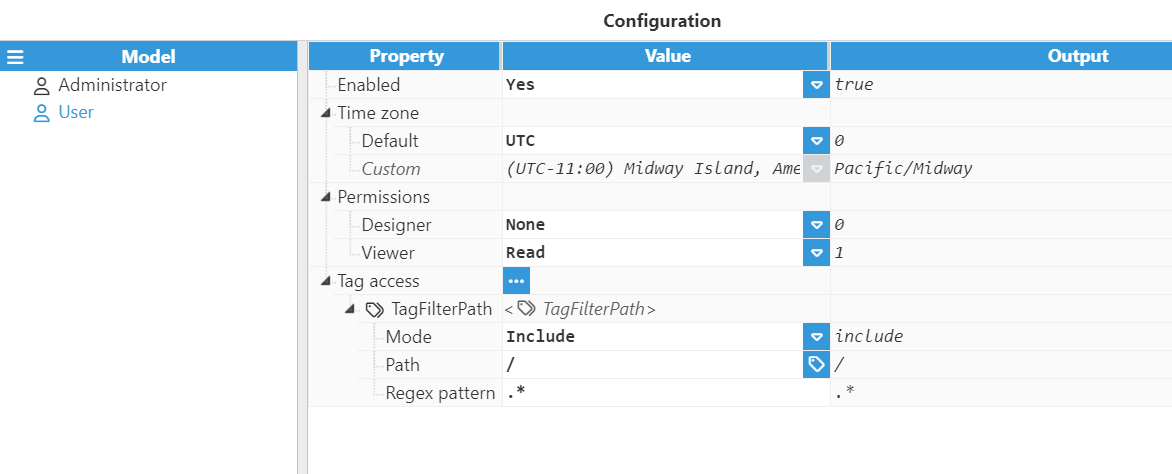
Once the Web Vision module has been instantiated and configured, the next step is to assign permissions to the roles previously created in the Roles section of WebUI.
The following fields are available for each role configured in the module instance.
Option | Description |
|---|---|
Enabled | Enables or disables access to Web Vision for the selected role. |
Time zone | Defines the time zone applied to timestamps shown in the graphical interface. |
Permissions | Sets the access level for the Designer and Viewer areas. |
Tag access | Defines which tags from the tag model are available to the selected role. |
Time zone options
Option | Description |
|---|---|
UTC | All timestamps are shown in UTC. This is the default option. |
User | The time zone is automatically obtained from the system running the web browser. |
Server | The time zone is automatically obtained from the system running Web Vision. |
Custom | Allows a specific time zone to be selected manually. |
Permission options
Property | Option | Description |
|---|---|---|
Designer | None | The role cannot access the Designer. |
View | The role can view the configuration but cannot save changes. | |
Edit | The role can modify and save configurations. | |
Viewer | Read | The role can access and navigate through the application. |
Write | The role can modify tag values and send commands from the HMI. |
Tag access
TagFilterPath is used to select which tags from the tag model are available to visualize for the corresponding role. Multiple filters can be applied to include or exclude specific areas of the tag model.
Note:
It is mandatory to add at least one filter, even when the whole tag model is going to be published.
Property | Description |
|---|---|
Mode | Defines whether the filter includes or excludes matching tags. |
Path | Specifies the tag or tag group path to which the filter is applied. |
Regex pattern | Regular expression used to filter tags. The default value is .*, which means that no additional filtering is applied within the selected path. |
For example, if the Regex pattern is ALARM|WARNING, only tags containing ALARM or WARNING in their tag path will be included.
For more information about regular expressions, see RegExr.