Note:
This module is available from N3uron version 1.22.0.
Note:
The MCP Server exposes over 40 built-in tools across 10 namespaces that work immediately upon connection—no scripting or custom integration required.
Built-in tools support cursor-based pagination with configurable batch sizes (via limit parameter), enabling clients to traverse large tag namespaces without exceeding memory or context window constraints.
Recommendation:
Enable only the tool permissions you actually need—and leave everything else turned off. The MCP Server enforces token-based access control and permission rules for discovery and invocation, especially for write operations (e.g., tag writes, module configuration, backups, certificates). Where available, use actor fields to support auditability.
Built-in Tools
In MCP, a tool is a server-defined operation that an MCP client can enumerate and then invoke by name with structured inputs, returning a structured result. In N3uron’s MCP Server, tools are organised into namespaces, such as Alarm, Tag, System, Module, and Backup, so that related operations are consistently grouped and easier to manage.
Access is controlled by token-based authorization: the client must present a valid token, and the server only lists—and allows the client to invoke—the tools, prompts, resources, and tag model access that are permitted for that token.
Note:
Tools are one of MCP’s three core primitives—alongside prompts and resources. Prompts provide reusable instructions, resources provide structured data or content, and tools provide executable actions the AI model can choose to call. When a client connects, it can fetch the tool catalog (names + descriptions + input/output schemas) and present that to the AI model so it can select the right operation and format parameters correctly.
Tools namespaces
The MCP Server groups built-in tools into the following namespaces:
Alarm: Access to the tag alarm system. Allows querying, filtering, and managing alarm states, including active, cleared, acknowledged, and unacknowledged alarms across the tag namespace.
Backup: Access and manage the node backup system. Allows creating, exporting, importing, and restoring complete node configuration snapshots, including all modules, tags, alarms, and settings. Essential for system maintenance, updates, and disaster recovery.
Certificate: Manage X.509 certificates and certificate stores for modules. Handles SSL/TLS certificates for secure communications, including client certificates, server certificates, and certificate authorities. Supports various certificate types for different module needs.
License: Manage node licensing system. Control software licenses, view license details, add new licenses, and handle license migrations. Essential for ensuring proper software authorization and managing licensed features.
Link: Access and monitor node links and connections. Manage communication links between nodes in distributed architectures, including monitoring link status, health, and connectivity information across the network.
Log: Access and manage system log files. Browse available log files from different modules and system components, and export log data for analysis, troubleshooting, and audit purposes. Essential for system monitoring and diagnostics.
Module: Comprehensive module management system for control module lifecycle (start/stop/restart), manage configurations, monitor instances, and handle installed modules. Essential for managing data sources, publishers, and custom modules in the ecosystem.
Redundancy: Access to redundancy status. Supports high-availability with primary/backup nodes. If the primary fails, the backup automatically takes over.
System: Access and control node system functions. Monitor node health, restart services, manage system identifiers, and get system status information. Essential for node administration and system maintenance.
Tag: Core tag namespace for accessing industrial data tags. Browse tag hierarchies, read current values, get detailed tag information, access historical data, and write values. This is the primary interface for industrial data acquisition and control.
Built-in tools reference
Alarm
Tool | Description |
|---|---|
alarm_ack Write | Acknowledge one or more active alarms, marking them as reviewed by an operator. This action changes unacknowledged alarms (status 2 or 3) to the acknowledged state (status 0 or 1). Returns void on success. Essential for alarm management workflows. - paths: Alarm paths to acknowledge. Can be a single alarm path string, a comma-separated list, or a JSON array of paths. All specified alarms must exist and be in an acknowledgeable state. - msg: Acknowledgement message to attach to this operation. This message will be stored in the alarm history and may include operator notes, corrective actions taken, or the reason for acknowledgement. Parameters: • paths: Alarm paths to acknowledge. Can be a single alarm path string, a comma-separated list, or a JSON array of paths. All specified alarms must exist and be in an acknowledgeable state. • msg: Acknowledgement message to attach to this operation. This message will be stored in the alarm history and can include operator notes, corrective actions taken, or the reason for acknowledgement. |
alarm_count Read | Retrieve the total number of alarms that match the specified criteria. Returns a numeric count of alarms without the detailed alarm information, useful for dashboard displays and alarm overview statistics. Parameters: • path: Path to browse for alarms in the tag namespace. Use '/' for root or specific paths like '/PLANT01/LINE01'. Only alarm-enabled tags will be included in the count. • options_filter_minPriority: Minimum alarm priority level (0-4). • options_filter_maxPriority: Maximum alarm priority level (0-4). • options_filter_status: Filter alarms by their current status for counting. Accepts array of status codes: - 0: Cleared and acknowledged -1: Active and acknowledged - 2: Cleared and unacknowledged - 3: Active and unacknowledged • options_filter_path: Regular expression filter for full alarm paths. Allows counting only alarms whose paths match the regex pattern. • options_recurrent: Include alarms from all subgroups recursively. When true, counts alarms in the entire subtree under the specified path. |
alarm_get Read | Retrieve a list of alarms from the specified path. Returns an array of AlarmInfo objects containing alarm details, including status, priority, timestamps, and acknowledgement information. Use filters to narrow results by status, priority, or path patterns. Parameters: • path: Path to browse for alarms in the tag namespace. Use '/' for root or specific paths like '/PLANT01/LINE01'. Only alarm-enabled tags will be included in results. • options_filter_minPriority: Minimum priority level (0-4). • options_filter_maxPriority: Maximum priority level (0-4). • options_filter_status: Filter alarms by their current status. Accepts array of status codes: - 0: Cleared and acknowledged (alarm resolved and operator notified) - 1: Active and acknowledged (alarm active but operator notified) - 2: Cleared and unacknowledged (alarm resolved but needs operator acknowledgement) - 3: Active and unacknowledged (alarm active and requires immediate attention) • options_filter_path: Regular expression filter for full alarm paths. Allows filtering alarms by their complete path using regex patterns (e.g., '.*HIGH.*' for alarms containing 'HIGH'). • options_recurrent: Include alarms from all subgroups recursively. When true, searches the entire subtree under the specified path. |
alarm_history Read | Retrieve historical alarm events for a specific alarm path within a time range. Returns an array of AlarmHistoryEvent objects showing alarm state changes, activations, clearances, and acknowledgements over time. Useful for alarm analysis and reporting. Parameters: • path: Complete path to the specific alarm to get history for. Must be a valid alarm-enabled tag path (e.g., '/PLANT01/LINE01/TEMP_HIGH'). • start: Start timestamp for the historical query. Accepts ISO 8601 string format (e.g., '2023-01-01T00:00:00.000Z') or Unix epoch timestamp in milliseconds. Must be an ISO string or a Unix epoch timestamp. • end: End timestamp for the historical query. Accepts ISO 8601 string format (e.g., '2023-01-02T00:00:00.000Z') or Unix epoch timestamp in milliseconds. Must be an ISO string or a Unix epoch timestamp. • options_filter_minPriority: Minimum priority level (0-4). • options_filter_maxPriority: Maximum priority level (0-4). • options_filter_status: Filter historical events by alarm status. Accepts an array of status codes:
• options_filter_path: Regular expression filter for alarm paths when using recursive search. Allows you to filter which alarms are included in the historical query. • options_recurrent: Include alarm history from all subgroups recursively under the specified path. When true, gets the history for all alarms in the subtree. • options_remoteNode: Specify remote nodes to query alarm history from. Can be a single node name, a forward slash-separated list ('/node1/node2'), or a JSON array. Useful in distributed networks. Can be a single item, a / separated list, or a JSON array. |
Backup
Tool | Description |
|---|---|
backup_create Write | Create a complete backup snapshot of the current node configuration. Captures all modules, tags, alarms, configurations, and optionally secrets. Returns void on success. This operation may take several minutes for large configurations. Parameters: • name: Unique name for the backup snapshot. Must be a valid filename (avoid special characters). This name will be used to identify the backup for future restore, export, or delete operations. • metadata_description: Human-readable description of the backup purpose. Include context like 'Before system update', 'Daily backup', or 'Pre-maintenance snapshot'. This helps determine the purpose of the backup later. |
backup_delete Write | Permanently delete a backup snapshot from the system. This action cannot be undone and will free up storage space. Returns void on success. Use with caution, as deleted backups cannot be recovered. Parameters: • name: Exact name of the backup to delete. Must match an existing backup name. Verify this is the correct backup before deletion, as the operation is irreversible. |
backup_export Read | Export a backup snapshot as a base64-encoded ZIP file. Returns the complete backup data as a base64 string that can be saved to a file or transferred to another system. Use this for moving backups between environments. Parameters: • name: Exact name of the backup snapshot to export. Must match an existing backup name from the backup list. Case-sensitive. |
backup_get Read | Retrieve a complete list of available backup snapshots on this node. Returns an object with backup names as keys and BackupData objects containing metadata like description, creation user, timestamp, and version information. Parameters: None required |
backup_import Write | Import a backup snapshot from base64-encoded data (typically from an exported backup). Creates a new backup entry in the system without applying it. Returns void on success. Use 'load' to actually restore the imported backup. Parameters: • name: Name to assign to the imported backup. Should be descriptive and unique to avoid conflicts with existing backups. • data: Base64-encoded ZIP backup data, typically obtained from an 'export' operation. The backup data must be valid; otherwise, the import will fail. |
backup_load Write | Load and apply a backup snapshot to restore the node configuration. WARNING: This completely replaces the current configuration with the backup contents. Returns LoadBackupResult with operation status and any warnings. Always create a current backup before loading. Parameters: • name: Name of the backup to load and apply. Must be an existing backup. Verify this is the correct backup, as loading will overwrite the current configuration. • options_actor: Identifier for audit trail purposes. Records who initiated the backup restore operation. Important for security and compliance tracking. |
backup_rename Write | Rename an existing backup snapshot. Changes the backup identifier while preserving all backup content and metadata. Returns void on success. Useful for organizing backups with more descriptive names. Parameters: • name: Current name of the backup to rename. Must exactly match an existing backup name. Case-sensitive. • rename: New name for the backup. Must be a valid filename and should not conflict with existing backup names. Choose descriptive names for easier identification. |
Certificate
Tool | Description |
|---|---|
certificate_export Read | Export a specific certificate from the certificate store. Returns the certificate data in PEM format or other standard certificate formats. Useful for backing up certificates or transferring them to other systems. Parameters: • options_moduleName: Name of the module whose certificate store contains the target certificate. Use 'bootstrap' for system-wide certificates. • options_type: Certificate store type containing the certificate. Must match the store type where the certificate is located. • options_id: Unique identifier of the certificate to export. This ID is obtained from the certificate list returned by the 'get' method. |
certificate_get Read | Retrieve a list of certificates from the specified certificate store. Returns an array of certificate information, including certificate IDs, names, expiration dates, and certificate types. Used to browse available certificates for a module. Parameters: • options_moduleName: Name of the module whose certificate store to query. Each module can have its own certificate store. Use 'bootstrap' for system-wide certificates. • options_type: Certificate store type to query. Common types include server_certificates, client_certificates, ca_certificates, links_inbound, links_outbound. The available types depend on the module. |
certificate_remove Write | Permanently delete a certificate from the certificate store. This action cannot be undone and will remove the certificate from the module's certificate store. Returns void on success. Use with caution, as removed certificates cannot be recovered. Parameters: • options_moduleName: Name of the module whose certificate store contains the certificate to remove. Use 'bootstrap' for system-wide certificates. • options_type: Certificate store type containing the certificate to remove. Must match the store type where the certificate is located. • options_id: Unique identifier of the certificate to remove. Verify this is the correct certificate, as removal is irreversible. |
certificate_set Write | Modify or update a certificate in the certificate store. Allows performing various actions on certificates, such as enabling/disabling, updating certificate data, or changing certificate properties. Returns void on success. Parameters: • options_moduleName: Name of the module whose certificate store contains the target certificate. Use 'bootstrap' for system-wide certificates. • options_type: Certificate store type containing the certificate to modify. Must match the store type where the certificate is located. • options_id: Unique identifier of the certificate to modify. This ID is obtained from the certificate list. • options_action: Action to perform on the certificate. Common actions include 'enable', 'disable', 'update', or 'refresh'. Available actions depend on the certificate type and module. |
License
Tool | Description |
|---|---|
license_add Write | Install a new license on this node. Accepts license data in JSON format and adds it to the node's license store. Returns void on success. The license will be validated and activated automatically if valid. Parameters: • data: Complete license data in JSON string format as provided by the licensing system. Must be valid JSON containing all required license fields and digital signatures. • options_actor: Identifier for audit trail purposes. Records who installed the license for compliance and security tracking. |
license_get Read | Retrieve the unique hardware identifier (UID) of this node. Returns a string containing the node's hardware fingerprint used for license generation. This UID is required when requesting new licenses from support. Parameters: None required |
license_getUid Read | Retrieve the unique hardware identifier (UID) of this node. Returns a string containing the node's hardware fingerprint used for license generation. This UID is required when requesting new licenses from support. Parameters: None required |
license_read Read | Get detailed information about a specific license. Returns comprehensive license data, including expiration date, enabled modules, feature limits, and license validity status. Useful for license verification and troubleshooting. Parameters: • name: Exact name of the license to examine. Must match a license name from the license list. Case-sensitive. |
license_remove Write | Permanently delete a license from this node. This action cannot be undone and will disable any features provided by the removed license. Returns void on success. Use with extreme caution, as this may disable critical functionality. Parameters: • name: Exact name of the license to remove. Must match an existing license name. Verify this is the correct license, as removal cannot be undone. • options_actor: Identifier for audit trail purposes. Records who removed the license for compliance and security tracking. |
license_unlicense Write | Remove a license and generate a migration file for re-licensing. Returns a migration file as plain text that contains encrypted node information required by support to generate a new license. WARNING: This unlicenses the node and may disable functionality. Parameters: • name: Name of the license to remove and migrate. The resulting migration file will need to be sent to support for new license generation. • options_actor: Identifier for audit trail purposes. Records who initiated the unlicensing operation for compliance tracking. |
Link
Tool | Description |
|---|---|
link_get Read | Retrieve information about node links and their current status. Returns an array of link objects containing connection status, remote node information, communication statistics, and link health indicators. Essential for monitoring distributed networks. Parameters: • options_remoteNode: Specify which remote nodes to query for link information. Can be a single node name, a forward slash-separated list ('/node1/node2'), or a JSON array. Leave null to get information about all configured links. Can be a single item, a / separated list, or a JSON array. |
Log
Tool | Description |
|---|---|
log_browse Read | Retrieve a comprehensive list of available log files from all modules and system components. Returns an array of log file objects containing file names, sizes, creation dates, and associated modules. Use this to identify which logs are available for analysis. Parameters: None required |
Module
Tool | Description |
|---|---|
module_details Read | Get comprehensive information about all instantiated (running) modules on this node. Returns detailed module information, including status, configuration, resource usage, and operational statistics. Essential for monitoring module health and performance. Parameters: None required |
module_getConfigData Read | Retrieve the complete configuration data for a specific configuration file of a module instance. Returns the configuration content in JSON format. Use this to examine current module settings and configuration values. Parameters: • moduleName: Name of the module instance whose configuration to retrieve. Must be an existing module instance. • configName: Name of the specific configuration file to retrieve. Common config names include tags, connections, and settings. Use module_getConfigList to see available config files. |
module_getConfigList Read | Get a list of available configuration files for a specific module type. Returns an object describing the configuration files/sections that can be managed for this module (e.g., 'config', 'tags', 'modules', 'links'). Each entry includes display text, icon, and filename. If moduleType is not provided, returns the configuration list for the Bootstrap module (core system settings). Parameters: • moduleType: Module type to query. Examples: 'MqttClient', 'OpcUaClient', 'ModbusClient'. Defaults to 'bootstrap' if not provided. |
module_getConfigPresent Read | Check if configuration files exist for a specific module instance. Returns boolean information about which configuration files are present for the module. Useful for validating module setup before operations. Parameters: • moduleName: Name of the module instance to check for configuration files. Must be an existing module instance name. |
module_getInstalled Read | Retrieve a list of all modules installed on this node. Returns module information, including versions, types, categories, and availability status. Use filters to find specific modules by type, category, or other criteria. Parameters: • filter_name: Filter by specific module name. Use partial names to search for modules containing the specified text. • filter_type: Filter by module type. Examples include 'MqttClient', 'OpcUaClient', 'ModbusClient', 'SqlServer', etc. • filter_category: Filter by module category. Common categories include publisher (data output modules) and source (data input modules). • filter_native: Filter to show only native modules (true) or exclude them (false). Native modules are built-in components. • filter_preRelease: Filter by pre-release type. Use 'nightly' to show development versions or leave empty for stable releases only. |
module_getInstances Read | Get information about active module instances (running modules) with optional filtering. Returns runtime information about instantiated modules, including their current status, resource usage, and operational parameters. Use this to monitor active modules Parameters: • filter_name: Filter by module instance name. Use partial names to search for specific running instances. • filter_type: Filter by module type. Examples: 'MqttClient', 'OpcUaClient', 'ModbusClient', 'SqlClient'. • filter_category: Filter by module category. publisher for data output modules, source for data input modules. • filter_native: Filter to show only native modules (true) or exclude them (false). • filter_preRelease: Filter by pre-release type. Use 'nightly' for development versions. |
module_restart Write | Restart a module instance by stopping it and starting it again. Returns void on success. This operation applies configuration changes, clears module state, and reinitializes connections. Essential after configuration updates. Parameters: • moduleName: Name of the module instance to restart. Can be either running or stopped - will be restarted in the running state. • options_actor: Identifier for audit trail purposes. Records who restarted the module for compliance and security tracking. |
module_setConfigData Write | Save configuration data to a specific configuration file for a module instance. Returns void on success. This operation updates the module's configuration and can optionally restart the module to apply changes immediately. Course of action: 1. Back up the current configuration. Parameters: • moduleName: Name of the module instance to update configuration for. Must be an existing module instance. • configName: Name of the configuration file to update. Common names include tags, connections, and settings. Use getConfigList to see available configuration files. • data: Complete configuration data in JSON string format. Must be valid JSON that matches the configuration schema for the specified config file. • options_restart: Automatically restart the module after saving the configuration to apply changes immediately. Recommended when configuration changes require a restart. • options_actor: Identifier for audit trail purposes. Records who modified the configuration for compliance and security tracking. • options_deleteData: Only applicable to the modules configuration file. List of module instance names to delete and clean their data. Can be a single instance, comma-separated list, or JSON array. |
module_start Write | Start a stopped module instance and bring it to operational state. Returns void on success. The module will begin processing data and performing its configured operations. Use this to activate modules after configuration changes or a restart. Parameters: • moduleName: Name of the module instance to start. Must be an existing module instance that is currently stopped. • options_actor: Identifier for audit trail purposes. Records who started the module for compliance and security tracking. |
module_stop Write | Stop a running module instance and cease all its operations. Returns void on success. The module will stop processing data, close connections, and enter a stopped state. Use this for maintenance, configuration changes, or troubleshooting. Parameters: • moduleName: Name of the module instance to stop. Must be an existing module instance that is currently running. • options_actor: Identifier for audit trail purposes. Records who started the module for compliance and security tracking. |
System
Tool | Description |
|---|---|
system_errorCount Read | Get the current count of system errors and warnings. Returns numeric counts of different error levels, including critical errors, warnings, and informational messages. Useful for system health monitoring and alerting. Parameters: None required |
system_generateNewUID Write | Delete the current node UID and generate a new unique hardware identifier. Returns void on success. WARNING: This will invalidate all current licenses as they are tied to the node UID. Use only when required for licensing issues. Parameters: • options_actor: Identifier for audit trail purposes. Records who generated the new UID for compliance and security tracking. |
system_restartService Write | Restart the entire node service. Returns void on success. WARNING: This will stop all modules and restart the complete service. Use with caution, as this affects all running operations and connections. Parameters: • options_actor: Identifier for audit trail purposes. Records who initiated the service restart for compliance and security tracking. |
system_status Read | Retrieve comprehensive status information about this node. Returns system health indicators, resource usage, uptime, and operational metrics. Essential for monitoring node health and performance. Usages represent a tuple of used and total: CPU usage: [used, total] in hundredths (e.g., [7476, 10000] = 74.76%). Disk usage: [used, total] in bytes Parameters: None required |
Redundancy
Tool | Description |
|---|---|
redundancy_status Read | Get redundancy status. Returns enabled state, standby status, and mode (primary/backup). Parameters: None required |
Tag
Tool | Description |
|---|---|
tag_browse Read | Returns the immediate child tags and groups under the specified path. Useful for navigating the tag hierarchy level by level. Does not include tag values. Returns an array of child tag and group names. Parameters:
|
tag_describe Read | Returns all tags under the specified path prefix. Useful for discovering available tags and their metadata. Optionally includes the latest value and quality for each tag. It's a paginated method, so large results can be retrieved in chunks using the cursor parameter. All responses include the total tag count and a cursor if more data is available. Parameters: • pathPrefix: Path prefix to search under. Returns all tags starting with this prefix. • metadata: Level of metadata detail to include. none = only paths, short = basic info (type, unit, description), full = all metadata fields. • includeValue: If true, includes the current value, quality, and timestamp for each tag. • limit: Maximum number of tags to return. Used for pagination. • cursor: Cursor for pagination; returned in the previous response if more data is available. |
tag_find Read | Searches and returns tags matching one or more patterns (exact path or regex). Can include current values and metadata. Useful for selective reads and filtered queries. It's a paginated method, so large results can be retrieved in chunks using the cursor parameter. All responses include the total tag count and a cursor if more data is available. Parameters: • path: Path to the tag or group to get details for. For individual tags, use a complete path like '/PLANT01/TEMP'. For groups, use wildcard '*' as in '/PLANT01/LINE01/*' to get details of all tags in the group. • pathFilter: Regular expression filter for tag paths when getting details of groups. Allows getting details only for tags whose paths match the regex pattern. • descriptionFilter: Text to filter in description. Only tags with descriptions containing this text will be returned. • typeFilter: Text to filter in type. Only tags with these types will be returned. Supported types: string, number or boolean. • unitsFilter: Text to filter in engineering units. Only tags with this engineering unit will be returned. Case insensitive. • formatFilter: Text to filter in format. Only tags with this format will be returned. • numberTypeFilter: Filter by number type. Only tags with this number type will be returned. Supported types: int8, int16, int32, int64, uint8, uint16, uint32, uint64, float32, float64. • clientAccessFilter: Filter by client access level. Only tags with this client access level will be returned. Supported levels: R or RW. • historyEnabledFilter: Filter by history enabled status. If true, only tags with history enabled will be returned. • sourceModuleFilter: Filter by source module. Only tags from this source module will be returned. • metadata: Level of metadata detail to include. none = only paths, short = basic info (type, unit, description), full = all metadata fields. • includeValue: If true, includes the current value, quality, and timestamp for each tag. • limit: Maximum number of tags to return. Used for pagination. • cursor: Cursor for pagination; returned in the previous response if more data is available. |
tag_getViews Read | Retrieve available tag views and view definitions configured in the system. Returns information about custom tag views that provide organized perspectives on the tag namespace. Useful for understanding the configured data organization. Parameters: None required |
tag_history Read | Retrieve historical data for multiple tags simultaneously within a defined time range. Returns time-series data for all specified tags with timestamps, values, and quality information. More efficient than multiple individual history calls when querying several tags. Parameters: • paths: List of tag paths for historical data retrieval. Can be a single tag path, a comma-separated list, or a JSON array. All paths must be individual tags (not groups). Example: '/PLANT01/TEMP1,/PLANT01/TEMP2'. • start: Start timestamp for the historical query. Accepts ISO 8601 string format or Unix epoch timestamp in milliseconds. Applied to all specified tags. Must be an ISO string or a Unix epoch timestamp. • end: End timestamp for the historical query. Accepts ISO 8601 string format or Unix epoch timestamp in milliseconds. Applied to all specified tags. Must be an ISO string or a Unix epoch timestamp. • metadata: Level of metadata detail to include. none = only paths, short = basic info (type, unit, description), full = all metadata fields. • includeValue: If true, includes the current value, quality, and timestamp for each tag. • options_mode: Historical data processing mode: raw (all samples), filter (remove samples within deadband), delta (only significant changes), aggregated (calculate statistics over intervals). The same mode applies to all tags. • options_limit: Maximum number of samples to return when using raw mode. Use to limit data volume for high-frequency tags. • options_invalidAsNull: When using raw mode, if true, converts values with non-good quality (quality <192) to null. • options_deadband: Deadband when using filter or delta mode • options_interval: Time interval in milliseconds for aggregation when using aggregated mode. Examples: 60000 (1 minute), 3600000 (1 hour). Applied to all tags in the query. • options_method: Aggregation method for aggregated mode: min (minimum), max (maximum), first (first value), last (last value), avg (average), delta (difference between last and first value within the interval), stddev (standard deviation). If not specified, uses each tag's default aggregation. |
tag_write Write | Write a new value to a specific tag in the system. Returns void on success. This operation sets the tag's current value and triggers any associated actions, like alarms or data forwarding. Essential for control operations and setpoint changes. Parameters: • path: Complete path to the tag to write. Must be an individual writable tag path (not a group). Example: '/PLANT01/LINE01/SETPOINT'. The tag must be configured to allow writes • value: Value to write to the tag. The data type must match the tag's configured data type (number, string, boolean, etc.). Value will be validated against tag constraints and limits. Can be any type. • options_actor: Identifier for audit trail purposes. Records who performed the write operation for compliance, security tracking, and operational history. |
Custom Tools
Custom tools expand MCP Server functionality beyond the built-in tools available for each namespace (Tag, Alarm, System, Module, etc.) by enabling you to expose specialized operations to MCP clients. Each custom tool serves as an interface definition—name, description, input schema, and output schema—while delegating the execution to a script within the N3uron Scripting module. This design unlocks exceptional capabilities because scripts have access to multiple powerful layers: the N3uron API for all platform operations, the Scripting module's internal libraries, the complete suite of Node.js 22 native modules, and can be extended with any NPM package from the ecosystem. This means you can integrate with external databases, consume REST APIs, execute complex data analytics, or orchestrate sophisticated automation workflows—essentially building any functionality you can imagine while maintaining a clean, AI-friendly MCP interface.
Note:
MCP clients only see and can invoke the tools that are allowed for the authorization token they present. If a token does not grant access to Custom Tools, the client will not be able to discover or invoke them.
Custom tools are set up in the Tools section of the MCP Server module instance. In this section, you create and manage each tool definition, link it to a script, and declare its input and output schema.
.gif)
Basic configuration
Setting | Description |
|---|---|
Enabled | Enables or disables this custom tool. When disabled, the tool will not be discoverable or invokable by MCP clients, even if they have the necessary permissions. The default value is Yes. |
Name | Unique identifier for the custom tool. This is the name that MCP clients will use to invoke the tool. Must be unique across all custom tools in this MCP Server instance. Use descriptive, lowercase names with underscores following the pattern verb_noun or action_description. |
Title | Human-readable display name for the tool. This title appears in tool listings and helps users understand the tool's purpose at a glance. |
Description | Detailed explanation of what the tool does, when to use it, and what it returns. This description is provided to the AI model so it can understand when and how to use the tool. Be clear and comprehensive—include the tool's purpose, input requirements (optional, because inputs have their own description), output format (optional, because outputs have their own description), and any important operational notes. |
Script
Setting | Description |
|---|---|
Scripting instance | Name of the Scripting module instance that contains the script to execute. The Scripting module must be running and accessible. |
Script name | Full path to the script within the Scripting module's namespace. The script receives the tool's input parameters as arguments and returns a result. Use forward slashes to specify the path hierarchy. |
Note:
Click the search icon to browse the available scripts in Scripting and link your chosen one to the tool.
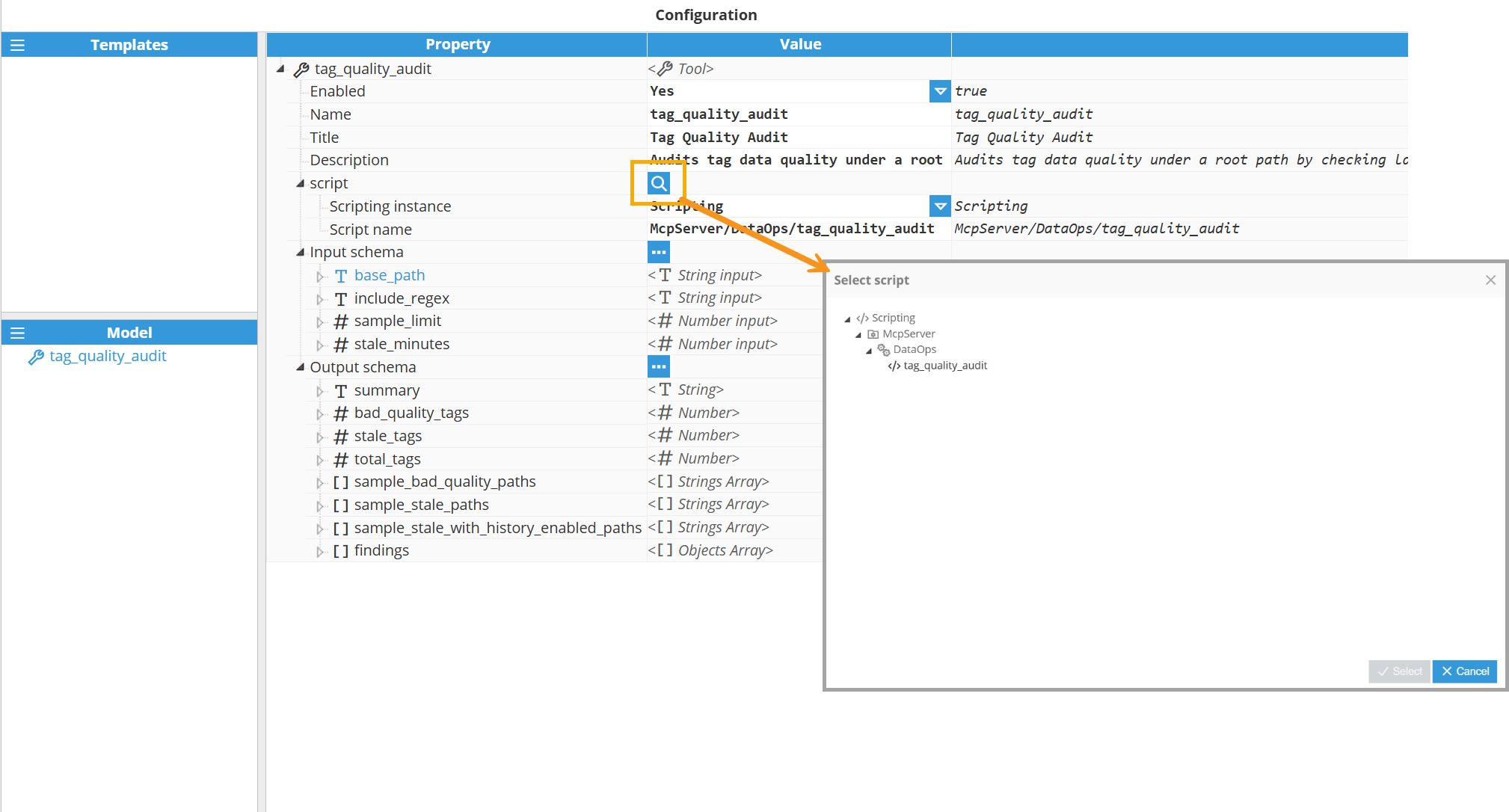
Input schema
The Input schema defines the structure and validation rules for parameters that the tool accepts. It uses JSON Schema format to describe each parameter's type, description, constraints, and default values. MCP clients use this schema to validate inputs before invoking the tool, and AI models use it to understand what parameters to provide.
.png)
Parameter Naming Conventions
All input and output parameter names must follow these naming rules:
Use lowercase letters only.
Separate words with underscores (_).
May include digits and dots, but not at the beginning.
May include hyphens, but these are not the convention.
No spaces or other special characters are allowed.
Note:
The configuration interface will display an error message if parameter names do not follow the required naming format: "Invalid arg name: use lowercase letters, digits, dots, underscores or hyphens, no spaces."
Available Input Types:
Type | Description |
|---|---|
String input | Accepts text values. Use for tag paths, descriptions, regex patterns, identifiers, or any textual data. |
Number input | Accepts numeric values (integers or floating-point). Use for counts, thresholds, timeouts, limits, percentages, or any numerical parameter. |
Boolean input | Accepts true/false values. Use for feature flags, enable/disable options, conditional parameters, or any binary choice. |
Strings Array input | Accepts an array of text values. Use for lists of tag paths, multiple identifiers, filter criteria, or any collection of string values.s |
Numbers Array input | Accepts an array of numeric values. Use for lists of thresholds, multiple limits, data points, or any collection of numerical values. |
Booleans Array input | Accepts an array of boolean values. Use for multiple enable/disable flags, batch feature toggles, or any collection of true/false values. |
Input Parameter Properties:
Property | Description |
|---|---|
Description | Clear explanation of what the parameter represents, its purpose, and any usage guidance. This helps AI models understand how to use the parameter correctly. Include format requirements, acceptable values, or examples when helpful. |
Nullable | Indicates whether the parameter can accept null as a valid value. Set to Yes if null is acceptable, No if the parameter must have a non-null value when provided. The default is No. |
Required | Specifies whether the parameter must be provided when invoking the tool. Set to Yes for required parameters, No for optional parameters. Required parameters without default values must be supplied by the client. The default is No. |
Default Value | Specifies the default value used when the parameter is not provided by the client. Configure both Enabled (Yes /No ) and Value (the actual default value). Default values make parameters effectively optional while providing sensible fallback behavior. When Enabled is set to Yes, the specified Value will be used if the client does not provide the parameter. |
Output schema
The Output schema defines the structure of the data returned by the tool's script. Like the input schema, it uses JSON Schema format to describe each property in the response. This schema helps AI models understand and interpret the tool's results.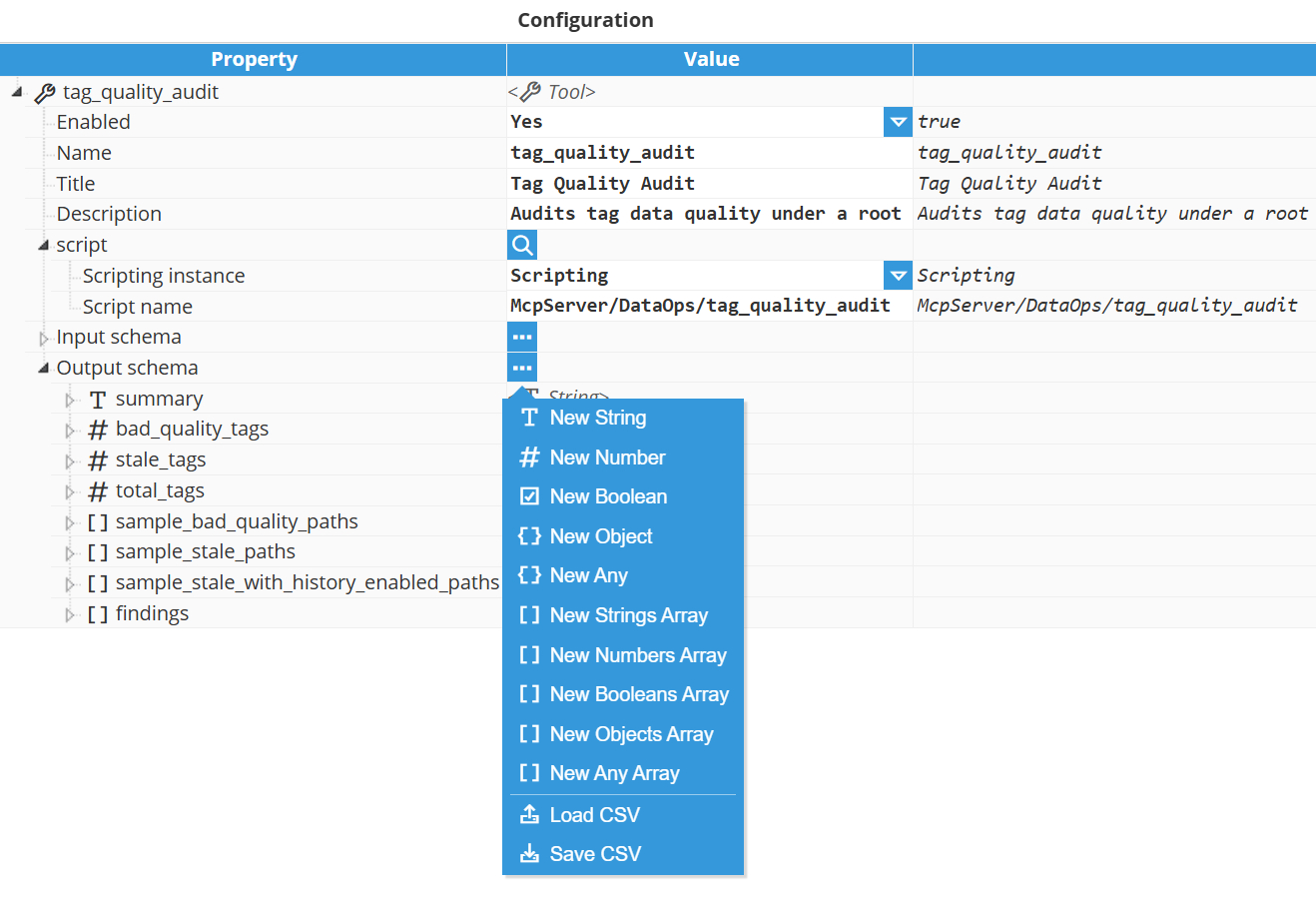
Note:
The output schema is optional. Your script's return value determines the actual data sent to MCP clients—the schema serves to document the expected response structure and enable client-side validation. While the tool will function without a defined output schema, providing one helps AI models better understand and interpret the results, and allows clients to validate that the response matches the expected format.
Available Output Types:
Type | Description |
|---|---|
String | Returns text values. Use for status messages, formatted reports, identifiers, descriptions, or any textual output. |
Number | Returns numeric values. Use for counts, totals, calculated values, metrics, percentages, or any numerical result. |
Boolean | Returns true/false values. Use for success/failure indicators, validation results, status flags, or any binary outcome. |
Object | Returns a structured object with named properties. Use for complex return values that group related data together. Each object can have Properties of any type, including nested objects and arrays. Define the structure by adding properties with their own types and descriptions. |
Any | Accepts any data type. Use when the return value type is dynamic or cannot be predetermined. While flexible, using more specific types provides better validation and helps AI models understand the results. |
Strings Array | Returns an array of text values. Use for lists of tag paths, identifiers, messages, or any collection of string values. |
Numbers Array | Returns an array of numeric values. Use for data series, multiple measurements, calculated results, or any collection of numerical values. |
Booleans Array | Returns an array of boolean values. Use for multiple status flags, validation results, or any collection of true/false values. |
Objects Array | Returns an array of structured objects. Use for lists of records, detailed findings, multiple complex results, or any collection where each item has multiple properties. Define the structure of each object by adding Properties that describe what fields each item in the array contains. |
Any Array | Returns an array where items can be of mixed or dynamic types. Use when the array contents vary in type or cannot be predetermined. More specific array types provide better validation and understanding. |
Output Parameter Properties:
Property | Description |
|---|---|
Description | Clear explanation of what the output property represents and how AI models should interpret it. Include format details, value meanings, units, or any information that helps understand the returned data. |
Nullable | Indicates whether the property can be null in the response. Set to Yes if null is a valid value, No if the property will always have a value. The default is No. |
Required | Specifies whether the property must always be present in the response. Set to Yes if the property is always returned, No if the property may be omitted under certain conditions. The default is Yes. |
Properties | For Object and Objects Array types, it defines the nested properties contained within each object. Each property can be of any type, allowing for the creation of hierarchical data structures. Define nested properties by adding them with their own names, types, descriptions, and configurations. |
Note:
JSON Schema offers powerful validation features including pattern matching, value ranges, array constraints, and nested structures. Script return values are always JSON. Defining an output schema enables MCP clients to validate responses against your configured constraints. Omitting the schema allows flexible, unconstrained JSON output. For detailed specification options, refer to the JSON Schema documentation.
 N3uron Agent Skills
The N3uron Agent Skills equip AI agents with structured knowledge of the N3uron platform, helping users accelerate tag model creation, template development, integration setup, and large-scale deployment workflows.
They can design tag hierarchies, define tag properties, build reusable templates with custom properties, inheritance, and nesting, and generate template definitions or import-ready CSV files from register maps, datasheets, Excel files, PDFs, images, exported tag lists, and other technical sources.
They also support advanced N3uron use cases, including SQL Client scripting, MQTT custom payloads and parser scripting, REST API Client and REST API Server setup, Scripting workflows, Derived Tags logic, Historian setup, WebVision-related structures, MCP Server configuration, and other industrial communication scenarios.
For troubleshooting and industrial analysis, they can work with logs, historical data, alarm records, module status, tag metadata, outputs from connected systems, and information exposed through the N3uron MCP Server.
These Skills can be used in compatible AI environments such as ChatGPT, Codex, Claude Desktop, Claude Code, Antigravity, MCPJam Inspector, and other agent-based platforms that support custom skills.
To get started, download the N3uron Agent Skill and follow the corresponding Knowledge Base guide for your environment:
ChatGPT | Codex | Claude Desktop | Claude Code | Antigravity | MCPJam Inspector
N3uron ChatGPT Assistant
The N3uron Scripting Assistant is a specialized AI tool available in the ChatGPT Store, designed to accelerate your work with N3uron's Scripting module. It provides expert assistance for building edge computing solutions through custom JavaScript logic—helping you configure triggers (startup, periodic, tag changes), access the N3uron API for real-time and historical data, leverage Node.js libraries and NPM packages, and implement powerful automations and integrations at the Edge.
It also provides hands-on guidance for building MCP Server Custom Tools—from defining the tool schema in the MCP Server (inputs/outputs) to implementing the tool logic in N3uron Scripting tasks, so you can expose reusable, business-specific operations.
Get code examples for N3uron API calls, Node.js native libraries (fs, net, HTTP), NPM ecosystem packages, custom libraries, event-driven scripts, and custom automation logic.
Receive configuration guidance.
Access best practices and troubleshooting support tailored to your specific industrial data challenges.