A custom payload is a payload structure or format that you define for the messages of MQTT Client. MQTT does not set rules for the payload content. The payload can be plain text, binary data, JSON or a different encoding that your application uses. You can change the format and the content to agree with the requirements of the devices or services that use MQTT.
Utilities
All the scripts of the custom parsers can use these utilities.
Buffer
The Node.js Buffer object. Use it to read and change a Buffer instance directly. For example, use it when Serialization is None and the module does not deserialize the message. For more information, refer to the Node.js Buffer Section.
Moment
Moment.js is a JavaScript library that formats and parses timestamps. The Moment library of the module also includes Moment Timezone (moment.tz()). For more information, refer to Moment.js and Moment Timezone.
Sprintf
Sprintf is a function that formats a string with a format string and one or more variables. It operates like the C++ sprintf function.
A format string can contain placeholders. A placeholder starts with the % character. The function replaces each placeholder with a variable that you give as an argument. The signature of the function is: sprintf(format, …args)
The format strings can use these placeholders:
Data type | Placeholder |
|---|---|
Integer | %d or %i |
String | %s |
Binary | %b |
JSON | %j |
ASCII character in decimal | %c |
Scientific notation | %e |
Floating point | %f |
Fixed point | %g |
Octal | %o |
Unsigned integer | %u |
Hexadecimal lowercase | %x |
Hexadecimal uppercase | %X |
Node buffer | %r |
The formats for decimal numbers (for example, floating point and scientific notation) can set the number of decimals. Use the format %.xY: x is the number of decimals and Y is the format (f for floating point, e for exponential, etc.). For example, %.2f shows a floating-point number with 2 decimals.
$.logger
Use the $.logger object to write messages to the log file on the disk, for debugging or for information. The log file is in N3uron/log/MqttClientInstance/. The internal code of the module and the custom parsers write to the same log file.
Use these functions to write to the log file:
$.logger.error(message, …arguments)
$.logger.warn(message, …arguments)
$.logger.info(message, …arguments)
$.logger.debug(message, …arguments)
$.logger.trace(message, …arguments)
Each function uses a format string (the same format as sprintf) and an optional list of arguments. The function replaces the placeholders of the format string with these arguments.
Publisher Custom Payload
To make a custom payload for an MQTT Client publisher, write a JavaScript script. The script makes the data structure that the publisher sends as the MQTT payload.
Procedure
To make a custom payload, do these steps:
Open the MQTT Client configuration and select the publisher.
In the Message format section, set Serialization to Custom.
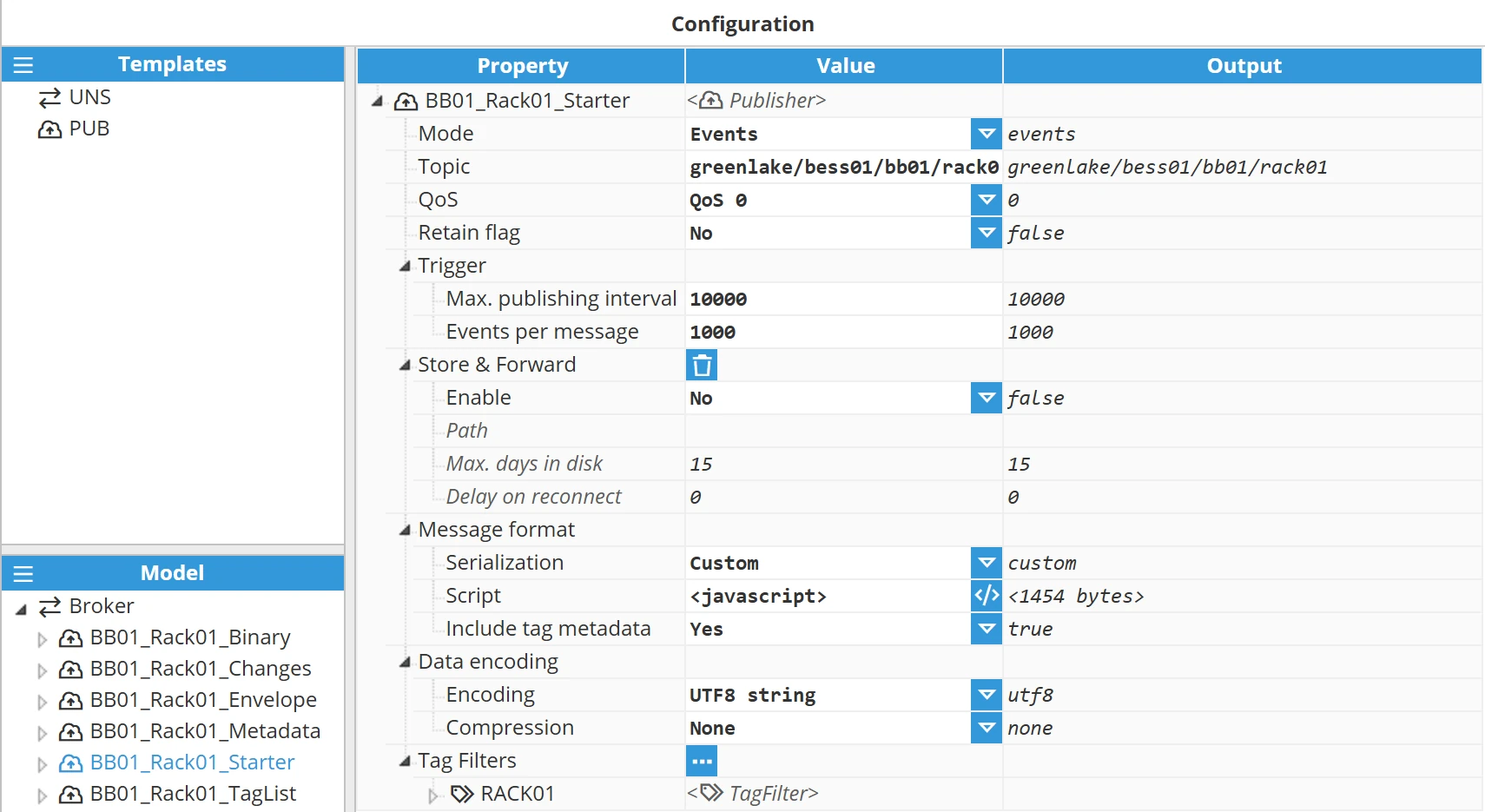
Click the button next to the Script field. The Script editor opens.
Write the script. Refer to Script objects and Script template.
Click Save in the Script editor.
Set the settings of the Data encoding section. Refer to Data encoding settings.
Save the configuration. Click Yes to restart the module.
For a full procedure with a test, refer to Create a custom payload publisher.
Script objects
These objects are available in the script:
Object | Description |
|---|---|
$.input | The array of events. Each event has the structure that Event structure shows. |
$.output | The payload of the message. It must be a string or a Buffer. To send no message when the script runs, do not set $.output or set it to null. |
$.topic | The topic of the message. When the script starts, $.topic contains the Topic of the publisher. To publish the message to a different topic, change $.topic in the script. |
$.local | An object that keeps its values for the next time the script runs, for example a counter or the last published values. A restart of the module clears this object. |
Event structure
Each event of $.input has this structure:
{
  "tagName": "TAG_ADDRESS",
  "data": {
    "value": "TAG_VALUE",
    "quality": "TAG_QUALITY",
    "ts": "EPOCH_TIMESTAMP"
  },
  "metadata": "TAG_METADATA"
}
Property | Description |
|---|---|
tagName | The path of the tag. |
data.value | The value of the tag (all data types). |
data.quality | The quality of the tag for this event. |
data.ts | The timestamp of the event. It is a number in epoch format, in milliseconds. |
metadata | The configuration of the tag, for example engUnits, format, description and numberType. This property is available only when Include tag metadata is set to Yes. When Include tag metadata is set to No, metadata is undefined. When the module cannot read the configuration of the tag, metadata is null. Include tag metadata is shown only when Serialization is Custom. Default: No. |
Data encoding settings
Set these settings of the Data encoding section for the custom payload:
Setting | Description |
|---|---|
Compression | Makes the payload smaller before the publisher sends it. This decreases the bandwidth and the transmission time.
|
Compression level | Sets the level of compression. This level is a balance between the processing speed and the size of the output.
|
Encoding | Sets how the final payload is encoded for the transmission and for the compatibility with the receiver.
|
Script template
This script uses all the script objects and utilities. Copy the script as a base for your script. Then remove the parts that you do not need.
Set Include tag metadata to Yes to get the engineering units and the format of the tags. With No, the script also operates.
// Starter script: it uses all the script objects. Copy it and change it for your use case.
// Set Include tag metadata to Yes to get "unit" and "text". With No, the script also operates.

// $.local: keeps its values for the next time the script runs. A module restart clears it.
$.local.seq = ($.local.seq || 0) + 1;

// $.input: the array of events. Use one for loop for many events.
const input = $.input;
const records = new Array(input.length);
for (let i = 0; i < input.length; i++) {
  const event = input[i];
  const meta = event.metadata; // undefined when Include tag metadata is No
  const value = event.data.value;
  records[i] = {
    tag: event.tagName,
    value: value,
    unit: meta && meta.engUnits ? meta.engUnits : "",
    text: meta && meta.format ? sprintf(meta.format, value) : String(value), // sprintf: format with placeholders
    quality: event.data.quality,
    ts: event.data.ts
  };
}

// $.logger: writes to the module log. Levels: error, warn, info, debug, trace.
$.logger.debug("Message %d contains %d events", $.local.seq, input.length);

// $.topic: contains the Topic of the publisher. Change it to send the message to a different topic.
$.topic = $.topic + "/starter";

// $.output: the payload, a string or a Buffer. Set it to null to send no message.
$.output = JSON.stringify({
  seq: $.local.seq,
  sent: moment.tz(Date.now(), "Europe/Madrid").format(), // moment: date and time functions
  events: records
});
This table shows how the script uses each object:
Object | Use in the script |
|---|---|
$.input | The for loop reads each event: the tag path, the value, the quality, the timestamp and the metadata. |
$.local | seq counts the messages. The value stays for the next run of the script. A restart of the module clears it, and the count starts at 1 again. |
sprintf | Formats the value with the Format of the tag. |
$.logger | Writes the message number and the number of events to the module log, at the debug level. |
$.topic | Adds /starter to the Topic of the publisher. |
moment | Writes the send time in the time zone of the plant (moment.tz()). |
$.output | The JSON string that the publisher sends. |
Message received (extract, 3 of 9 events):
{"seq":5,"sent":"2026-11-24T07:31:44+01:00","events":[
  {"tag":"/GREENLAKE/BESS01/BB01/BMS01/RACK01/VOLTAGE","value":1280,"unit":"V","text":"1280.00","quality":192,"ts":1795501903056},
  {"tag":"/GREENLAKE/BESS01/BB01/BMS01/RACK01/SOC","value":85.83834075927734,"unit":"%","text":"85.84","quality":192,"ts":1795501903056},
  {"tag":"/GREENLAKE/BESS01/BB01/BMS01/RACK01/STATE","value":1,"unit":"","text":"1","quality":192,"ts":1795501903056}
]}
Examples
Note:
For a step-by-step procedure and for examples, refer to Custom Payload Example.