A Query Method defines a named database operation with specified input arguments and a return format. Callers can include Web Vision through its Call Module Method action, or MCP clients through the MCP Server. When a caller invokes the method, the SQL Client validates the arguments, builds and executes the SQL statement on the selected channel, and returns the result in the configured format.
Note:
From N3uron version 1.22.8, it is available in the SQL Client instance under Query methods.
Create a Query Method
Open System > Config and select the SQL Client instance.
Create and save the channel that connects to the target database. The example in this article uses the WindFarmSCADA channel and the
turbine_telemetrywind_farm_scadadatabase.Select Query methods. Open the Model menu and select New QueryMethod. Name the method
GetTurbineTelemetry.Select the method and configure its settings, pipeline and schemas as described below. Use Run in the Pipeline header to test the editor configuration before saving it.
After the test succeeds, click Save and confirm the module restart to load the configuration.
The published method name is queryMethods.<channel>.<method>. For this example, it is queryMethods.WindFarmSCADA.GetTurbineTelemetry. The channel and method names must not contain a dot.
Method Settings
Setting | Description |
|---|---|
Enabled | Publishes the method. The default is Yes. A disabled method is not listed and cannot be called. |
Description | Explains what the method does and what it returns. Use one or two sentences. The input property descriptions are appended automatically, one line per property. |
Channel | Selects the channel whose database receives the statement. The list uses the saved instance configuration and marks disabled channels. Save a newly created channel before selecting it here. A channel name can also be typed or supplied as an expression. If the channel is missing or disabled, the method is still published, but calls fail with |
Modifies the database | Declares whether the method can change database data or structure. The default is No. Select Yes for statements such as |
Note:
The module does not inspect the SQL to decide whether a method writes. Set Modifies the database to Yes for every method that can write. Leaving it at No does not make the statement read-only.
Pipeline
A normal call runs these stages in order:
Validate the caller's argument against Input schema. The Query script reads the validated value through
$.inputand puts the statement in$.output.Execute the statement on the selected channel within Statement timeout and commit the database transaction.
Convert the database result into the answer. Rows and Single value use fixed answer formats. Script runs the Parser script and validates its answer against Output schema.
The controls below follow their order in the WebUI. The Run test has different commit behavior, described in Test the Pipeline.
Setting | Description |
|---|---|
Statement timeout | Maximum time for the database operation, in milliseconds. The default is 30000. The valid range is 1000 to 300000. Calls to the same method run one at a time, in arrival order. Waiting behind those calls and waiting for a pooled database connection both count toward this limit. If the limit expires while waiting, the call fails without running its Query script. Query and Parser script execution time is separate from this setting. Each script has its own 30-second execution limit. |
Parser type | Chooses how the database result becomes the answer: Rows (the default), Single value or Script. |
Query script | Builds the SQL statement once per call. Set |
Parser script | Shown only when Parser type is Script. Reads the database result through |
Query Script
Use a bound statement to keep argument values separate from the SQL text. Put a :name placeholder in text and the matching entry in values. The driver binds the values; do not add SQL quotes around the placeholders.
For example, the following PostgreSQL query returns the latest telemetry row for one turbine. It uses the required String input property turbineId, configured in the example below. The view contains turbine_id, active_power_kw, wind_speed_ms and observed_at.
$.output = {
  text: "SELECT turbine_id, active_power_kw, wind_speed_ms, observed_at FROM turbine_telemetry WHERE turbine_id = :turbineId ORDER BY observed_at DESC LIMIT 1",
  values: { turbineId: $.input.turbineId }
};
The LIMIT 1 clause bounds this example to one row. Query Methods do not truncate result rows. Use a row limit appropriate to your database and operation.
Bound values can include strings, numbers, booleans, dates, binary buffers and null. If an optional argument is omitted, the script reads undefined. Convert it to an explicit value such as null before binding it. For example: $.input.limit === undefined ? null : $.input.limit. The editor checks these scripts as ES2019; it does not accept ?? or ?..
The values field can also be an array with driver-specific positional placeholders, such as ? for MySQL/MariaDB or $1, $2 for PostgreSQL/TimescaleDB. A bound statement runs one SQL statement. On PostgreSQL, multiple statements separated by semicolons require the string form.
Note:
A complete SQL string is also accepted, but it does not bind caller arguments. The script must escape values inserted into the SQL text. The module logs a warning on every call that uses this form. Prefer the bound statement for caller-supplied values.
Script Context
The Query script and the Parser script use the following context. Their $.input and $.output have different meanings.
Member | Purpose |
|---|---|
| In the Query script, the validated call argument. With an Object input, read a property with |
| In the Query script, the SQL string or bound statement. In the Parser script, the JSON-compatible answer that must match Output schema. For a None output, leave it empty. |
| Read-only timestamp at which the call was received, in Unix epoch milliseconds. Assigning to it fails the script. |
| Stores values between calls of this method. The Query and Parser scripts of the same method share it. A module restart clears it. |
| Writes custom messages with |
| Provide date/time handling, formatted strings and binary data handling. Moment includes Moment Timezone. See User-defined scripts for the shared library references. |
Parser Types and Answers
Parser type | Answer |
|---|---|
Rows | Returns every result set with column names and types, row arrays and a row count. The answer contains |
Single value | Returns |
Script | Returns the value built by the Parser script, checked against Output schema. It does not add the Rows or Single value answer wrapper. Use it to return a number, text, an array or a structured answer for a specific caller. |
For Rows, the answer has the following structure. This one-row example illustrates the fields; telemetry values and execution time vary between calls.
{
  "ok": true,
  "durationMs": 31,
  "results": [
    {
      "columns": [
        {
          "name": "turbine_id",
          "type": "TEXT"
        },
        {
          "name": "active_power_kw",
          "type": "DOUBLE"
        },
        {
          "name": "wind_speed_ms",
          "type": "DOUBLE"
        },
        {
          "name": "observed_at",
          "type": "TIMESTAMP"
        }
      ],
      "rows": [
        [
          "WTG01",
          1758,
          8.5,
          "2026-11-20T00:21:18.396Z"
        ]
      ],
      "rowCount": 1
    }
  ]
}
Input Schema
Input schema defines the argument that callers can pass. Validation occurs before the Query script runs. The root Data type defaults to Object. This is the usual choice for named arguments, with one entry in Properties for each argument.
Data type | Accepted value |
|---|---|
None | No arguments. Call the method with |
Boolean |
|
Numeric | A number. Numeric type selects a decimal or an integer type. |
Date | An ISO 8601 date-time string, such as |
String | Any text. |
Fixed string | Exactly one entry from Allowed values. Matching is case-sensitive. Add at least one allowed value; the choices are published to callers. |
Any | Any JSON value, without a type check. |
Array | A list. Configure Items to define the type shared by every item. For an array of objects, configure the properties of one item there. |
Object | Named Properties, each with its own type. Nested Object and Array values can describe deeper structures. An Object schema with no properties accepts only |
Numeric Type
This control is shown when Data type is Numeric. The default is Decimal, which accepts finite numbers. Integer types also check that the number is whole and within range. All numeric types are published as JSON numbers.
Numeric type | Range |
|---|---|
Decimal | Any finite number. |
Integer (8, 16, 32 or 48 bits) | For a size of N bits: −2N−1 to 2N−1−1. For example, Integer (32 bits) accepts −2147483648 to 2147483647. |
Unsigned integer (8, 16, 32 or 48 bits) | For a size of N bits: 0 to 2N−1. For example, Unsigned integer (8 bits) accepts 0 to 255. |
Array Items
When Data type is Array, open Items to configure the type of each item. The Items type setting defaults to String. The choices are Boolean, Numeric, Date, String, Fixed string, Any and Object. None and Array are not offered as item types. To describe nested arrays, use an Object item with an Array property. These controls apply to both Input schema and the Script parser's Output schema.
Object Properties
Open the Properties menu and select New SchemaProperty. The entry name becomes the JSON property name and the name read by the script. Names can contain letters, digits, underscores and hyphens, but no dots.
Setting | Description |
|---|---|
Data type | The property type. The default is String. The choices are the same as the root types above, except None. Conditional Numeric type, Allowed values, Items and Properties controls follow the selected type. |
Required | The default is Yes: a value without this property is rejected. Set No to allow the caller to omit it. An omitted optional input property is |
Description | Explains the property, units, format or accepted values. It is appended to the method description so the caller can understand the argument without reading the script. |
Output Schema
Output schema is shown only when Parser type is Script. It defines the answer that the Parser script leaves in $.output. The root type defaults to Object; the same type and conditional controls described for Input schema apply.
For a Date output, the Parser script can return a Date or a valid ISO 8601 date-time string. A JSON caller receives a string. A None output resolves no value. Any accepts whatever JSON-compatible value the script builds. An optional output property can be omitted when its Required setting is No.
If the answer does not match this schema, a normal call fails with SCRIPT_RUNTIME_ERROR and identifies the field at fault. A binary answer is represented for JSON callers as { "$binary": "base64-encoded-data" }.
Note:
Rows and Single value have fixed answer schemas, which the module publishes automatically. Switching to either parser type removes the custom Output schema when the configuration is saved.
Example: Read Wind Turbine Telemetry
This example reads the latest row for turbine WTG01. It uses an existing PostgreSQL view named turbine_telemetry. Adapt the database, view and column names to your plant. The database user configured on the channel must be able to read that view.
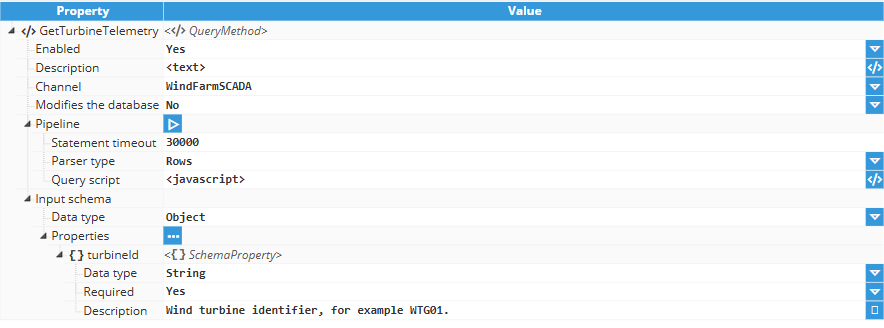
Set Enabled to Yes, Channel to WindFarmSCADA and Modifies the database to No. Enter the description Return the latest telemetry row for one wind turbine.
Keep Statement timeout at 30000 and Parser type at Rows. Paste the bound query from Query Script into the Query script editor.
Under Input schema, keep Data type at Object. Add a property named
turbineId. Keep its Data type at String and Required at Yes. Enter the description Wind turbine identifier, for example WTG01.
Test the Pipeline
Note:
Run executes the scripts currently in the editor without saving them. Its database transaction is rolled back. On MySQL and Oracle, structure-changing statements such as
CREATE,ALTER,DROPandTRUNCATEcan commit themselves and earlier changes in the same test. Rollback cannot undo those changes. Use a separate test database for structure changes. See the MySQL and Oracle transaction rules.
Click Run in the Pipeline header.
Enter
{"turbineId":"WTG01"}in Arguments (JSON). This is the argument the caller would supply. Leave Event ts empty to use the current time.Click Build statement. Check the SQL text and the separate
:turbineIdvalue. This step builds the statement without executing it.Click Execute and parse (rolled back). Check the execution status, returned row, answer and log. The example returns one row for WTG01 with active power, wind speed and observation time.
Try
{}to see the missing required argument error. Try{"turbineId":123}to see the type error. Correct the argument before continuing.
Missing or incorrectly typed arguments are rejected with INVALID_ARGUMENT. For this example, the errors identify arguments.turbineId as required or report that a string was expected.
Return a Single Value
Set Parser type to Single value and run the same query. Because turbine_id is the first selected column, value is "WTG01". If the query returns no row, value is null. To return active power instead, put that column first in the SQL statement or use the Script parser below.
Return Active Power with a Parser Script
Set Parser type to Script.
Under Output schema, set Data type to Numeric. Keep Numeric type at Decimal.
Paste the following code into Parser script. Keep the bound Query script and Input schema from the Rows example.
const dataset = Array.isArray($.input) ? $.input[0] : $.input;
if (dataset.getRowCount() === 0) {
  throw new Error("No telemetry was found for the requested turbine.");
}
$.output = dataset.getRow(0).getValue("active_power_kw");
The script selects the first Dataset, checks that a row exists, and reads its active_power_kw field. It returns a number in kilowatts, such as 1758. It does not return a wrapper with value. For the Dataset and DatasetRow methods, see User-defined scripts.
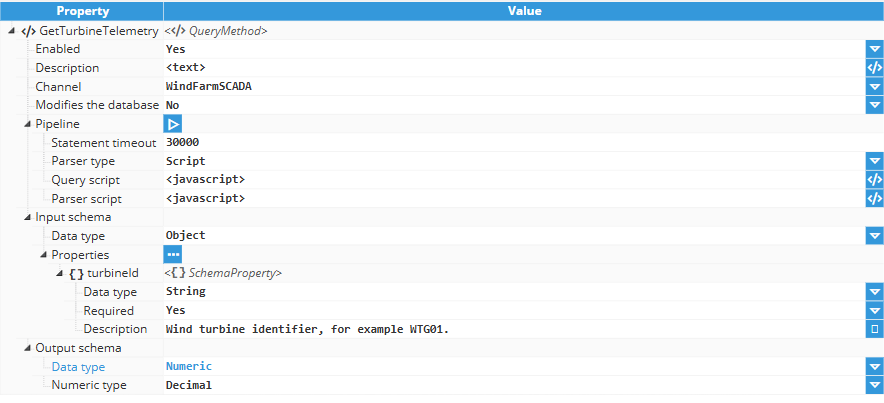
Run the pipeline again with WTG01 and check the numeric answer. If the Parser script returns text while Output schema is Numeric, Run displays the answer with a schema warning for diagnosis. It states that a real call would fail with SCRIPT_RUNTIME_ERROR.
Close Run when the tests are complete. Keep the parser type and answer schema that your caller needs, then click Save and confirm the module restart. Callers use the saved method configuration.