Expressions can be used to embed JavaScript code on properties and data entries to calculate the result value, instead of using static values. The value assigned to the property is the value returned by the embedded JavaScript code in the expression when triggered.
Expressions are useful for creating dynamic components, configuring reusable templates, responding to events, and obtaining values from Tags or other component properties. Web Vision provides additional functions, which can be used in Expressions to augment its capabilities.
Expressions can also use properties and custom properties, by invoking property(), self() or parent() functions, according to the hierarchy of the element to be called. These expressions will invoke the property they are pointing to when resolving the expression.
Syntax
To enter an expression inside a property field, the assignation must start with an equal sign (=). This character is already preset when using Expression editor.
Expressions are JavaScript code, meaning that expressions, operators and functions are resolved as JavaScript code and syntax and expressions valid on JS are valid on Web Vision expressions:
//Assuming a basePath custom property with the value /Group1/Inverter1/
self("custom.basePath")               // /Group1/Inverter1/
'self("custom.basePath")'             // self("custom.basePath")
self("custom.basePath") + "Power"     // /Group1/Inverter1/Power
`${self("custom.basePath")}Power`     // /Group1/Inverter1/Power

self("custom.basePath") + Power       // INVALID, power needs to be enclosed in quotes

//Assuming there is a "valid" boolean custom property set to true
if(valid === true) "green"; else "red"                           // green
//Valid changes to false -> red

//StringCustomProperty is a string with a value of "2"
parseInt(self("custom.stringCustomProperty"))*2                  // 4
Date.now()+3600*1000                                             // Date one hour from now, in Epoch
//fullTagPath is a string with a value of "/Group1/Inverter1/Power
 self("custom.stringCustomProperty").split(‘/’).slice(-1)[0]     // Power
As expressions are evaluated as JavaScript code, all strings must be enclosed in either single(‘, `) or double quotes ("), contrary to raw property values, where assignations are casted to their data type. The following examples show different valid and invalid expressions, and the returning values when evaluated:
5                       // 5
"This is a string"      // This is a string
'This is a string'      // This is a string
`This is a string`      // This is a string
"The value is " + 5     // The value is 5
`The value is ${5}`     // The value is 5
The value is 5          // INVALID: the string needs to be enclosed in quotes
"The value is" 5        // INVALID: 5 needs to be concatenated to the string
List of functions
Function tag()
The tag() function obtains information about a N3uron tag. If propertyPath is omitted, the function returns the tag value; if it is provided, the function returns the requested property. It returns null if the property does not exist.
tag("tagPath.propertyPath")The syntax for this function is tag("<tagPath>.<propertyPath>"), where tagPath is the string of the full path to the required tag, and propertyPath is the JSON path’s to the required property value. The following JSON example shows some of the values returned by this function and how to access to those values using tag().
Parameter | Description |
|---|---|
tag path | String naming the full path of the tag to be acceded, and optionally followed by the property path to access a specific property. |
Tag:{
	fullPath: "/Group1/Inverter1/Power",
	config:{
		engUnits: "kW"
	},
	data:{
		value:150,
		quality:192,
		ts: "2018-09-25T14:56:52.460Z",
	}
}

//tag is a custom property with value "/Group1/Inverter1/Power"
tag(self("custom.tag"))     // 150
tag("Group1/Inverter1/Power.engUnits")     // null (engUnits path is config.engUnits)
tag("Group1/Inverter1/Power.config.engUnits")     // kW
tag(self("custom.tag")+".data.quality")     // 192
Function alias()
The alias() function resolves alias paths references to the original target path previously configured.
alias("@aliasGroup/aliasName")
alias("@aliasName")
The syntax of this function is alias("@<aliasGroup>.<aliasName>"), where aliasGroup refers to the name of the alias group and subgroups of the alias to be accessed, or null if accessing to a root alias; and aliasName refers to the name of the alias to be accessed.
Parameter | Description |
|---|---|
alias path | String naming the path to the alias to be called. Can be preceded by the alias group it belongs, or only the alias name, if in root folder. |
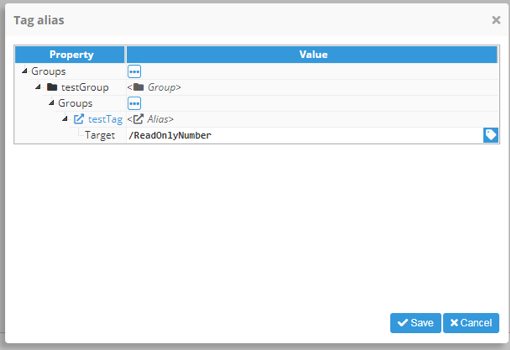
For example, for the following alias structure @testGroup/testTag, the function resolves it to the original target path:
// Example
alias("@testGroup/testTag")     // /ReadOnlyNumber
Function property()
The property() function points to the value of the property named in its parameter, either from the same element or a different element, that must be accessible from the current property. Any changes on the property read will be updated on the value returned by this function.
property("pathToElement.propertyName")The syntax of this function is property("<pathToElement>.<propertyName>"). The pathToElement must be a path from this element, using ‘..’ to refer to the parent element and separated by backslashes for relative paths from the current element or using the absolute path from the root element. The propertyName uses the internal name of the property, which may be different than the label used in the configuration window. In order to find the internal path, the link property helper can be used.
Parameter | Description |
|---|---|
property path | String naming the path of the property to be acceded from the current property, followed by the property name. |
The following example creates a rectangle that occupies 10% of the parent container width and a label component centered inside the rectangle. It uses the following components (these properties are simplified for this example, not the real internal structure of the properties):
Container:{
	width:1920,
	height:1080,
	components: {
		Rectangle:{
			x:500,
			y:450,
			width: property(../.width)/10,                    // 192
			height:100
		},
		Label:{
			x: property("../Rectangle.width"),                // 192
			y:property("../Rectangle.height"),                // 100
			width: property("../Rectangle.container.x"),      // 500
			height: property("../Rectangle.container.y")      // 450
		}
	}
}
Function self()
The self() function has a similar functionality as property() function, except it is used in a component to refer to itself. This function can be used in events to obtain the value of this component.
self("propertyName")The syntax of this function is self("<propertyName>"). The propertyName refers to the name of the property to be called from the current element instance. In order to find the internal name, the link property helper can be used.
Parameter | Description |
|---|---|
property name | String naming the property to be acceded from the current element. |
See the below example. Assuming the following component is used:
Dropdown:{
	width:200,
	height:100,
	dropdown:{
		options: Power, Temperature, Speed
		selectedValue: Temperature
	}
}

//Using property
property("./.value")     // Temperature
//Using self
self("value")            // Temperature
Function parent()
The parent() function has the same functionality as the property() function, except it is used in a component to refer to its parent’s properties.
parent("<propertyName>")The syntax of this function is parent("<propertyName>"). The propertyName refers to the name of the property to be called from the parent of the current element instance. In order to find the internal name, the link property helper can be used.
Parameter | Description |
|---|---|
property name | String naming the property to be acceded from the current element’s parent. |
See the below example. Assuming the following components are used, in order to set the rectangle position in the middle of the parent container; x/y values must be set to half of the parent width/height, minus half of the self width/height.
Container:{
	width:1920,
	height:1080,
	components: {
		Rectangle:{
			x:parent("width")/2 – self("width")/2,           // 910
			y:parent("height")/2 – self("height")/2,         // 490
			width:100,
			height:100
		}
	}
}
Function dataset()
The dataset() function is used to obtain the value of a Dataset element instance, or a manual dataset [[key1,value1],[key2,value2],…,[keyN,valueN]]. For instance, it can be used to populate a Chart series.
dataset("<datasetPath>"
dataset("<manualDataset>")
The syntax of this function are dataset("<datasetPath>") || dataset("<manualDataset>"). The datasetPath must be a relative path to the required dataset to be used. The manualDataset must be an array of pairs [key, value] that will be casted into a dataset object.
Parameter | Description |
|---|---|
dataset source | The parameter can be defined as a string naming the path of the dataset to be instantiated by this function, or as an array of pairs [key, value] to be used as source for the new dataset. |
For normal usage, a <dataset> placeholder will be displayed. This placeholder represents the dataset object, which has a very similar functionality to a JavaScript array. It also has a loading property, which allows users to see if the dataset has been loaded or not. When used on ‘dataset’ properties, the input will automatically obtain and use the values returned from the dataset.
Datasets can be operated using standard JavaScript arithmetical, logical, and bitwise operators.
// Generic function definition
dataset("<dataset path | manual dataset>")
// Basic example (using manual dataset syntax for example simplicity)
dataset("[[1,2],[3,4],[5,6]]")                      // <dataset> (if used in a dataset property the values will be automatically loaded and used)
// Join example
dataset("[[1,2],[3,4],[5,6]]").join(", ")           // 1,2, 3,4, 5,6
// plus operation example
(dataset([[1,2],[3,4],[5,6]]) + dataset([[1,2],[3,4],[5,6]])).join(", ")     // 1,4, 3,8, 5,12
// Zero fill right shift bitwise operator
(dataset([[1,2],[3,4],[5,6]]) >>> 2).join(", ")     // 1,0, 3,1, 5,1
Function func()
The func() function allows users to reference a template function defined in the Function system folder anywhere in the project. The syntax is the function name and a comma-separated list of parameters, which will be passed on to the function as an array called argv.
func("<functionName>", parameter1, parameter2, ..., parameterN)The syntax of this function is func("<functionName>", parameter1, parameter2, …, parameterN). The functionName is the name of the template function to be called from this function. The parameter1 … parameterN are the sorted list of parameter to be sent to the function, declaring as many as needed or empty if no parameters are required.
Parameter | Description |
|---|---|
function name | String naming the function to be called from the Function templates list |
parameter value | Object to be sent to the function as parameters. No minimum nor maximum number of parameters are defined. |
Declaring more parameters than used will not affect real-time execution, while missing required parameters will throw an error.
//Example, multiply array by number and return multiplied array
func("multiplyArray", [1,2,3,4], 5)     // [5, 10, 15, 20]
Function ui()
The ui() function adds an additional functionality for accessing multiple system functionalities and values in expressions, for example, data manipulation and user information.
ui("<requestName>")The syntax of this function is ui("<requestName>"). The requestName is the command to be executed from the list of UI requests available.
Parameter | Description |
|---|---|
request name | String naming the request to be called from the function |
See below for function calling examples:
// Generic function definition
ui("<request>")
// Current timestamp in milliseconds
ui("time")                     // 1604664222188
// Current date with "<Year-month-day hour:minute:second format>"
ui("timestr")                  // 2020-11-06 12:04:04
// Offset from GMT in millisenconds
ui("timeoffset")               // 25200000
// Offset from GMT in text format
ui("timeoffsetstr")            // GMT-07:00
// Currently selected timezone in text format
ui("timezone")                 // America/Phoenix
// WebVision viewport width
ui("width")                    // 1920
// WebVision viewport height
ui("height")                   // 1080
// User name
ui("user.name")                // admin
// Returns true of false depending if the user has writing permission
ui("user.writePermission")     // true
// Returns information about the main and distributed nodes linked to the module, in array format.
ui("nodes")
// Returns information about the main and distributed nodes linked to the module, in object format.
ui("nodes.object")
Function sprintf()
The sprintf() function allows values to be formatted using formatters, as specified in the Sprintf format specification appendix. This function accepts a format string and a value as parameters and returns the formatted value.
sprintf("<formatString>", value1, ..., valueN)The syntax of this function is sprintf("<formatString>", value1, ..., valueN). The formatString is the string to which the parameter will be injected where the formatter is defined. The value1… valueN are the sorted list of parameter to be injected in the string, casted to the indicated format.
Parameter | Description |
|---|---|
format string | String to be formatted and returned by the function. |
valueN | Each additional parameter received is injected in its position indicated inside the format string, casted to the format indicated. |
// Generic function definition
sprintf("<format string>", <Value1>, <Value2>, …, <ValueN>)     // <Formatted value>
// float decimals specification
sprint("%.1f", 50.522)                                         // 50.5
// Modify parameters order
sprintf("%2$s %3$s a %1$s", "cracker", "Polly", "wants")       // Polly wants a cracker
// Add positive/negative sign
sprintf("%+.1f", -54.4)                                        // -54.4
sprintf("%+.1f", 54.4)                                         // +54.4
// Add padding character
sprintf("%'.09d", 54)                                          // .......54
// Exponential formatting
sprintf("%.3e", 54000000)                                      // 5.400e+7
Function moment()
The moment() function enables direct access to moment.js, allowing for advanced date manipulation and adding multiple additional helpers for date manipulation. More information about the Moment functionality can be found on the moment.js docs page. The Moment date format specification can be found in the Timestamp formatting appendix.
moment("<date>")The syntax of this function is moment("<date>"). The moment is the date to be casted to moment.js date object. String and Date objects can be send as parameters to this function.
Parameter | Description |
|---|---|
date | The function returns the Date of the given parameter. If null, returns the current timestamp. |
// Generic function definition
moment(<optional date>)
// Initialize moment with custom Date object
moment(new Date())                       // Fri Nov 06 2020 13:19:56 GMT+0100
// Initialize moment with custom timestamp
moment(Date.now())                       // Fri Nov 06 2020 13:19:56 GMT+0100
// Initialize moment with date string
moment("2019-Feb-01 00:00:00")           // Fri Feb 01 2019 00:00:00 GMT+0100
// Date formatting as readable string
moment(Date.now()).format("YYYY-MM")     // 2020-11
Function urlParam()
The urlParam() function retrieves the value of a query parameter from the URL used to open the Web Vision application. It can be used to pass contextual information to a project, such as an equipment identifier, operating area, selected view, or display mode.
urlParam("<paramName>")The syntax of this function is urlParam("<paramName>"). The paramName is the name of the parameter from the URL from which Web Vision is being opened to be retrieved by the function.
Parameter | Description |
|---|---|
parameter | Name of the URL parameter whose value will be retrieved. |
The function returns the value associated with the specified URL parameter. The returned value can be used in expressions, bindings, conditions, actions, or navigation logic.
This function is forced to be refreshed whenever an action Set URL Param is invoked.
Function action()
The action() is only available inside events configuration. Returns the value from the action specified in the parameter, inside the context of the event triggering the actions where the function is being called.
action("<actionPosition>")The syntax of this function is action("<actionPosition>"). The actionPosition is the number of the position of the action to receive the result from, in ascending order and starting by 1.
Parameter | Description |
|---|---|
position pointer | Integer pointing to the position of the action for the result to be read, starting by 1. |
For any 'Call Module Method', the result of the function will be the result of the method called, or null if the method does not return a value.
Environmental objects
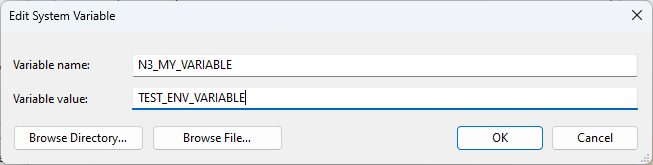
For security reasons, environment variables can be accessed if they start with the N3_ prefix. As an example, suppose a Windows system environment variable named N3_MY_VARIABLE is created. This variable can then be accessed in a Label component using the Expression editor with the following expression: env.N3_MY_VARIABLE.
Note:
Starting from N3uron version 1.21.7., env object is available for accessing environment variables in expressions.
.png)