Web Vision is the N3uron module used to create, organize, and run web-based HMI applications. This article introduces the main concepts used when building a Web Vision project, including the design environment, runtime access, project structure, reusable objects, data access, logic, and user interaction.
Understanding these concepts helps designers build scalable HMI projects that are easier to maintain, reuse, and extend as the projects grow.
Designer and Viewer
Web Vision separates project engineering from project runtime through two main environments: Designer and Viewer.
Environment | Description |
|---|---|
Designer | The engineering environment used to create and configure Web Vision projects. It allows users to build pages, add visual elements, configure templates, define data sources, create functions, and assign actions. |
Viewer | The runtime environment used by operators and end users to interact with the HMI. It displays the published project and provides access to real-time values, navigation, controls, alarms, dashboards, and other configured interface elements. |
Tip:
Use Designer to build and maintain the project, and use Viewer to validate how the application will be presented to operators.
Project Tree
The Project tree is the main navigation structure inside Designer. It organizes the Web Vision project into logical sections and gives access to the objects that define the application.
From the Project tree, users can manage pages, templates, folders, visual components, data configuration, and project-level resources. A well-organized Project tree makes large HMI applications easier to navigate, troubleshoot, and maintain.
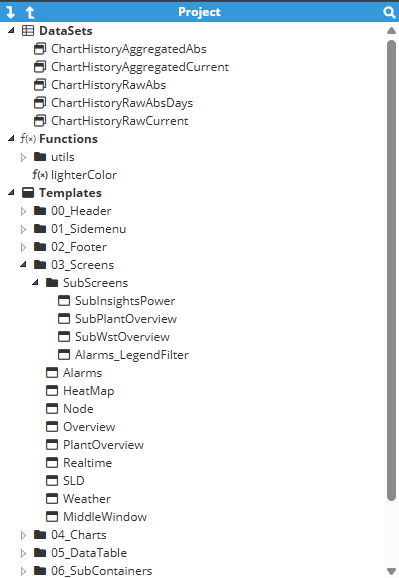
Templates
Templates are reusable design objects that help standardize screens and interface components across a Web Vision project. They are useful when the same layout, object structure, or visual behavior needs to be replicated in multiple instances.
Templates reduce duplication and improve consistency. When a common design pattern changes, updating the template can simplify maintenance and help keep the project aligned.
Typical uses
Reusable equipment faceplates.
Repeated station, line, or unit views.
Common navigation headers, panels, cards, and popups.
Standardized objects linked to different Tags or Datasets.
Visual Elements
Visual Elements are the graphical objects used to build the UI. They can represent static content, dynamic values, controls, indicators, navigation elements, charts, images, and other interface components.
Each visual element can be configured with properties such as position, size, style, visibility, data bindings, animations, and interaction behavior. These properties define how the element looks and how it responds during runtime.
Element type | Purpose |
|---|---|
Static elements | Display fixed content such as labels, shapes, images, titles, and layout elements. |
Dynamic elements | Display values, states, colors, visibility, or animations based on data coming from N3uron Tags or expressions. |
Interactive elements | Allow users to navigate, open popups, execute actions, write values, acknowledge alarms, or trigger configured logic. |
Datasets
Datasets are structured data sources used by Web Vision to feed visual elements, lists, tables, charts, templates, and other dynamic components. Datasets can be used to simplify the organization of the data by generating reusable configuration of data sources, instead of using individual objects.
Datasets can be used to provide information, define object instances, supply configuration values, or connect project elements to different data paths. This is especially useful in applications with many similar devices, areas, or process units.
Functions
Functions are reusable logic blocks that can be called from different parts of a Web Vision project. Function implementation can be used to centralize common calculations, transformations, formatting rules, or behaviors.
Function usage prevents logic redundancy across several elements. This makes projects easier to update and reduces the risk of inconsistent behavior between screens.
Common use cases
Formatting values before displaying them.
Calculating derived values for the HMI.
Evaluating display states such as colors, labels, visibility, or alarms.
Reusing the same behavior in multiple pages or templates.
Actions
Actions define the events triggered when a user interacts with the HMI. They connect interface events to runtime behavior.
Actions can be assigned to visual elements and used to execute navigation, open dialogs, write values, trigger commands, run logic, or update the user interface.
Recommendation:
Use clear names for actions and group related behaviors logically. This makes project maintenance easier, especially when several users work on the same HMI.
Expressions
Expressions are formulas or logic statements used to calculate values, evaluate conditions, transform data, or control visual behavior. They are commonly used to make the interface respond dynamically to runtime data.
An expression can be used to determine value, text, color, visibility, animation, status, formatting, or other properties based on Tag values, constants, variables, or function results.
Examples of expression-driven behavior
Change the color of an element when a value exceeds a threshold.
Show or hide a panel depending on a runtime condition.
Convert a numeric state into a readable status label.
Calculate a percentage, total, average, or formatted engineering value.
How the Concepts Work Together
A Web Vision project is built by combining these concepts. The Project tree organizes the application, Templates provide reusable structures, and Visual Elements create the operator interface.
Datasets provide structured data, Expressions calculate dynamic behavior, Functions centralize reusable logic, and Actions define how the interface responds to user input or runtime events.
Concept | Main role |
|---|---|
Designer | Engineering environment where the project is created and maintained. |
Viewer | Runtime environment where users interact with the published HMI. |
Project tree | Organizes pages, templates, and project resources. |
Templates | Provide reusable layouts and components. |
Visual Elements | Build the visible and interactive interface. |
Datasets | Provide structured data for repeated or dynamic content. |
Functions | Centralize reusable logic and calculations. |
Actions | Define user interactions and runtime behavior. |
Expressions | Calculate values and control dynamic properties. |