User defined scripts are used mainly in the following three cases:
To serialize tag events into a Dataset ready to be inserted into the database.
To create the query for exchanging, extracting, or sending data to the database.
To parse a Dataset obtained from the database into data objects, ready to write or update the tags.
These scripts use the JavaScript language, and have access to the standard JavaScript functions and objects (such as parseInt or the Date object), as well as the following additional libraries and functions added by the N3uron platform.
Script execution flow
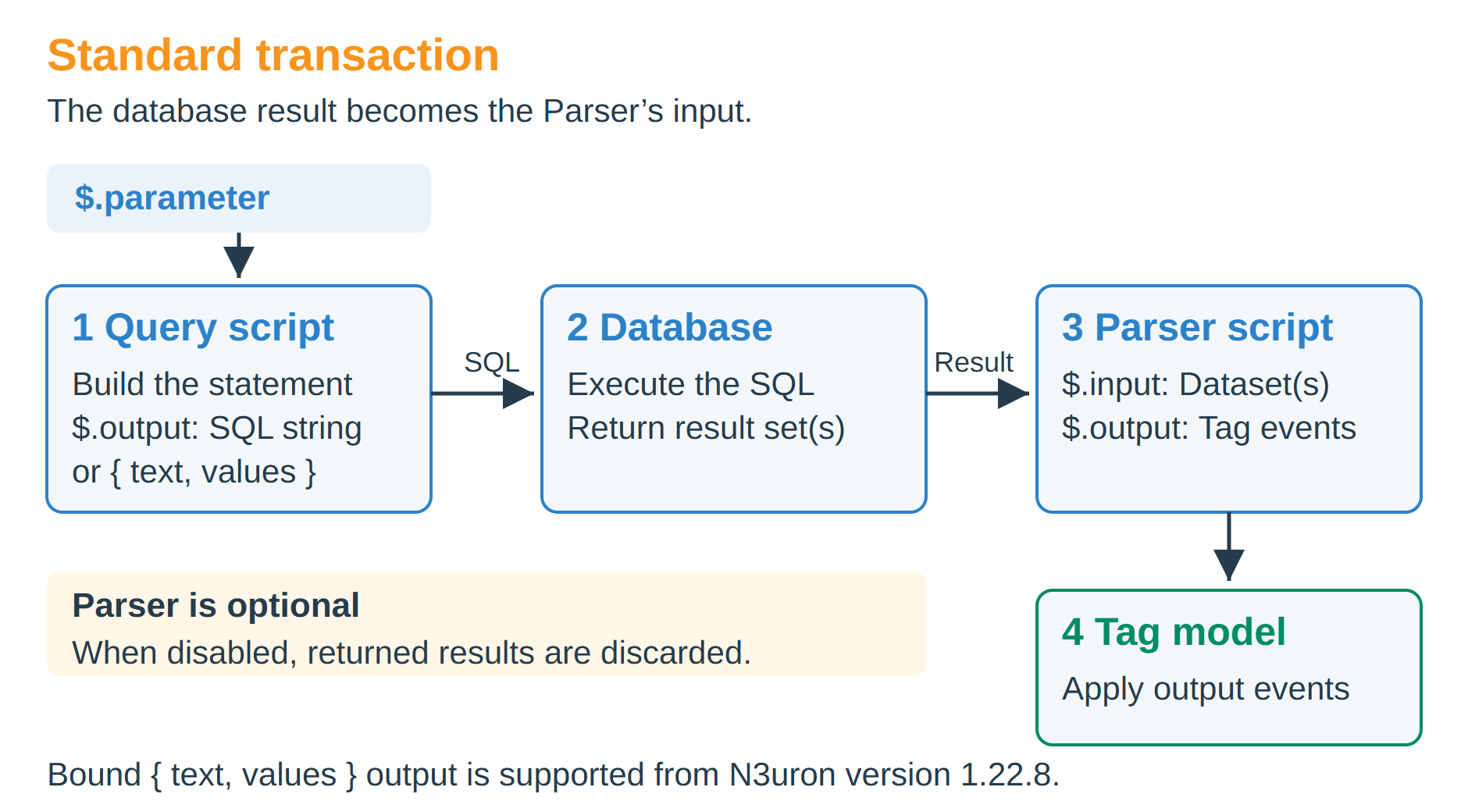
A pipeline is the ordered set of scripts and database work for one transaction. The meaning of $.input and $.output depends on the script’s position in that flow.
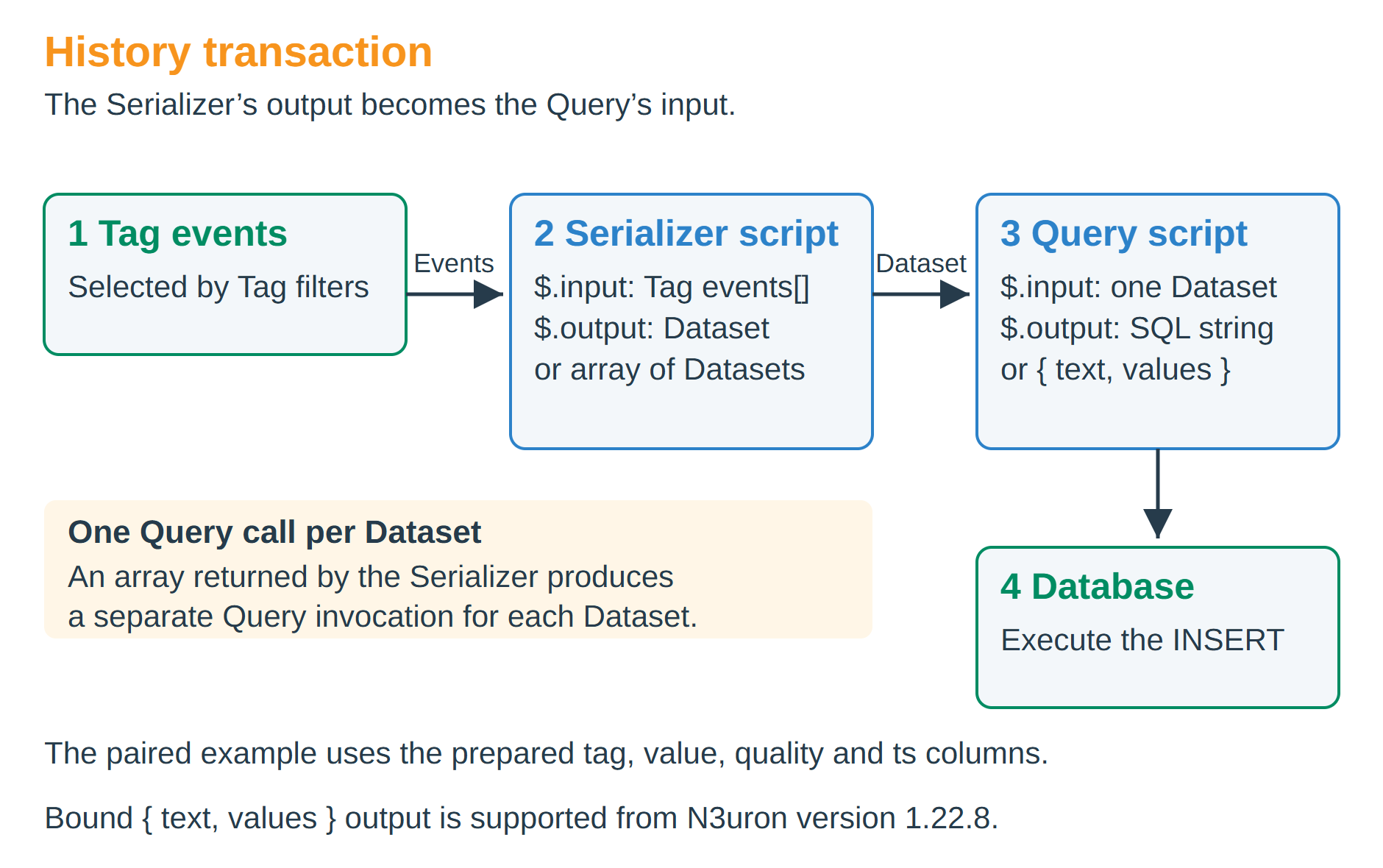
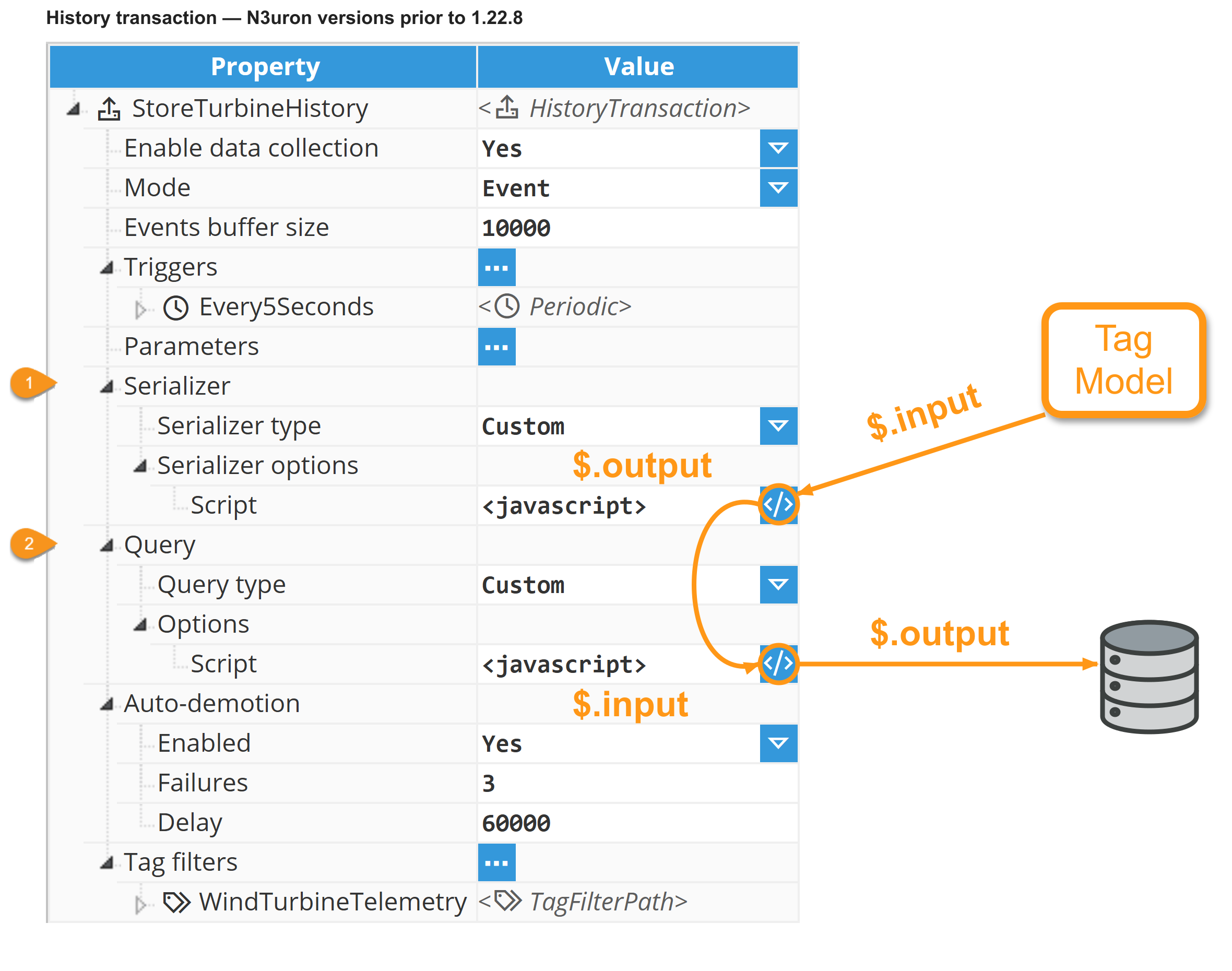
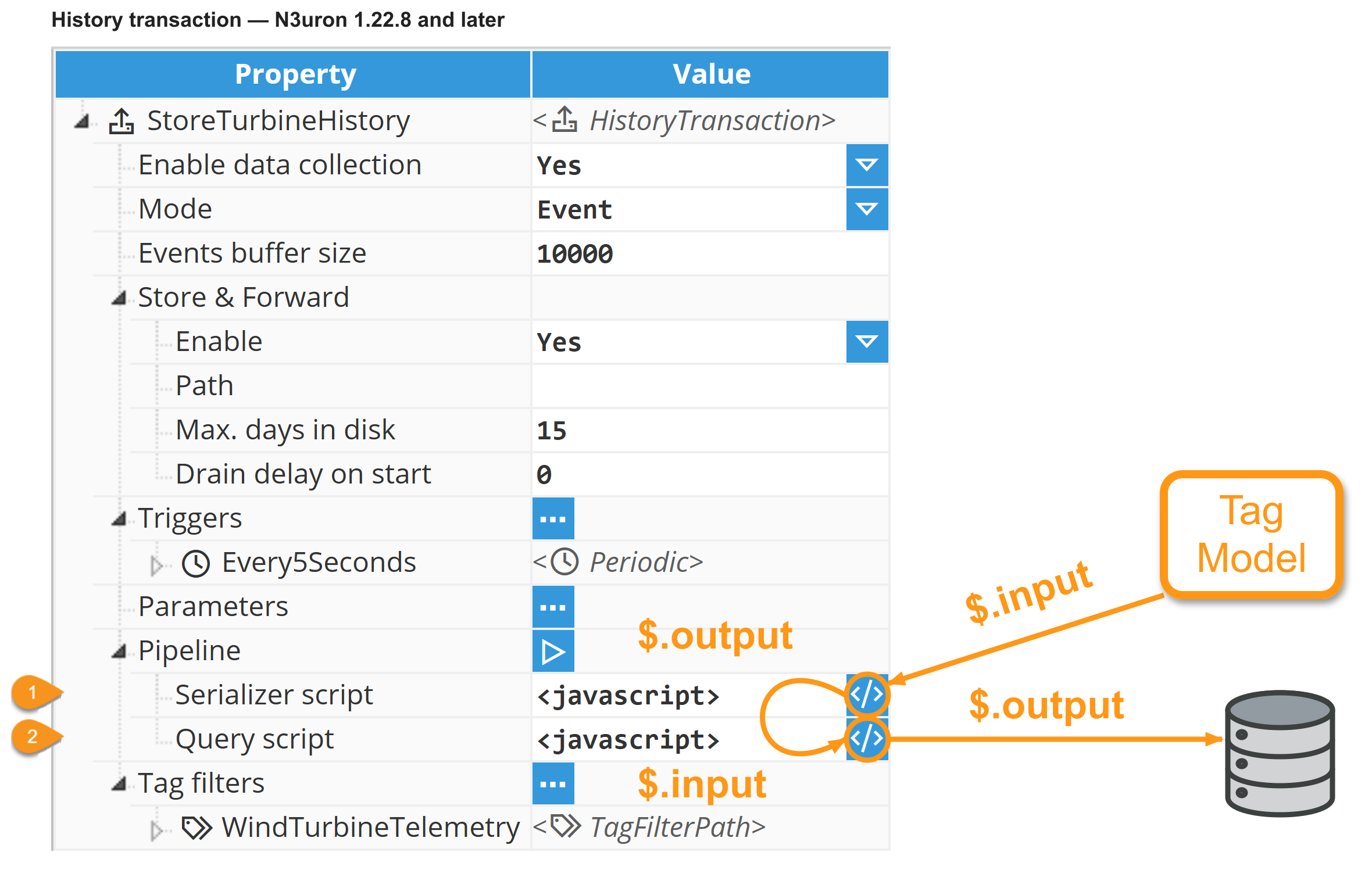
In History, the Serializer’s $.output becomes the Query’s $.input. The Query examples below use the valid Dataset prepared by the preceding Serializer. Adapt the pair together to your own data model.
Moment
Moment is a JavaScript library that simplifies date parsing and formatting, as well as manipulating dates (such as adding a specific duration to a date). The SQL Client version also includes Moment Timezone, which is used to parse dates in specific time zones and to change time zones that are given a moment object.
Moment can be accessed by directly invoking the moment() constructor, while Moment Timezone is accessed using moment.tz()
Documentation about Moment can be found in Moment.js and Moment Timezone.
Buffer
Buffer is a Node.js class that is used to create and manipulate binary arrays. This class is used whenever a field needs to be a binary value, or when converting between different encodings (for example, from Base64 to UTF-8). Documentation about the Buffer class can be found at Node.js Buffer API.
sprintf
sprintf builds a string from a format pattern and its values. Put a placeholder beginning with % in the pattern for each value to format. The table lists the supported forms; the examples below show the calls and results.
Placeholder | Description |
|---|---|
%d or %i | Decimal integer. A fractional part is truncated. |
%s | String. |
%b | Binary representation of a number, for example 5 becomes 101. |
%t | Boolean text. |
%j | JSON representation. |
%c | Character identified by its decimal character code; for example, 48 gives 0. |
%e | Scientific notation. Use a precision such as %.2e for two decimal places. |
%f | Floating-point notation. Use %.2f for two decimal places. |
%g | Numeric precision. Use %.3g for three significant digits. |
%o | Octal representation of an integer. |
%u | Unsigned integer representation. A fractional part is truncated. |
%x | Hexadecimal representation with lower-case letters. |
%X | Hexadecimal representation with upper-case letters. |
%r | Node.js Buffer representation; see the byte-format example below. |
If the integer and the unsigned integer format type receive a decimal number, they truncate the decimal part.
Precision depends on the placeholder. For example, %.2f gives two decimal places: 12.3456 becomes 12.35. With %.2e, 1234 becomes 1.23e+3. With %.3g, 12.3456 becomes 12.3.
See below for examples of the different format options in the following script:
sprintf("Numbers are: %d and %i", 10, 15.7);
// Numbers are: 10 and 15
sprintf("String is: %s", "Hello world!");
// String is: Hello world!
sprintf("The binary representation of 5 is: %b", 5);
// The binary representation of 5 is: 101
sprintf("The ASCII character with decimal value 48 is %c", 48);
// The ASCII character with decimal value 48 is 0
sprintf("1000 in exponential notation is: %e", 1000);
// 1000 in exponential notation is: 1e+3
sprintf("1234 in exponential notation and 2 decimals is: %.2e", 1234);
// 1234 in exponential notation and 2 decimals is: 1.23e+3
sprintf("12.34 in floating point notation is: %f", 12.34);
// 12.34 in floating point notation is: 12.34
sprintf("12.3456 with precision 3 is: %.3g", 12.3456);
// 12.3456 with precision 3 is: 12.3
sprintf("12 in octal is: %o", 12);
// 12 in octal is: 14
sprintf("-10 in unsigned integer format is: %u", -10);
// -10 in unsigned integer format is: 4294967286
sprintf("30 in hexadecimal is: %x", 30);
// 30 in hexadecimal is: 1e
sprintf("30 in uppercase hexadecimal is: %X", 30);
// 30 in uppercase hexadecimal is: 1E
const buf = Buffer.from("Hello world!", "utf8");
sprintf("The buffer is: %r", buf);
// The buffer is: <48-65-6C-6C-6F-20-77-6F-72-6C-64-21>
The $ object
Note:
The API object $ are read-only from N3uron version 1.22.8. Keep user-defined data separate from these API properties. Do not add user-defined properties directly to $, such as $.count. Declare temporary variables with const or let. Use $.local, for example $.local.count, for your own data that must be shared between scripts or retained between executions of the same transaction.
$.logger
Note:
From N3uron version 1.22.8, the $.logger property of the $ object is read-only. Its logging methods are used in the same way as before.
The $.logger object is used to log messages to the disk, which can be used for both debugging and informative purposes. The log file can be found at N3uron/log/<module_instance_name>/. It’s shared by both the internal execution of the module and the messages written by the users. The logger has five different logging levels:
$.logger.error()
$.logger.warn()
$.logger.info()
$.logger.debug()
$.logger.trace()
Each logging function takes a format string followed by zero or more arguments:
(String) message: Format string using sprintf formatting.
(Any) arguments: Arguments that will replace the placeholders in the format string.
Diagnostics and testing
Give each message a transaction name and a useful count or identifier. For a Parser that receives one Dataset, these messages help distinguish an empty database result from an empty Parser output. Place them after the Parser produces its events.
$.logger.debug("ReadTurbineTelemetry: input rows=%d", $.input.getRowCount());
$.logger.debug("ReadTurbineTelemetry: output events=%d", $.output.length);
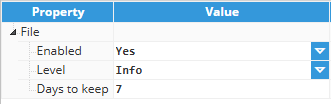
For normal execution, open Modules → SQL Client → Logger. Under File, Enabled controls the daily log file and Level controls its detail. Info is the default. Select Debug temporarily when you need debug messages. Days to keep defaults to seven days.
Note:
Use Debug or Trace for a short investigation. Restore the normal logging level afterwards. Avoid logging credentials, complete parameter objects or large result sets. These recommendations reduce sensitive output and unnecessary log volume.
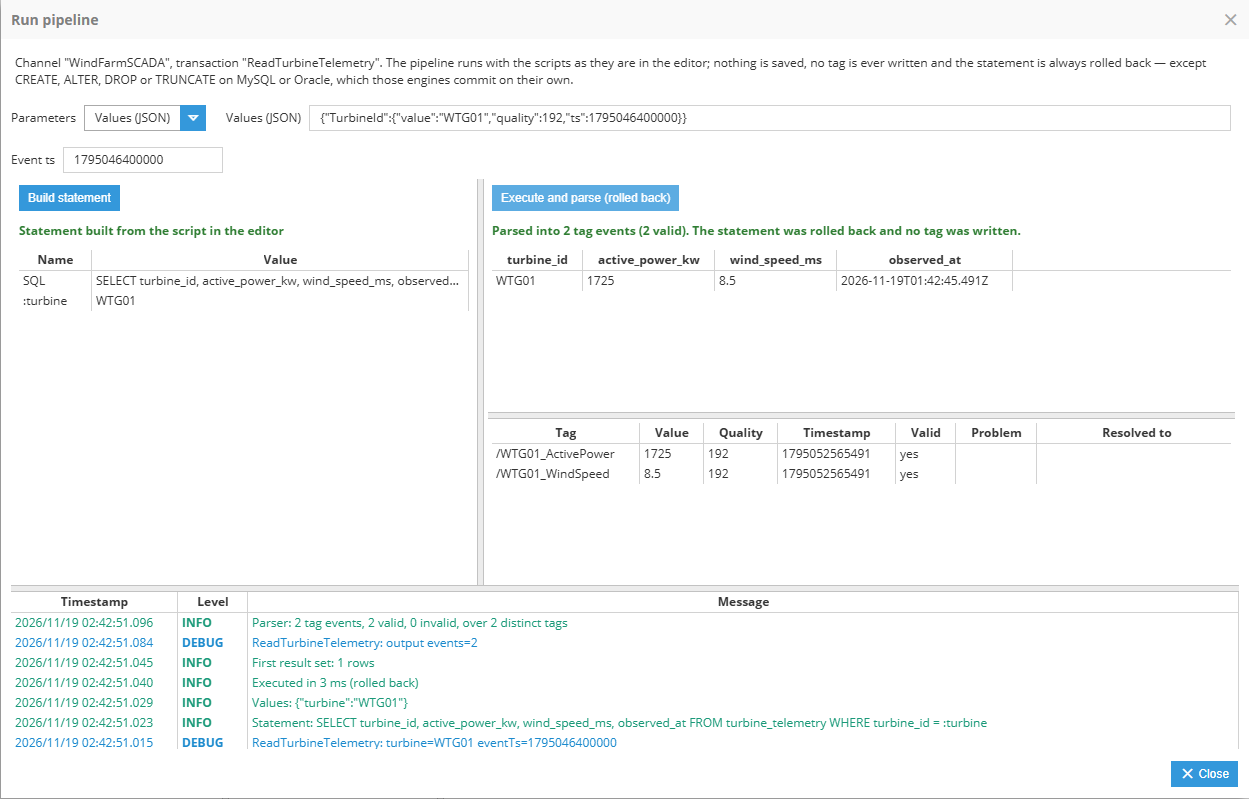
From N3uron version 1.22.8, Run pipeline also displays script messages and execution results. The DEBUG line below records the turbine identifier and supplied trigger timestamp.
$.parameter
Scripts receive a snapshot of the configured parameters immediately before each execution.
Note:
From N3uron version 1.22.8, $.parameter is read-only. Assigning a parameter, one of its properties or a nested value fails the script. Read the input and create separate working data for transformations.
const power = $.parameter.Power_output.value;
const powerMW = Number(power) / 1000;
// powerMW is a new number. The parameter remains unchanged.
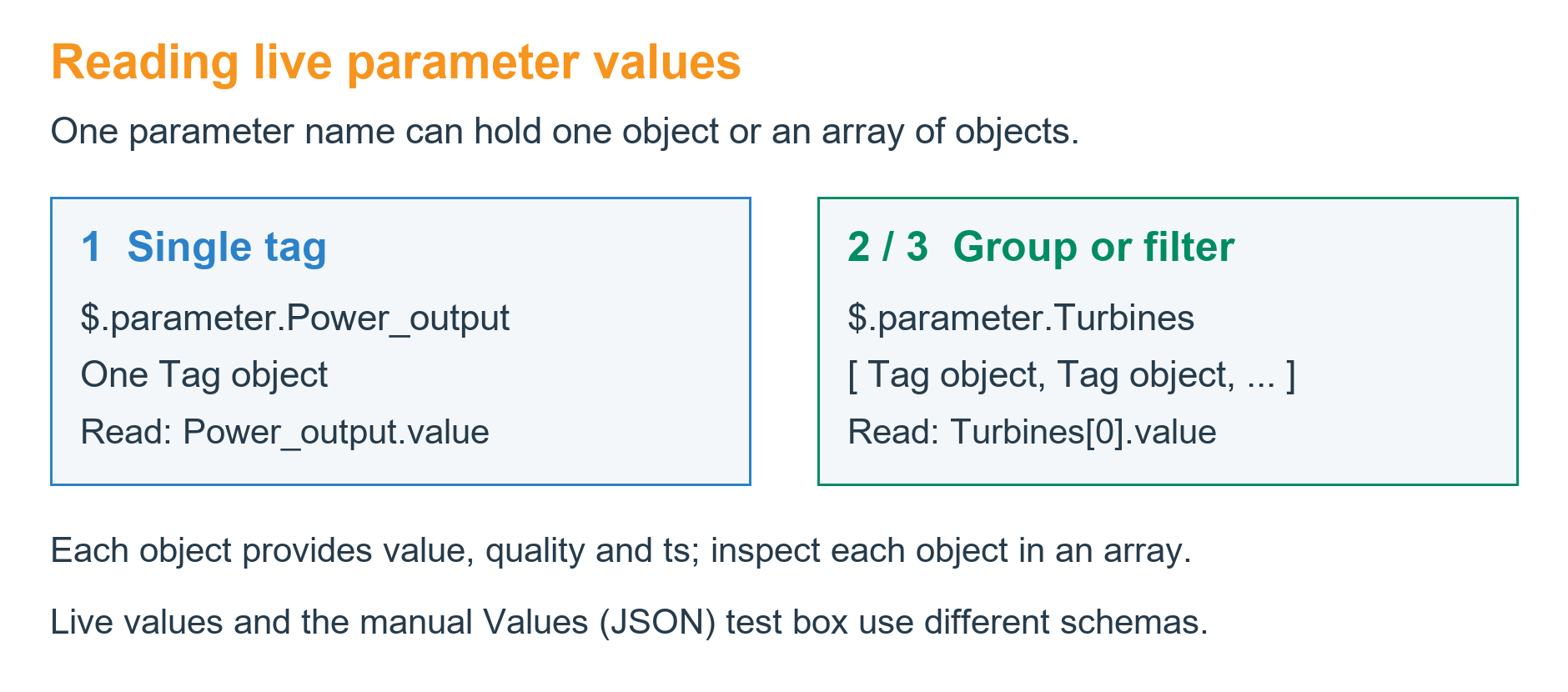
The access forms below apply to a Single tag parameter. A Tag group or Multiple tags (Filter) parameter returns an array. Select an event by index or iterate the array before reading value, quality or ts.
Transactions with parameters can be used by accessing the $.parameter object.
A configured parameter provides one Tag object or an array of Tag objects. Read the following properties on each object. For an array, select an element or iterate its objects first.
Property | Description |
|---|---|
value | The Tag value: number, string, boolean or null. For a Single tag parameter, read $.parameter.Power_output.value. |
quality | Numeric quality code, from 0 to 255. Check the quality code before using the value when your application requires it. |
ts | The Tag timestamp as a number of milliseconds since 1 January 1970 UTC (Unix epoch). It can differ from the transaction trigger time in $.event.ts. |
initial | Boolean subscription metadata indicating an initial Tag value. It is present in the live parameter objects shown in this article. It is not a field accepted by the manual Values (JSON) test input. |
Parameter types
Parameter type | Selection and script access |
|---|---|
1. Single tag | Select one Tag by its path. The parameter holds one object. Read its value directly, for example $.parameter.Power_output.value. |
2. Tag group | Select a group path. The parameter holds an array of the Tags in that group. For example, $.parameter.Turbines[0].value reads the first object’s value. |
3. Multiple tags (Filter) | Select Tags with the configured filters. The parameter holds an array. Iterate the array to process the selected objects; see the include/exclude example below. |
As an example, consider a Wind Turbine tag model with tags from: WT-1001, WT-1002 and WT-1003.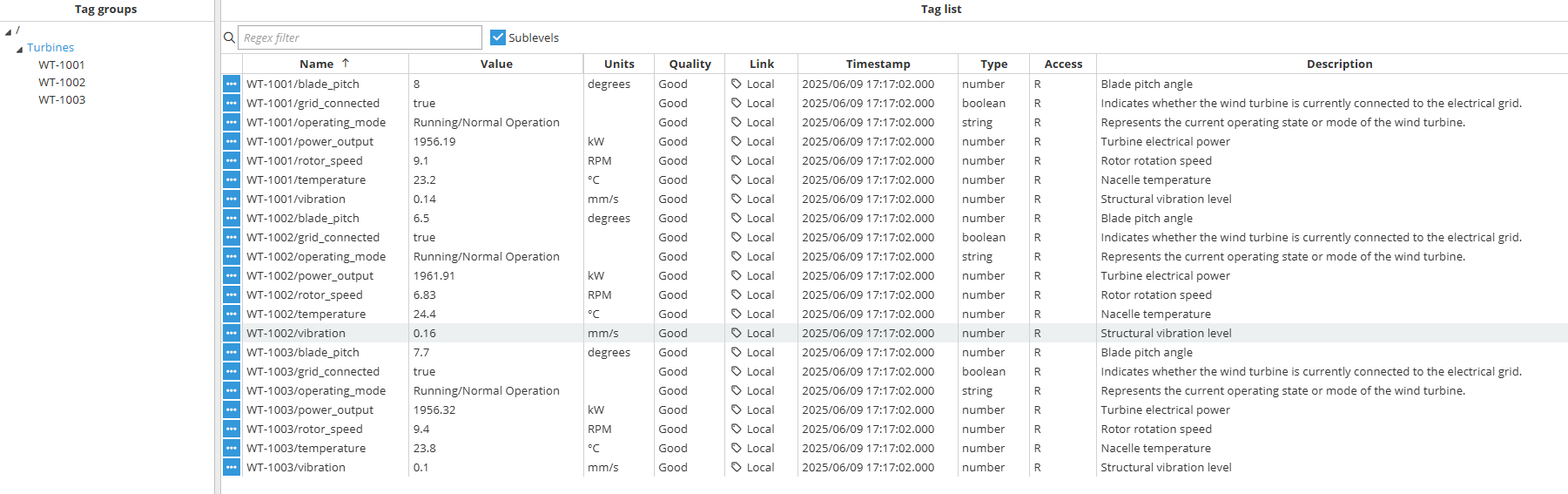
N3uron versions prior to 1.22.8:
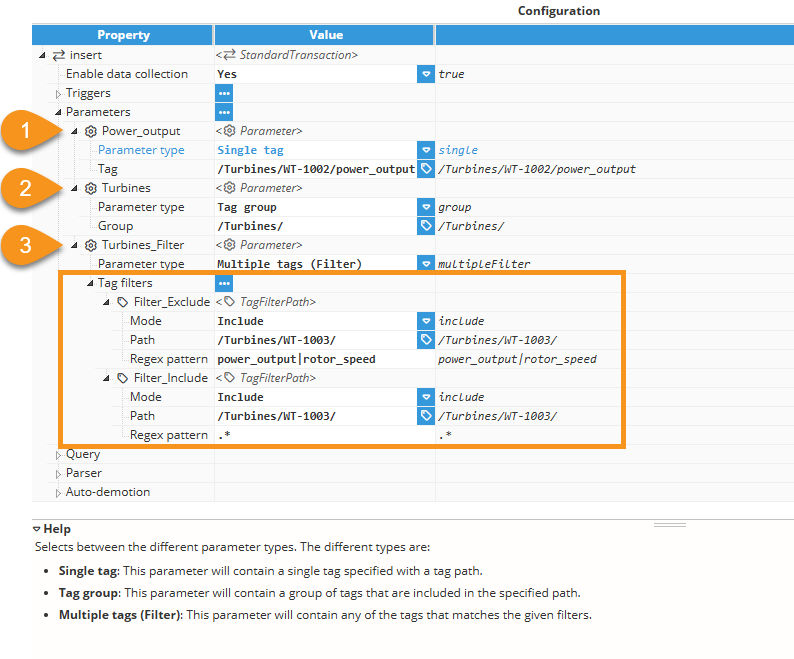
The earlier-layout image uses the Wind Turbine model above. The numbered markers identify the same three parameter types listed in the table.
N3uron 1.22.8 and later:
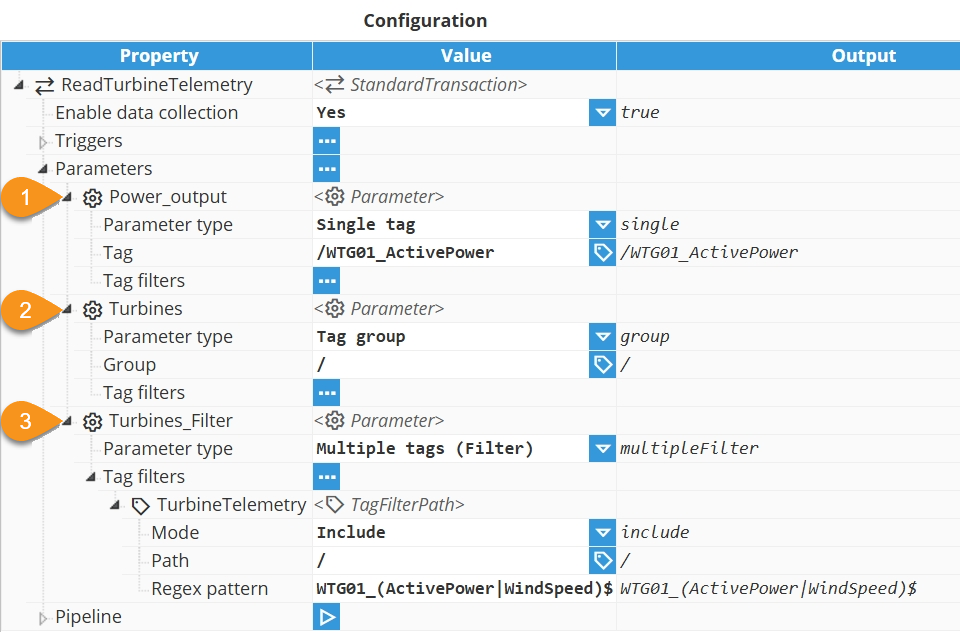
The current-layout example uses the existing /WTG01_ActivePower and /WTG01_WindSpeed Tags. Marker 1 selects the power Tag. Marker 2 selects the root group /, which contains these two Tags in this example. Marker 3 uses an Include filter at / with WTG01_(ActivePower|WindSpeed)$. The names Power_output, Turbines and Turbines_Filter are parameter names used by the scripts.
The detailed access examples below continue to use the earlier image’s /Turbines/ model and paths. Adapt those paths to your own Tag model.
If a parameter is configured to reference the Wind Turbine tags, as shown in the example, its values can be accessed in your script through the $.parameter object. The last known value of any parameter can be accessed using one of the following forms:
$.parameter['paramName'].value
$.parameter.paramName.value
Where paramName refers to the name of the parameter instance defined in the transaction configuration. For example: $.parameter.Power_output.value or $.parameter.Turbines[0].value. The same applies for ts (timestamp) or quality attributes: $.parameter.Power_output.ts or $.parameter.Power_output.quality.
Power_output parameter.
Parameter type: Single tag.
Tag: /Turbines/WT-1002/power_output.
$.parameter.Power_output references a specific tag and will return a single tag object.
{
        "tag": "/Turbines/WT-1002/power_output",
        "value": 1958.39,
        "quality": 192,
        "ts": 1749483005000,
        "initial": false
}
Turbines parameter.
Parameter type: Tag group.
Group: /Turbines/.
$.parameter.Turbines references a group of tags under the specified group path and returns an array of tag objects.
[
    {
        "tag": "/Turbines/WT-1001/power_output",
        "value": 1961.82,
        "quality": 192,
        "ts": 1749483005000,
        "initial": false
    },
    {
        "tag": "/Turbines/WT-1001/rotor_speed",
        "value": 14.67,
        "quality": 192,
        "ts": 1749483005000,
        "initial": false
    },
    ...
]
Turbines_Filter parameter
Parameter type: Multiple tags (Filter).
Tag Filters:
Filter_Exclude.
Mode: Exclude.
Path: /Turbines/WT-1003/.
Regex pattern: power_output|rotor_speed.
Filter_Include.
Mode: Include.
Path: /Turbines/WT-1003/.
Regex pattern: .*.
$.parameter.Turbines_Filter, is configured to include all tags under /Turbines/WT-1003/, except for power_output and rotor_speed. This allows you to filter out specific tags when retrieving the tag group selectively, and returns an array of tag objects.
[
        {
            "tag": "/Turbines/WT-1003/blade_pitch",
            "value": 6.6,
            "quality": 192,
            "ts": 1749483005000,
            "initial": false
        },
        {
            "tag": "/Turbines/WT-1003/temperature",
            "value": 24.6,
            "quality": 192,
            "ts": 1749483005000,
            "initial": false
        },
        {
            "tag": "/Turbines/WT-1003/vibration",
            "value": 0.1,
            "quality": 192,
            "ts": 1749483005000,
            "initial": false
        },
        {
            "tag": "/Turbines/WT-1003/operating_mode",
            "value": "Running/Normal Operation",
            "quality": 192,
            "ts": 1749483005000,
            "initial": false
        },
        {
            "tag": "/Turbines/WT-1003/grid_connected",
            "value": true,
            "quality": 192,
            "ts": 1749483005000,
            "initial": false
        }
]
Use Object.entries($.parameter) with for…of to read each parameter name and its value, as in the logging example below. When you need only the values, use Object.values($.parameter), as in the flattening function that follows. Each parameter value can be a single Tag object or an array of Tag objects.
for (const [param, value] of Object.entries($.parameter)){
   $.logger.info("Parameter %s is %j", param, value);
}
Extract Tag Objects as a Flat Array from Parameters:
This sample function demonstrates how to extract and flatten all values from Parameters into a single array. It supports both cases where a parameter value is an array of tag objects (each element will be added individually) or a single tag object (added directly). The result is a flat array of parameter values, which can then be used for further processing.
function getValuesFromParameters() {
  const parameterValues = [];
  for (const paramValue of Object.values($.parameter)) {
    if (Array.isArray(paramValue)) {
      // Parameter is an array: append each element individually
      for (const element of paramValue) {
        parameterValues.push(element);
      }
    } else {
      // Parameter is a single tag object: append it directly
      parameterValues.push(paramValue);
    }
  }
  return parameterValues;
}
Note:
This function returns references to the original Tag event objects. Its new outer array does not copy the event objects or nested values. Use it to read parameters. Build new objects before changing their contents.
$.local
$.local is an empty object that can be used to store any user variables that persist between transaction executions, as well as any variables that are shared between different scripts belonging to the same transaction. For example, when creating a local variable named "count", the following syntax is used:
//Only define the variable if it's undefined
if($.local.count === undefined) $.local.count = 0;
$.event
From N3uron version 1.22.8, $.event identifies the trigger firing that starts the execution. Its ts property is a timestamp in Unix epoch milliseconds.
For Tag condition, Tag change and Buffer size, $.event.ts is the triggering Tag event timestamp.
For a Periodic trigger, $.event.ts is the scheduled instant, without timer jitter.
If several firings combine before the next execution, the execution carries the latest firing.
Note:
$.event is read-only. Keep working values in local variables and transaction state in $.local.
Use $.event.ts for the trigger firing timestamp, a parameter event’s ts for its Tag timestamp, and a database row’s timestamp for measurement time. These timestamps describe different events.
$.logger.debug("ReadTurbineTelemetry: eventTs=%s", $.event.ts);Understanding $.input and $.output objects in Standard and History transaction scripts
At each stage, check the available $.input and required $.output before writing the script. Their meaning depends on the stage and transaction type. The flow diagrams near the start of this article show the order; the sections below explain where to configure each script and what it must return.
Standard transaction
A Standard transaction builds and executes a SQL query. If parsing is enabled, its Parser then converts the database result into Tag updates.
Where to configure the scripts
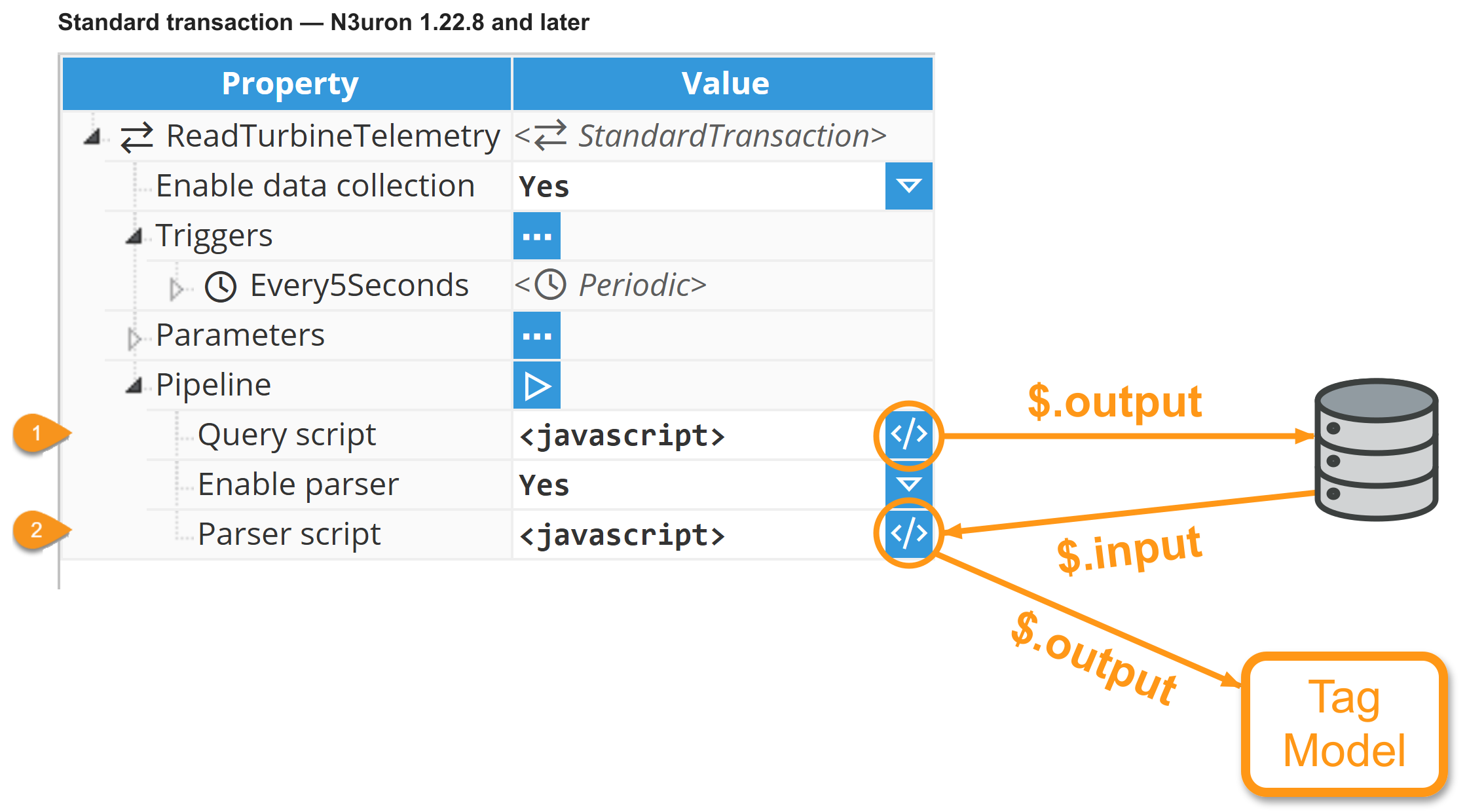
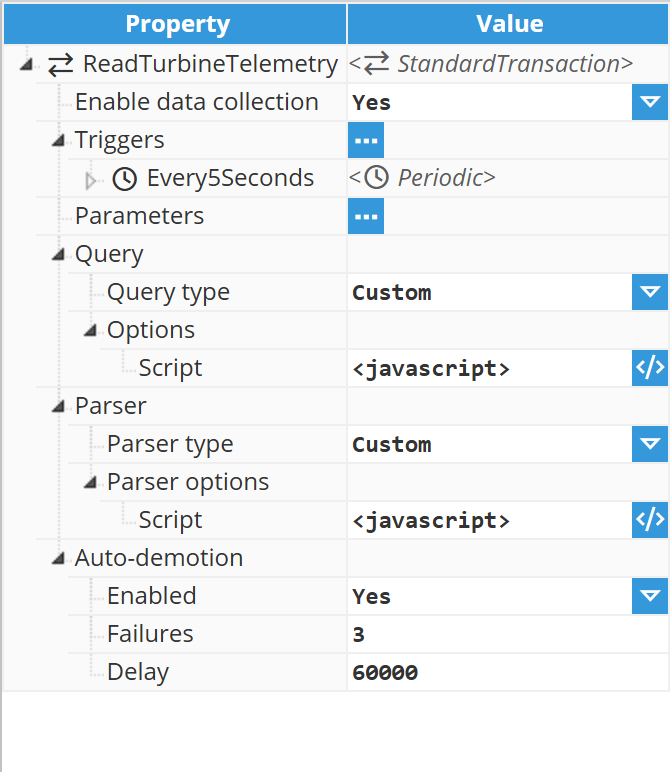
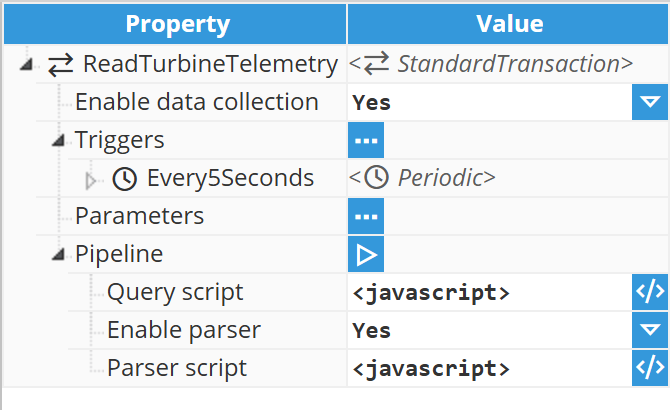
From N3uron version 1.22.8, expand Pipeline in the Standard transaction:
Open Query script to build the SQL statement.
Set Enable parser to Yes when you need to process the database result.
When the parser is enabled, open Parser script to convert the result into Tag events.
With Enable parser = No, the query still runs. Its returned results are discarded and the Parser writes no Tags.
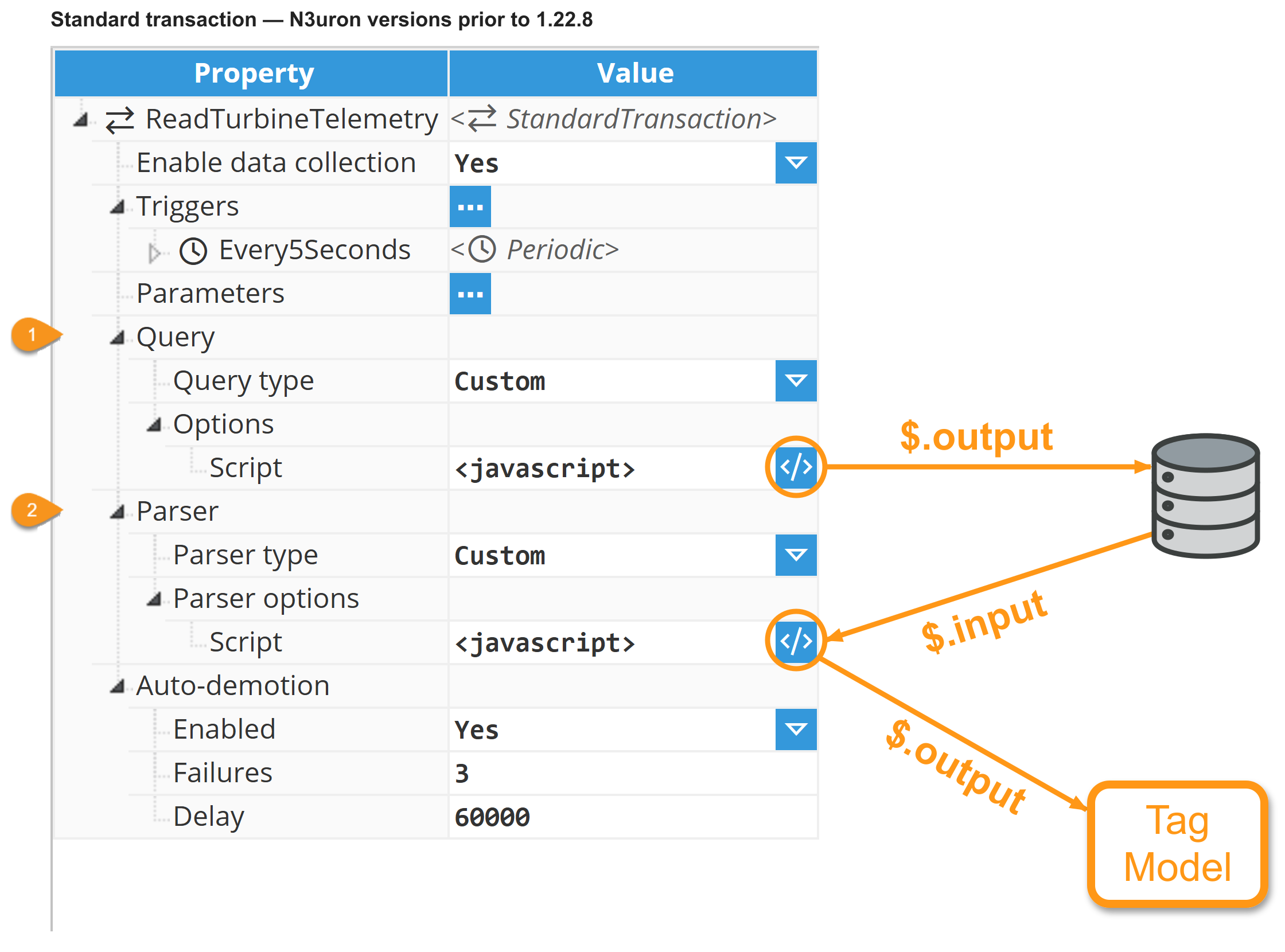
In versions prior to N3uron version 1.22.8, the scripts are in separate groups:
For the Query, expand Query, set Query type to Custom, then open Options → Script.
For the Parser, expand Parser, set Parser type to Custom, then open Parser options → Script. Select None in Parser type to disable parsing.
N3uron versions prior to 1.22.8:
N3uron 1.22.8 and later:
Script Type | $.input Value/Type | $.output Value/Type | Description |
|---|---|---|---|
Custom Query | No preceding script input. Use $.parameter for configured parameters. | SQL string. From N3uron version 1.22.8, also a bound statement: { text, values }. |
|
Custom Parser | Dataset or array of Datasets (from DB query result) | Array of Tag data objects |
|
1. Query script — build the SQL statement
Use this script to decide which SQL statement the database will execute. For example, read a configured turbine identifier from $.parameter and use it as an input value for a SELECT, INSERT or UPDATE.
Input: a Standard Query has no preceding Serializer and receives no script input through $.input. Read configured Tag inputs through $.parameter.
Output: assign the complete SQL query string to $.output. From N3uron version 1.22.8, you can also assign a bound statement object, { text, values }. The Query output section explains both forms.
Validation: an incorrect Query output type fails execution.
2. Parser script — convert the database result into Tag events
Use the Parser after a successful query to select the database values that must update the Tag model.
Input: $.input is one Dataset for a single result set, such as one SELECT result. For multiple result sets, it is an array of Datasets. Select or iterate the Datasets before reading their rows.
Starting output: $.output starts as an empty array. Add the Tag events to this array.
Required output: an array of Tag data objects. Each object needs tag and value. The optional fields are quality and ts; ts is a number in Unix epoch milliseconds. See Tag data object for the complete field table.
Validation: an incorrect Parser output type logs an exception and aborts the transaction.
History transaction
A History transaction sends selected Tag events to the database. The Serializer arranges those events into Dataset rows. The Query then builds the statement for each Dataset. History has no Parser stage.
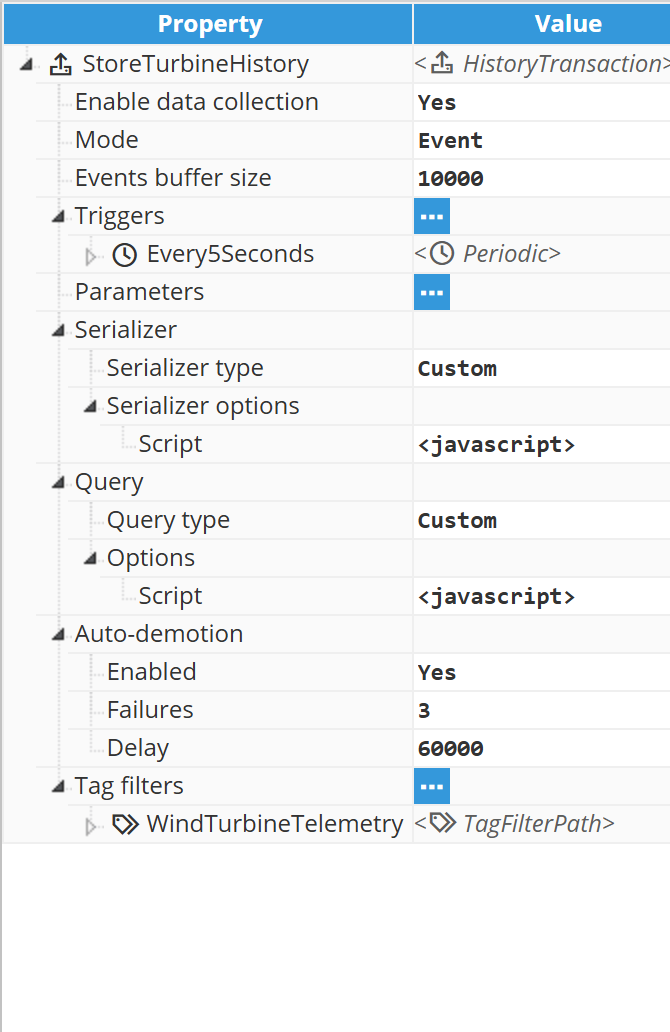
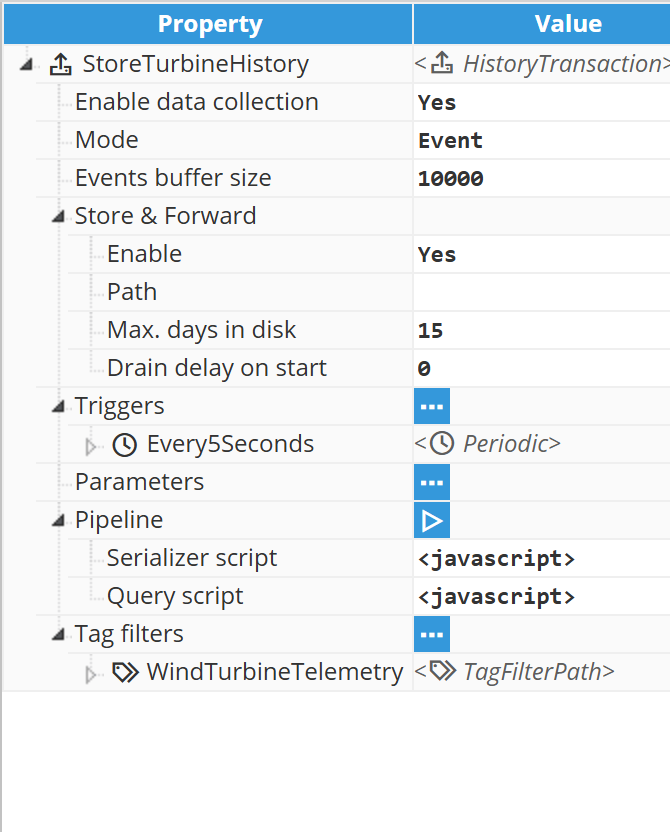
From N3uron version 1.22.8, expand Pipeline to open Serializer script and Query script, in that order. In earlier versions, select Custom in the separate Serializer and Query groups, then open their Script controls. The data handoff remains the same.
N3uron versions prior to 1.22.8:
N3uron 1.22.8 and later:
Script Type | $.input Value/Type | $.output Value/Type | Description |
|---|---|---|---|
Custom Serializer | Array of Tag event objects: tag, value, quality, ts. | Dataset or array of Datasets | Transforms Tag events into a Dataset or an array of Datasets. The Query script receives each Dataset separately. |
Custom Query | One Dataset from the Custom Serializer. | SQL string. From N3uron version 1.22.8, also a bound statement: { text, values }. | Runs once for each Dataset produced by the Serializer. It builds the SQL statement for that Dataset. |
1. Serializer script — arrange the Tag events into rows
Use the Serializer to choose the Dataset columns and fill its rows from the selected Tag events. The paired History example below shows this preparation before the Query reads the Dataset.
Input: $.input is an array of Tag events selected by the transaction filters. Each event includes tag, value, quality and ts. The timestamp is in Unix epoch milliseconds.
Starting output: the default $.output is an empty Dataset.
Required output: one Dataset or an array of Datasets. Return separate Datasets when the Query must build a separate statement for each one. An incorrect output type fails execution.
2. Query script — build a statement for one Dataset
Use this script to turn the Serializer’s prepared rows into SQL. Keep the Serializer and Query examples together: the Query depends on the columns that the Serializer created.
Input: $.input is one Dataset from the Serializer. If the Serializer returns an array, the Query runs once for each Dataset, receiving one Dataset on each call.
Output: assign the complete SQL query string to $.output. From N3uron version 1.22.8, you can also return { text, values }. See Query output for the bound form and its database-specific placeholders.
Validation: an incorrect Query output type fails execution. An empty SQL string skips the current Dataset.
Query output
A Query script prepares the SQL statement. It does not parse returned rows. Keep the string form for existing scripts where appropriate. From N3uron version 1.22.8, prefer bound statements when values come from Tags or other input.
Output form | Use and limits |
|---|---|
SQL string | The complete SQL text. This is the form used in earlier versions. If values are inserted into the text, the script must quote and escape them. |
{ text, values } | From N3uron version 1.22.8, text contains SQL with :name placeholders. The values object supplies matching values separately through the database driver. Do not quote the placeholders. |
Positional values | From N3uron version 1.22.8, values can be an array with native positional placeholders: ? for MySQL/MariaDB, or $1, $2, and so on for PostgreSQL/TimescaleDB. |
Empty string | An empty string skips the execution. Use it when no statement is required. In History, it skips only the current Dataset. |
Bound values can be strings, numbers, Booleans, Date objects, Buffer objects or null. The Query Help permits NaN and Infinity only with PostgreSQL. Placeholder-like text inside SQL string literals, quoted identifiers or comments remains ordinary SQL text.
Note:
A bound statement contains one SQL statement. The Query Help permits multiple PostgreSQL statements separated by semicolons only in the SQL-string form. Keep table and column identifiers fixed, or select them from a controlled list. Bound values do not select table or column names.
Note:
For SQL strings, escape string values before quoting them. Escaping rules depend on the database and its settings. For example, String(value).replace(/'/g, "''") doubles single quotes. Prefer the bound form for new scripts.
Worked examples
The following examples use the SQL Client instance, WindFarmSCADA channel and an existing PostgreSQL database named wind_farm_scada. Adapt the table schema and Tag paths to your plant before normal execution.
Read turbine telemetry
In ReadTurbineTelemetry, the Query selects one turbine. For the test, TurbineId is supplied in Values (JSON). For normal execution, configure a Single tag parameter named TurbineId that reads the plant’s turbine identifier Tag. The supplied Query and Parser pair uses WTG01. Other turbines require corresponding Parser Tag mappings.
Query script
const turbine = $.parameter.TurbineId;
if (!turbine || typeof turbine.value !== "string") {
  throw new Error("TurbineId must contain a string value");
}
$.logger.debug("ReadTurbineTelemetry: turbine=%s eventTs=%s", turbine.value, $.event.ts);
$.output = {
  text: "SELECT turbine_id, active_power_kw, wind_speed_ms, observed_at FROM turbine_telemetry WHERE turbine_id = :turbine",
  values: { turbine: turbine.value }
};
Parser script
Enable the Parser. This example reads one Dataset and maps the WTG01 result to two existing Tags. The row’s measurement timestamp becomes each output event’s ts. If a query returns multiple Datasets, select or iterate the required Dataset before using rows().
for (const row of $.input.rows()) {
  if (row.getValue("turbine_id") !== "WTG01") continue;
  const timestamp = row.getValue("observed_at").getTime();
  $.output.push({tag: "/WTG01_ActivePower", value: row.getValue("active_power_kw"), quality: 192, ts: timestamp});
  $.output.push({tag: "/WTG01_WindSpeed", value: row.getValue("wind_speed_ms"), quality: 192, ts: timestamp});
}
$.logger.debug("ReadTurbineTelemetry: output events=%d", $.output.length);
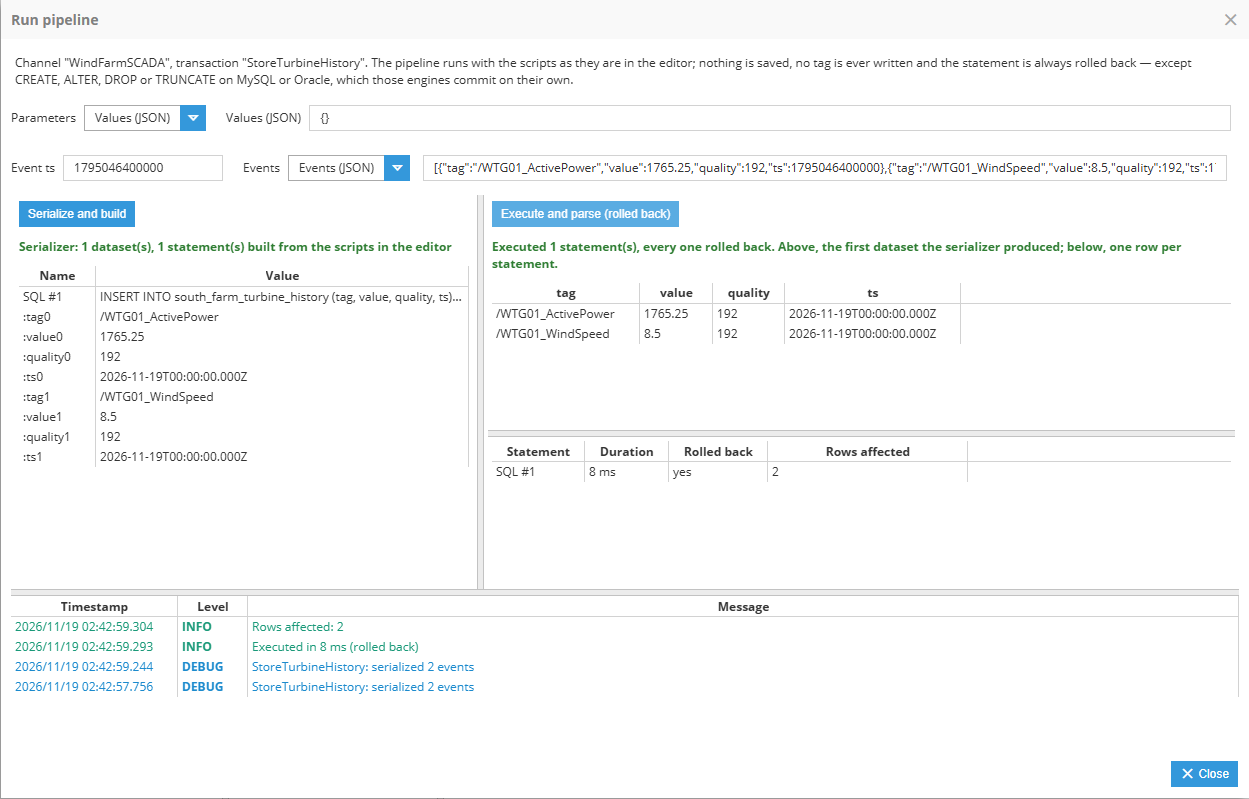
The native test below returns one turbine row and two valid events. It displays the SQL placeholder and its separate bound value. The test reports rollback and no Tag writes.
Store turbine history
In StoreTurbineHistory, the Serializer creates a typed Dataset from numeric Tag events. The Query creates one INSERT statement for its rows. The table south_farm_turbine_history must already exist with tag, value, quality and ts columns.
Serializer script
const ds = new Dataset();
ds.addColumn("tag", "NVARCHAR");
ds.addColumn("value", "DOUBLE");
ds.addColumn("quality", "SMALLINT");
ds.addColumn("ts", "DATETIME");
for (const event of $.input) {
  if (typeof event.value !== "number" || !Number.isFinite(event.value)) {
    $.logger.warn("StoreTurbineHistory: skipped nonnumeric event for %s", event.tag);
    continue;
  }
  ds.addRow({tag: event.tag, value: event.value, quality: event.quality, ts: event.ts});
}
$.logger.debug("StoreTurbineHistory: serialized %d events", ds.getRowCount());
$.output = ds;
Note:
In the History Serializer, Event mode inputs include initial to identify subscription snapshots when the module starts or the Tag model changes. Snapshot mode does not include this property. To exclude initial values, set const events = $.input.filter(function (event) { return !event.initial; }); and use for (const event of events) in the Serializer. The filter returns a new array. Decide whether the application needs initial values before applying this policy.
This example accepts finite numeric values only. It logs and skips other values. Adapt that policy if the selected Tags contain strings or Booleans.
Query script
This Query receives the Dataset built by the Serializer above. Its tag, value, quality and ts columns are available through $.input. The example assumes those columns contain the prepared values and uses them to build the INSERT. Adapt the Serializer and Query together when your column names or data types differ.
const rows = [];
const values = {};
let index = 0;
for (const row of $.input.rows()) {
  const suffix = String(index++);
  rows.push("(:tag" + suffix + ", :value" + suffix + ", :quality" + suffix + ", :ts" + suffix + ")");
  values["tag" + suffix] = row.getValue("tag");
  values["value" + suffix] = row.getValue("value");
  values["quality" + suffix] = row.getValue("quality");
  values["ts" + suffix] = row.getValue("ts");
}
$.output = rows.length ? {
  text: "INSERT INTO south_farm_turbine_history (tag, value, quality, ts) VALUES " + rows.join(", "),
  values: values
} : "";
Each row receives distinct placeholder names. The empty Dataset case returns an empty string. The native test below inserts two prepared rows and reports two affected rows, then rolls the statement back.
Test scripts and pipelines
From N3uron version 1.22.8, the Run button on the Pipeline header opens Run pipeline. It uses the scripts currently in the editor. The test does not save their configuration.
Open the relevant Standard or History transaction and edit its scripts.
Open Run pipeline. Choose Values (JSON) for controlled parameter input. Supply each parameter as an object with value and, when needed, quality and ts.
For a History test, choose Events (JSON) and supply the Tag events that the Serializer must process. These are test inputs; the pending History buffer is not read or consumed.
Enter Event ts when the execution needs a fixed timestamp. An empty field uses the current instant.
For Standard, select Build statement. For History, select Serialize and build. Inspect the SQL, bound values and Dataset before database execution.
Use the execution button to check the database result. With the Standard Parser enabled, Execute and parse (rolled back) also displays output events and validation results.
Read the log panel. Check row counts, resolved Tag destinations, values, quality, timestamps and errors before saving a script for normal execution.
The Standard example uses this parameter JSON:
{"TurbineId":{"value":"WTG01","quality":192,"ts":1795046400000}}The History example uses these event inputs:
[
  {"tag":"/WTG01_ActivePower","value":1765.25,"quality":192,"ts":1795046400000},
  {"tag":"/WTG01_WindSpeed","value":8.5,"quality":192,"ts":1795046400000}
]
The manual Values (JSON) box accepts one object per parameter, with value and optional quality and ts. It does not accept tag or initial, and a parameter array is rejected. This manual test format differs from the runtime Tag objects and group arrays illustrated earlier. The History Events (JSON) box uses tag to identify each event.
Note:
To use Live values of this transaction, save the configuration and restart the module first. The running module must know the transaction by name. This prerequisite does not apply to manually supplied JSON values.
Note:
Use a separate test database and a limited account. Do not test CREATE, ALTER, DROP or TRUNCATE on MySQL or Oracle through this window. Those engines can commit these statements independently, including earlier changes from the same run. The rollback label does not prevent this.
For ordinary test statements, the native window reports rollback. Standard tests do not write Parser events to Tags. History tests leave the pending buffer untouched. A successful test proves the supplied script and inputs; it does not test every production condition.
Suggested test cases
Case | Check |
|---|---|
Normal input | The statement uses expected bound values. Database rows and output events match the plant mapping. |
No matching rows | The Parser produces no unintended Tag update. For History, an empty Dataset produces an empty SQL string. |
Quotes and unusual text | A quoted value remains data in the bound values. It does not change the SQL structure. |
Missing or unsuitable input | Check null, missing parameters, unexpected value types and the application’s quality policy. |
Multiple Datasets | The Parser handles each required result set. A History Query receives one Dataset per invocation. |
Errors | The log identifies the transaction and stage. Investigate the cause before normal execution. |
Dataset
Create new Datasets in the History Serializer. A Standard Parser receives existing Dataset instances through $.input; use their methods to read or modify the returned data. The constructor reference below applies to the History Serializer.
The Dataset class is a representation of a database table in SQL Client. As such, it has columns that correspond to the database columns, with a name and a type, and rows that contain data for these columns.
A Dataset instance is iterable: use a for…of loop to read its rows. Use rows() or columns() to obtain explicit iterators over the rows or columns.
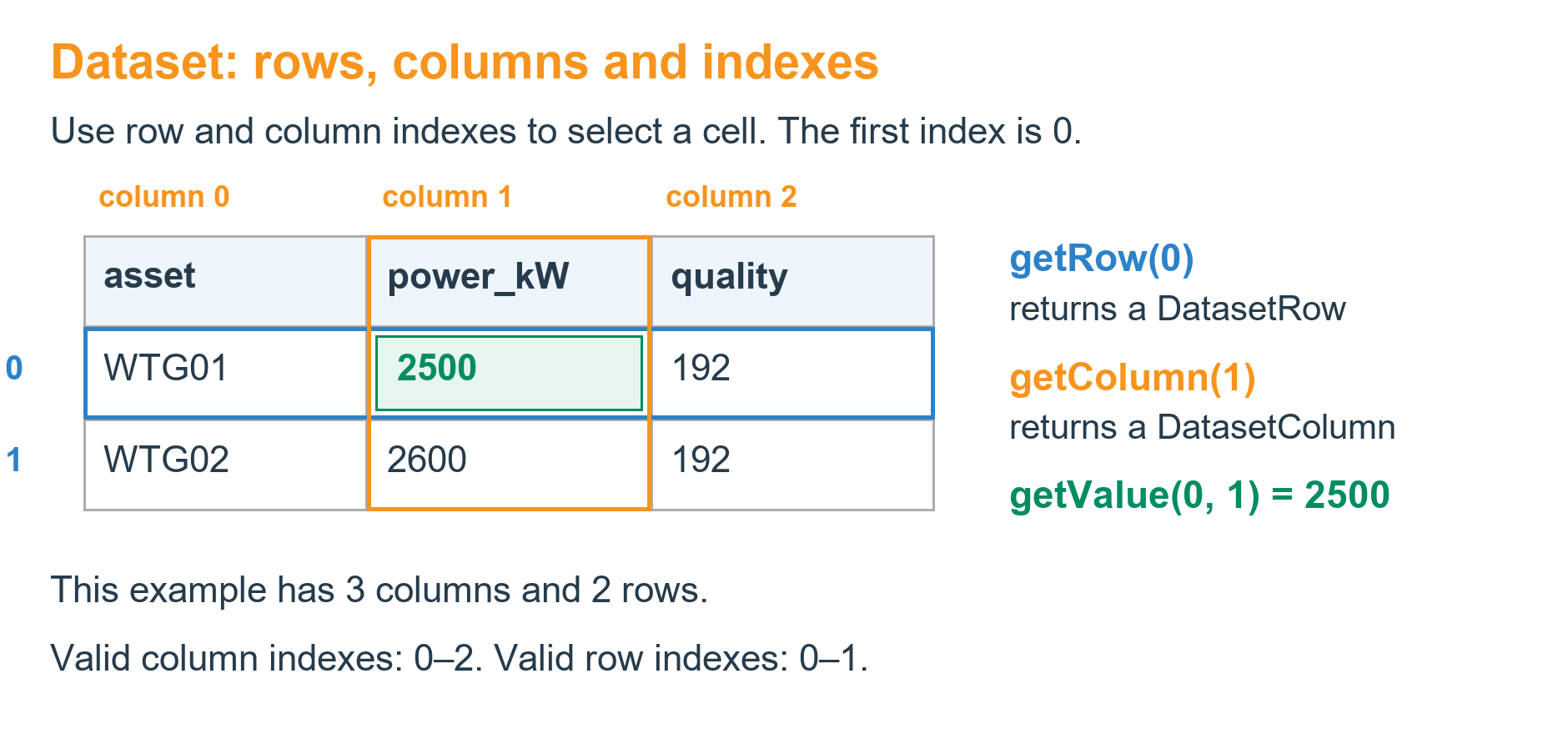
Read these reference sections together: a Dataset holds column definitions and rows, a DatasetRow gives access to one row, and a DatasetColumn describes one column. Row and column indices start at 0. For example, a Dataset with three rows has row indices 0, 1 and 2.
Dataset.Types
Use these constants when defining Dataset columns, for example Dataset.Types.DOUBLE. addColumn() also accepts the type name as a string, such as "DOUBLE". The descriptions identify the data category. Database storage lengths, numeric ranges, precision and time-zone rules depend on the engine, schema and connector; the type name alone does not define those limits.
Type | Description |
|---|---|
CHAR | Character data associated with a fixed-length database text type. |
VARCHAR | Character data associated with a variable-length database text type. |
NCHAR | Character data associated with a fixed-length national-character database type. |
NVARCHAR | Character data associated with a variable-length national-character database type. |
BINARY | Binary data associated with a fixed-length database binary type. Values use a Buffer. |
VARBINARY | Binary data associated with a variable-length database binary type. Values use a Buffer. |
NUMERIC | Exact numeric data, including decimal values. Keep exact decimal digits in a string when preparing values in a script; see Value casting. |
DECIMAL | Exact decimal data. Use a decimal string when JavaScript number rounding would lose required digits. |
SMALLINT | A smaller-range integer category in the database. Dataset values use JavaScript numbers. |
INT | An integer category for whole-number values. Dataset values use JavaScript numbers. |
BIGINT | A large-integer category. Database results use strings to avoid losing digits when the integer exceeds JavaScript number precision. |
FLOAT | An approximate floating-point numeric category. Dataset values use JavaScript numbers. |
REAL | An approximate floating-point numeric category. Its native database precision depends on the engine; Dataset values use JavaScript numbers. |
DOUBLE | An approximate double-precision numeric category. Dataset values use JavaScript numbers. |
BOOLEAN | A true or false value. See Value casting for the accepted string and non-string conversions. |
DATE | A calendar-date category. SQL Client represents mapped values with a JavaScript Date object. |
TIME | A time value without a calendar date. SQL Client keeps it as a string. |
TIMESTAMP | A database timestamp category, represented with a JavaScript Date object. Check the database and driver rules for time zones. |
DATETIME | A database date-and-time category, represented with a JavaScript Date object. |
JSON | JSON data. Read values are strings; script-added values use the JSON serialization rules in Value casting. |
TEXT | Text data associated with a database text column. Dataset values use strings. |
TINY_INT | A small-integer category used by database types such as TINYINT. Dataset values use JavaScript numbers. |
YEAR | A year value represented as a number. A year alone does not identify a complete date or time zone. |
ENUM | One value selected from a database-defined list of allowed members. Dataset values use strings; define the allowed members in the database schema. |
TINY_BLOB | A binary large-object category for smaller database binary values. Dataset values use a Buffer. |
BLOB | A binary large-object category. Dataset values use a Buffer. |
MEDIUM_BLOB | A medium-capacity database binary large-object category. Dataset values use a Buffer. |
LONG_BLOB | A large-capacity database binary large-object category. Dataset values use a Buffer. |
MEDIUM_INT | An intermediate-range integer category used by database types such as MEDIUMINT. Dataset values use JavaScript numbers. |
SET | Zero or more members selected from a database-defined list, represented together as a string. Define the allowed members in the database schema. |
MONEY | A monetary-value category. Script-added Dataset values are cast to strings; confirm the native result mapping for the selected connector. |
Dataset methods
Use the constructor in the History Serializer. Use the instance methods on a Dataset received by the Standard Parser or prepared by the History Serializer. Check the row or column count before using an index.
Constructor or method | Description |
|---|---|
Dataset() | The constructor of the Dataset class takes no parameters and is used to create a new empty Dataset. |
getColumnCount(): number | Returns the number of columns included in the Dataset. |
getColumnIndex(colName: string): number | Returns the zero-based index of the named column. If the column does not exist, an exception is thrown. |
getColumnName(index: number): string | Returns the name of the column for the specified index. If the index is negative or greater than or equal to the number of columns, an exception is thrown. |
getColumnNames(): string[] | Returns an array of column names for all columns present in the Dataset. |
getColumn(col: string | number): DatasetColumn | Returns the column by name or zero-based index. Use a name from getColumnNames(), or an index from 0 through getColumnCount() - 1. Check the name or index before the call; do not depend on an out-of-range return value. |
getRowCount(): number | Returns the total number of rows present in the Dataset. |
getRow(row: number): DatasetRow | Returns the row at the zero-based index. Valid indexes run from 0 through getRowCount() - 1. Check the row count before the call; do not depend on an out-of-range return value. |
getValue(row: number, column: number | string): any | Returns the value at the given row and column. The column can be a name or zero-based index. If either the row or column is out of range, an exception is thrown. |
setValue(row: number, column: number | string, value: any): void | Sets the value at the specified row and column. The Column can either be a name or an index. If either the row or the column is out of range, an exception is thrown. The value will be automatically cast to the column type, if possible. |
addColumn(name: string, type: number | string): void | Adds a column with the specified name and type. Use a numeric code from Dataset.Types, such as Dataset.Types.INT, or a type-name string such as "INT". Existing rows receive null in the new column. |
addRow(data: any[] | object): void | Adds a new row to the Dataset with the specified data. The data can be either an array of values or an object, where each key corresponds to a column. If there are not enough fields to completely fill the row, an exception will be thrown. |
rows(): Iterator<DatasetRow> | Returns an iterator over the rows of the Dataset, which can be used in for…of loops. |
columns(): Iterator<DatasetColumn> | Returns an iterator over the columns of the Dataset, which can be used in for…of loops. |
getRows(): DatasetRow[] | Returns an array that comprises all rows present in the Dataset. |
getColumns(): DatasetColumn[] | Returns an array comprised of all columns present in the Dataset. |
DatasetRow
This class represents a row in a Dataset. Each row has the same number of fields as the Dataset has columns. Use Dataset.addRow() to add rows. DatasetRow objects are iterable over their field values with for…of. The fields() method returns an explicit iterator over the same values.
Each DatasetRow has the following methods:
Method | Description |
|---|---|
getFieldCount(): number | Returns the number of fields present in this row. |
getValue(column: string | number): any | Returns the value of the field with the specified column name (if column is a string) or the column index (if it's a number). If the column doesn't exist, an exception is thrown. |
setValue(column: string | number, value: any): void | Sets the value of the field with the specified column name (if column is a string) or the column index (if it's a number). If the column doesn't exist, an exception is thrown. The value passed as the parameter is cast to the column type (if possible) or set to null if the cast is not possible. |
fields(): IterableIterator<any> | Returns an iterator over the fields of this row that can be used in for…of loops. |
DatasetColumn
This class represents a column in the Dataset. Each column has a name and a type, which means that whenever a value is inserted in a row of a given column, it will attempt to cast it to the appropriate type, or null if the cast is invalid.
Use Dataset.addColumn() to create a DatasetColumn. Each DatasetColumn has the following methods:
Method | Description |
|---|---|
getName(): string | Returns the name of this column. |
getType(): string | Returns the column type as a string. |
Database value types
Query results are converted to Datasets. The connector maps native database column types to Dataset types. The JavaScript values read from the Dataset depend on that mapped type, as described below.
This table describes values read from a database result. Use the separate Value casting table when a script adds or changes a Dataset value.
JavaScript value | Dataset types and usage |
|---|---|
string — text and JSON | CHAR, VARCHAR, NCHAR, NVARCHAR, TEXT, ENUM, SET and JSON are cast to a string directly. |
string — TIME | TIME is returned as a string because it contains no date. Use moment(TIME_STRING, "HH:mm:ss.SSS") to create a Moment value. A Moment value is not a JavaScript Date. To obtain a Date, first choose the date and time zone for the time-only value, then use toDate() on the resulting Moment. |
string — exact numeric values | BIGINT, NUMERIC and DECIMAL can potentially offer more precision than the number type in JavaScript. As such, by default, they are cast to a string. If a number is desired, the parseInt or parseFloat method can be used to parse the string (with potential loss of precision). |
Buffer | BINARY, VARBINARY, TINY_BLOB, BLOB, MEDIUM_BLOB and LONG_BLOB are cast to a Buffer instance. As such, any of the Buffer methods can be used to read and manipulate the Buffer data. |
number | FLOAT, REAL, DOUBLE, SMALLINT, INT, TINY_INT, MEDIUM_INT are cast to Number directly. |
number — YEAR | YEAR is returned as a number. A year alone does not specify a complete date. Choose a date and time-zone policy before converting it. For example, if the year represents 1 January at midnight UTC, use moment.utc(String(YEAR_NUMBER), "YYYY").toDate() to obtain a JavaScript Date. |
Date | DATE, TIMESTAMP and DATETIME are cast to a JavaScript Date object. This can be used directly, or alternatively, a moment object can be created by invoking the moment function with the Date value (moment(DATE_OBJECT)). |
boolean | BOOLEAN is cast directly to the Boolean JavaScript type. |
Database types are mapped by the connector to Dataset types. The mapping can vary by engine and driver. Inspect the resulting column type and value when a database type is not listed here; do not assume that an unfamiliar native type will be returned as text. If necessary, cast it explicitly in the SQL query.
Value casting
Casting converts a value to the type declared for its Dataset column. It runs when a script adds a row or changes a value with setValue(). Read the null rules first: they take precedence over the other conversions. A value that fits a Dataset conversion can still fail the database column's own constraints.
Value family | Dataset column types and conversion rules |
|---|---|
Null and unsupported inputs | If a conversion fails, the value inserted is null. If the value passed to the Dataset is null, undefined, an array, a symbol, or a function, it will be cast as null. |
String | String: CHAR, VARCHAR, NCHAR, NVARCHAR, ENUM, BIGINT, TEXT, SET and MONEY are cast to strings. Casting to strings is done by invoking the toString method. If this method is not available, the value will be cast to null. |
JSON | JSON is serialized with JSON.stringify for supported inputs. A string is encoded as a JSON string literal, including its quotes. A string that already contains JSON text is encoded again; it is not inserted unchanged. Pass an object when the stored JSON must be an object, rather than a string containing that object’s JSON text. The null rules above also apply. |
TIME | TIME: String values are kept as supplied. Provide and validate an explicitly formatted time string, such as "10:20:30.123", before database execution. |
NUMERIC and DECIMAL | NUMERIC and DECIMAL: Numeric values remain numbers, and string values remain strings. Use a decimal string when exact decimal digits must be preserved. Validate the value before sending it to the database; these Dataset columns do not validate that a supplied string is numeric. |
Buffer | Buffer: BINARY, VARBINARY, TINY_BLOB, BLOB, MEDIUM_BLOB and LONG_BLOB will be cast to a Buffer object. If the value is a Buffer, the value will be inserted without any changes. If the value is a number, a new Buffer with size 8 will be created and the number will be stored as a 64-bit Double with big-endian byte ordering. If the value is a Boolean, a new Buffer with size 1 will be created, and the Boolean value will be stored as an 8-bit unsigned integer. If the value is a string, it is encoded as UTF-8 bytes. The Buffer’s byte length can differ from the JavaScript string length; for example, "é" occupies two UTF-8 bytes. |
Number | Number: FLOAT, REAL, DOUBLE, SMALLINT, INT, TINY_INT, MEDIUM_INT and YEAR will be cast to a JavaScript number. If the value can't be parsed to a number correctly (resulting in a NaN value), null will be inserted. Numeric strings are parsed with parseFloat for FLOAT, REAL and DOUBLE, or parseInt for the integer types and YEAR. Validate the complete string before assigning it when trailing text must be rejected; do not use casting as input validation. |
Date | Date: DATE, TIMESTAMP and DATETIME will be cast to a JavaScript Date object. The values are parsed using the Date constructor. If the date is not valid, null will be inserted. |
Boolean | Boolean: BOOLEAN will be cast to a Boolean value. If the type is a string, "true", "y" and "t" will be cast to true, and everything else to false. For accepted non-string values, Boolean conversion applies: for example, 0 and NaN become false, while 1 becomes true. The null rules above take precedence. |
Tag data object
The Parser returns an array of Tag data objects. The fields below identify the destination Tag, its value and the optional event quality and timestamp.
Return one object for each destination Tag. The actual property names are tag, value, quality and ts. The uppercase names in the example below are placeholders for your own values. Add the objects to the Parser's $.output array.
Object field | Description |
|---|---|
tag (TAG_ADDRESS) | Required. This value is used to associate the given tag event with a tag within the N3uron tag model. The value can be either a tag path or a tag address, or even an alias (if an alias is defined in the tag configuration). |
value (TAG_VALUE) | Required. This is the value that will be saved to the specified tag. It can be a number, a string, or a Boolean value and if the destination tag has a different type, casting to the correct type will be attempted. |
quality (TAG_QUALITY) | Optional. Optional event quality as a number from 0 to 255. For a Tag sourced by SQL Client, omitting it uses 192 (GOOD_NON_SPECIFIC). Use the platform’s defined quality codes, for example 0 for Bad [Non-Specific], 64 for Uncertain [Non Specific] and 192 for Good [Non Specific]. See quality codes. |
ts (TAG_TIMESTAMP) | Optional. Optional timestamp in Unix epoch milliseconds. If supplied, it must be a number. When SQL Client is the Tag source, omitting this field uses the current time. Use Date or moment to prepare the required numeric timestamp. |
Note:
When SQL Client is the Tag source, the Parser distinguishes Tag address from a full Tag path. If the Parser uses the full path, leave the source’s Tag address blank. If an address or alias is configured, use that mapping and check the resolved destination in the pipeline test.
{
  tag: TAG_ADDRESS,
  value: TAG_VALUE,
  quality: TAG_QUALITY,
  ts: TAG_TIMESTAMP
}