A custom parser is a JavaScript script that reads the messages of an MQTT Client subscriber. The script changes each message into tag events. With a custom parser, MQTT Client can read almost all payload formats: JSON with a different structure, Protocol Buffers, plain text or binary data.
Utilities
All the scripts of the custom parsers can use these utilities.
Buffer
The Node.js Buffer object. Use it to read and change a Buffer instance directly. For example, use it when Deserialization is None and the module does not deserialize the message. For more information, refer to the Node.js Buffer Section.
Moment
Moment.js is a JavaScript library that formats and parses timestamps. The Moment library of the module also includes Moment Timezone (moment.tz()). For more information, refer to Moment.js and Moment Timezone.
Sprintf
Sprintf is a function that formats a string with a format string and one or more variables. It operates like the C++ sprintf function.
A format string can contain placeholders. A placeholder starts with the % character. The function replaces each placeholder with a variable that you give as an argument. The signature of the function is: sprintf(format, …args)
The format strings can use these placeholders:
Data type | Placeholder |
|---|---|
Integer | %d or %i |
String | %s |
Binary | %b |
JSON | %j |
ASCII character in decimal | %c |
Scientific notation | %e |
Floating point | %f |
Fixed point | %g |
Octal | %o |
Unsigned integer | %u |
Hexadecimal lowercase | %x |
Hexadecimal uppercase | %X |
Node buffer | %r |
The formats for decimal numbers (for example, floating point and scientific notation) can set the number of decimals. Use the format %.xY: x is the number of decimals and Y is the format (f for floating point, e for exponential, etc.). For example, %.2f shows a floating-point number with 2 decimals.
$.logger
Use the $.logger object to write messages to the log file on the disk, for debugging or for information. The log file is in N3uron/log/MqttClientInstance/. The internal code of the module and the custom parsers write to the same log file.
Use these functions to write to the log file:
$.logger.error(message, …arguments)
$.logger.warn(message, …arguments)
$.logger.info(message, …arguments)
$.logger.debug(message, …arguments)
$.logger.trace(message, …arguments)
Each function uses a format string (the same format as sprintf) and an optional list of arguments. The function replaces the placeholders of the format string with these arguments.
Subscriber Custom Parser
A subscriber custom parser changes the MQTT messages that the subscriber receives into N3uron tag events.
Procedure
To make a custom parser, do these steps:
Open the MQTT Client configuration and select the subscriber.
Set the settings of the Message format section. Refer to Message format settings.
In the Data parser section, set Type to Custom.
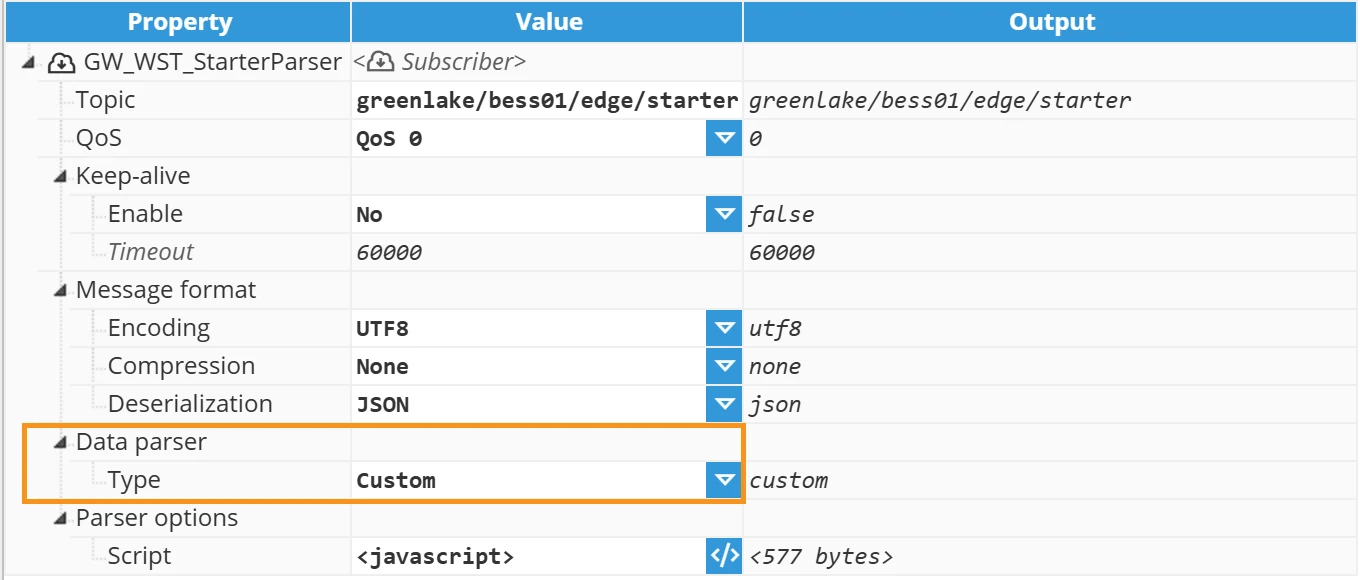
Click the button next to the Script field. The Script editor opens.
Write the script. Refer to Script objects and Script template.
Click Save in the Script editor.
Save the configuration. Click Yes to restart the module.
In the Source section of each tag, set these settings:
Enabled: Yes
Module type: MqttClient
Module name: the name of the MQTT Client instance.
Subscriber: the connection and the subscriber, in the format Connection/Subscriber.
Tag address: the value of tag in the tag events of the script. When Tag address is empty, the script must use the full path of the tag.
Make sure that the tags get the values, the quality and the timestamp of the received messages.
For procedures with tests, refer to Parsing Examples.
Script objects
These objects are available in the script:
Object | Description |
|---|---|
$.input | The received message after the Message format settings.
|
$.output | The array of tag events. To update a tag, add a tag event with $.output.push(tagEvent). Each tag event has the structure that Tag event structure shows. |
$.topic | The topic of the received message. With a wildcard topic (+ or #), use $.topic to find the device or the asset that sent the message. |
Tag event structure
Each tag event of $.output has this structure:
{ "tag": "/Group/Tag", "value": 1234, "quality": 192, "ts": 1586353800000 }Property | Description |
|---|---|
tag | The Tag address of the tag. When Tag address is empty, use the full path of the tag. |
value | The value of the tag event: a number, a string or a boolean, for the data type of the tag. |
quality | The quality of the tag event: a number from 0 to 255. 0 to 63 is bad, 64 to 127 is uncertain and 192 to 255 is good. |
ts | The timestamp of the tag event. It is a number in epoch format, in milliseconds. |
Message format settings
Set these settings of the Message format section for the messages that the subscriber receives:
Setting | Description |
|---|---|
Encoding | Selects the format that decodes the message. Default: Binary.
|
Compression | Selects the algorithm that decompresses the received message. Default: GZip.
|
Deserialization | Selects the serializer that changes the message into a JavaScript object. Default: JSON.
|
Serialization options | Available when Deserialization is Protocol Buffers.
|
Script template
This script uses all the script objects. Copy the script as a base for your script. Then change it for the format of your messages.
The script reads a JSON array of events. Set Deserialization to JSON.
// Starter script: it uses all the script objects. Copy it and change it for your message format.
// Input: a JSON array of events { t: tag path, v: value, q: quality, ts: ISO 8601 date }.
const input = $.input;
$.logger.debug("Topic %s: %d events", $.topic, input.length);
for (let i = 0; i < input.length; i++) {
  const ev = input[i];
  $.output.push({
    tag: ev.t,                    // Tag address of the tag, or its full path when Tag address is empty
    value: ev.v,
    quality: ev.q,
    ts: moment(ev.ts).valueOf()   // ISO 8601 date to epoch milliseconds
  });
}
This table shows how the script uses each object:
Object | Use in the script |
|---|---|
$.input | The for loop reads each event of the array. |
$.logger | Writes the topic and the number of events to the module log, at the debug level. |
$.topic | The topic of the received message, in the log message. |
moment | Changes the ISO 8601 date of each event into a timestamp in epoch format, in milliseconds. |
$.output | Gets one tag event for each event of the array. |
Message received:
[
  {
    "t": "/GREENLAKE/BESS01/WST/AMBIENT_TEMP",
    "v": 23.980009078979492,
    "q": 192,
    "ts": "2026-11-24T11:31:13.064Z"
  },
  {
    "t": "/GREENLAKE/BESS01/WST/HUMIDITY",
    "v": 50,
    "q": 192,
    "ts": "2026-11-24T11:31:13.064Z"
  },
  {
    "t": "/GREENLAKE/BESS01/WST/WIND_SPEED",
    "v": 3,
    "q": 192,
    "ts": "2026-11-24T11:31:13.064Z"
  }
]
The Tag address of each tag is the tag path in the message, for example /GREENLAKE/BESS01/WST/AMBIENT_TEMP.
Examples
Note:
For procedures and examples with results, refer to Parsing Examples.