This article shows how to make a subscriber with a custom parser, and gives examples of scripts. For the script objects, the utilities and the settings, refer to Custom Parser.
Create a custom parser subscriber
To make a subscriber with a custom parser, do these steps:
Make an MQTT Client module instance. Refer to MQTT Client Configuration.
Add a connection to the broker.
In the Model panel, add a subscriber to the connection.
Set the Topic of the subscriber, for example greenlake/bess01/edge/starter.
In the Message format section, set the settings for the received messages. For a JSON message without compression, set Encoding to UTF8, Compression to None and Deserialization to JSON.
In the Data parser section, set Type to Custom.
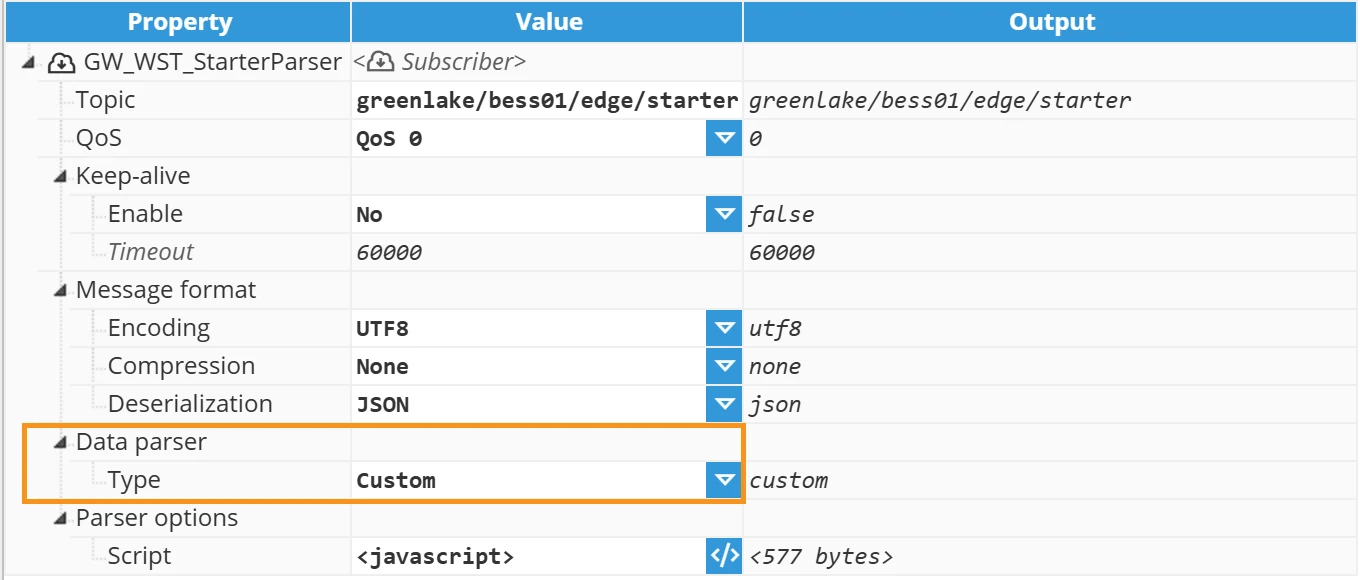
Click the button next to the Script field. The Script editor opens.
Paste the Script template or the script of an example.
Click Save in the Script editor.
Save the configuration. Click Yes to restart the module.
In the Source section of each tag, set Enabled to Yes, Module type to MqttClient and Module name to the module instance. In Config, set Subscriber to Connection/Subscriber and Tag address to the value of tag in the script.

Save the tag configuration.
In Data > Realtime, make sure that the tags get the values with Good quality.

Examples
The examples use the messages of a BESS plant. Each example shows the settings to change, the script, a message that the subscriber received during a test and the values that the tags got.
All the examples use Compression set to None. Unless an example gives other values, set Encoding to UTF8 and Deserialization to JSON.
Parse a JSON message
This example reads the message of a weather station. The message has one timestamp and an object for each measurement. The name of each measurement is the Tag address of a tag.
// Make one tag event for each measurement of the weather station message.
// The name of each measurement is the Tag address of a tag.
const data = $.input.data;
const ts = Date.parse($.input.ts);
const names = Object.keys(data);
for (let i = 0; i < names.length; i++) {
  $.output.push({ tag: names[i], value: data[names[i]].value, quality: 192, ts: ts });
}
Message received:
{
  "ts": "2026-11-24T12:56:33.055Z",
  "data": {
    "AMBIENT_TEMP": {
      "value": 24.81,
      "unit": "degC"
    },
    "HUMIDITY": {
      "value": 50,
      "unit": "%"
    },
    "WIND_SPEED": {
      "value": 3,
      "unit": "m/s"
    }
  }
}
Tag values. The timestamp of the three tags is 1795524993055 (the ts of the message):
Tag | Value |
|---|---|
MET_STATION/AMBIENT_TEMP | 24.81 |
MET_STATION/HUMIDITY | 50 |
MET_STATION/WIND_SPEED | 3 |
Parse a Protocol Buffers message
This example reads a Protocol Buffers message from a power conversion system (PCS). Each event has a oneof value field and a Google timestamp.
Set Encoding to Binary and Deserialization to Protocol Buffers. In Serialization options, set Proto file type to Custom, paste this file in Custom file and set Message type to PcsReport.
syntax = "proto3";
import "google/protobuf/timestamp.proto";

message PcsReport {
  repeated TagEvent events = 1;
}

message TagEvent {
  string tag = 1;
  oneof valueType {
    int32 Integer = 2;
    double Double = 3;
    string String = 4;
    int64 Long = 5;
  }
  uint32 quality = 6;
  google.protobuf.Timestamp ts = 7;
}
After the deserialization, $.input is a JavaScript object:
valueType contains the name of the oneof field that has the value, for example Double.
ts has seconds and nanos. The script changes them into epoch milliseconds.
The 64-bit integers (Long, ts.seconds) are numbers. A value beyond 2^53 - 1 loses precision.
// Deserialization is Protocol Buffers, so $.input is the PcsReport object.
// valueType gives the name of the oneof field that has the value.
// 64-bit integers (Long, ts.seconds) are numbers: precision is lost above 2^53 - 1.
const events = $.input.events;
for (let i = 0; i < events.length; i++) {
  const ev = events[i];
  $.output.push({
    tag: ev.tag,
    value: ev[ev.valueType],
    quality: ev.quality,
    ts: ev.ts.seconds * 1000 + Math.floor(ev.ts.nanos / 1000000)
  });
}
Message received (binary, shown as JSON):
{
  "events": [
    {
      "tag": "ACTIVE_POWER",
      "Double": 2612.27,
      "quality": 192,
      "ts": {
        "seconds": 1795524993,
        "nanos": 55000000
      }
    },
    {
      "tag": "MODULES_ONLINE",
      "Integer": 6,
      "quality": 192,
      "ts": {
        "seconds": 1795524993,
        "nanos": 55000000
      }
    },
    {
      "tag": "OPERATING_STATE",
      "String": "discharging",
      "quality": 192,
      "ts": {
        "seconds": 1795524993,
        "nanos": 55000000
      }
    },
    {
      "tag": "ENERGY_EXPORTED",
      "Long": 135075915124,
      "quality": 192,
      "ts": {
        "seconds": 1795524993,
        "nanos": 55000000
      }
    }
  ]
}
Tag values:
Tag | Value |
|---|---|
PCS_PROTOBUF/ACTIVE_POWER | 2612.27 |
PCS_PROTOBUF/MODULES_ONLINE | 6 |
PCS_PROTOBUF/OPERATING_STATE | discharging |
PCS_PROTOBUF/ENERGY_EXPORTED | 135075915124 |
Parse a text message
This example reads a text message from a grid meter. Each line has the format TAGNAME|VALUE|QUALITY|TS and ends with \r\n.
Set Deserialization to None. Then $.input is a Buffer.
// Deserialization is None, so $.input is the received message as a Buffer.
// Each line is TAGNAME|VALUE|QUALITY|TS. Empty lines are skipped.
const lines = $.input.toString("utf8").split("\r\n");
for (let i = 0; i < lines.length; i++) {
  const line = lines[i];
  if (line === "") continue;
  const fields = line.split("|");
  $.output.push({ tag: fields[0], value: Number(fields[1]), quality: Number(fields[2]), ts: Number(fields[3]) });
}
Message received:
POI_ACTIVE_POWER|20000|192|1795524993055
POI_REACTIVE_POWER|0|192|1795524993055
POI_FREQUENCY|50|192|1795524993055
Tag values:
Tag | Value |
|---|---|
POI_METER/POI_ACTIVE_POWER | 20000 |
POI_METER/POI_REACTIVE_POWER | 0 |
POI_METER/POI_FREQUENCY | 50 |
Use the topic to find the tag path
In this example, each battery rack sends its values to its own topic, for example greenlake/bess01/edge/racks/bb01/rack01. One subscriber with a wildcard topic receives the messages of all the racks. The script makes the tag path from the levels of $.topic.
Set Topic to greenlake/bess01/edge/racks/+/+. Leave the Tag address of the tags empty. Then the script must use the full path of the tag.
// Build the tag path from the topic: greenlake/bess01/edge/racks/bb01/rack01 gives /GREENLAKE_GATEWAY/BB01/RACK01/<name>.
// The tags have an empty Tag address, so the module uses the full tag path as the address.
const levels = $.topic.split("/");
const base = "/GREENLAKE_GATEWAY/" + levels[4].toUpperCase() + "/" + levels[5].toUpperCase() + "/";
const values = $.input.values;
const names = Object.keys(values);
for (let i = 0; i < names.length; i++) {
  $.output.push({ tag: base + names[i], value: values[names[i]], quality: 192, ts: $.input.ts });
}
Messages received:
Topic | Message |
|---|---|
greenlake/bess01/edge/racks/bb01/rack01 | {"ts":1795524993055,"values":{"SOC":84.12,"SOH":96.31}} |
greenlake/bess01/edge/racks/bb01/rack02 | {"ts":1795524993055,"values":{"SOC":83.76,"SOH":96.95}} |
Tag values:
Tag | Value |
|---|---|
/GREENLAKE_GATEWAY/BB01/RACK01/SOC | 84.12 |
/GREENLAKE_GATEWAY/BB01/RACK01/SOH | 96.31 |
/GREENLAKE_GATEWAY/BB01/RACK02/SOC | 83.76 |
/GREENLAKE_GATEWAY/BB01/RACK02/SOH | 96.95 |
Read the messages of a custom payload publisher
This example reads the messages of an MQTT Client publisher that uses the custom payload example with the tag metadata. Refer to Custom Payload Example. The publisher can be in a different N3uron node. Each record of the message has the tag path, the value, the units, the formatted text, the quality and an ISO 8601 timestamp.
Set the Tag address of each local tag to the tag path in the other node, for example /GREENLAKE/BESS01/BB01/BMS01/RACK01/SOC.
// Read the records of the "tag metadata" Custom Payload example: [{ tag, value, unit, text, quality, ts }].
// The Tag address of each local tag is the tag path in the remote node.
const records = $.input;
for (let i = 0; i < records.length; i++) {
  const r = records[i];
  $.output.push({ tag: r.tag, value: r.value, quality: r.quality, ts: Date.parse(r.ts) });
}
Message received (extract, 3 of 18 records):
[
  {
    "tag": "/GREENLAKE/BESS01/BB01/BMS01/RACK01/VOLTAGE",
    "value": 1280,
    "unit": "V",
    "text": "1280.00 V",
    "quality": 192,
    "ts": "2026-11-24T12:56:33.055Z"
  },
  {
    "tag": "/GREENLAKE/BESS01/BB01/BMS01/RACK01/CURRENT",
    "value": 50.09414291381836,
    "unit": "A",
    "text": "50.09 A",
    "quality": 192,
    "ts": "2026-11-24T12:56:33.055Z"
  },
  {
    "tag": "/GREENLAKE/BESS01/BB01/BMS01/RACK01/SOC",
    "value": 84.1153564453125,
    "unit": "%",
    "text": "84.12 %",
    "quality": 192,
    "ts": "2026-11-24T12:56:33.055Z"
  }
]
The message has two records for each tag. Each tag gets the value of the last record:
Tag | Value |
|---|---|
RACK01_MIRROR/VOLTAGE | 1280 |
RACK01_MIRROR/CURRENT | 50.09414291381836 |
RACK01_MIRROR/SOC | 84.1153564453125 |
RACK01_MIRROR/SOH | 96.30999755859375 |
RACK01_MIRROR/CELL_V_MAX | 3450.1923828125 |
RACK01_MIRROR/CELL_V_MIN | 3422.73046875 |
RACK01_MIRROR/CELL_T_MAX | 26.49363899230957 |
RACK01_MIRROR/CELL_T_AVG | 25.99172019958496 |
RACK01_MIRROR/STATE | 1 |
Parse a nested JSON message
This example reads a site summary with one object for each asset. The script makes the Tag address from the asset name and the measurement name, for example GRID/POI_FREQUENCY.
// Make one tag event for each measurement of each asset. The Tag address is <asset>/<measurement>, for example GRID/POI_FREQUENCY.
const assets = $.input.assets;
const ts = $.input.ts;
const assetNames = Object.keys(assets);
for (let i = 0; i < assetNames.length; i++) {
  const values = assets[assetNames[i]];
  const names = Object.keys(values);
  for (let j = 0; j < names.length; j++) {
    $.output.push({ tag: assetNames[i] + "/" + names[j], value: values[names[j]], quality: 192, ts: ts });
  }
}
Message received:
{
  "site": "greenlake",
  "ts": 1795524993055,
  "assets": {
    "PCS": {
      "ACTIVE_POWER": 2612.27,
      "REACTIVE_POWER": 0
    },
    "GRID": {
      "POI_ACTIVE_POWER": 20000,
      "POI_FREQUENCY": 50
    }
  }
}
Tag values:
Tag (Tag address) | Value |
|---|---|
SITE_SUMMARY/PCS_ACTIVE_POWER (PCS/ACTIVE_POWER) | 2612.27 |
SITE_SUMMARY/PCS_REACTIVE_POWER (PCS/REACTIVE_POWER) | 0 |
SITE_SUMMARY/GRID_POI_ACTIVE_POWER (GRID/POI_ACTIVE_POWER) | 20000 |
SITE_SUMMARY/GRID_POI_FREQUENCY (GRID/POI_FREQUENCY) | 50 |
Change the units and the local time
In this example, the device sends kW and kvar, and the local time of the plant without a UTC offset. The script changes the values to MW and Mvar. It uses moment.tz() to change the local time (Europe/Madrid) into a UTC timestamp in milliseconds.
// The device sends kW and kvar with the plant local time (Europe/Madrid) and no UTC offset.
// Convert the values to MW and Mvar (4 decimals), and the local time to a UTC timestamp in milliseconds.
const msg = $.input;
const ts = moment.tz(msg.local_time, "YYYY-MM-DD HH:mm:ss", "Europe/Madrid").valueOf();
$.output.push({ tag: "ACTIVE_POWER_MW", value: Number((msg.P_KW / 1000).toFixed(4)), quality: 192, ts: ts });
$.output.push({ tag: "REACTIVE_POWER_MVAR", value: Number((msg.Q_KVAR / 1000).toFixed(4)), quality: 192, ts: ts });
Message received:
{
  "P_KW": 2612.3,
  "Q_KVAR": 0,
  "local_time": "2026-11-24 13:56:33"
}
Tag values. The timestamp of both tags is 1795524993000 (2026-11-24 12:56:33 UTC). The message has no milliseconds:
Tag | Value |
|---|---|
PCS_LOCAL_TIME/ACTIVE_POWER_MW | 2.6123 |
PCS_LOCAL_TIME/REACTIVE_POWER_MVAR | 0 |
Set the quality from the device status
In this example, a gateway sends the values of the power plant controller (PPC) with a status field. The script uses status to set the quality of the values: ONLINE gives 192 (Good). All the other values give 24 (Bad, communication failure).
// Use the status of the gateway as the quality of the values: ONLINE gives 192 (Good), any other status gives 24 (Bad, communication failure).
const msg = $.input;
const quality = msg.status === "ONLINE" ? 192 : 24;
const names = Object.keys(msg.values);
for (let i = 0; i < names.length; i++) {
  $.output.push({ tag: names[i], value: msg.values[names[i]], quality: quality, ts: msg.ts });
}
Message received:
{
  "device": "PPC",
  "status": "ONLINE",
  "ts": 1795524993055,
  "values": {
    "RESPONSE_TIME": 20.4950008392334
  }
}
Tag values:
status | PPC_STATUS/RESPONSE_TIME |
|---|---|
ONLINE | 20.4950008392334, quality 192 (Good) |
COMM_FAIL | null, quality 24 (Bad) |
Skip the values that are not numbers
In this example, the script sends only the numeric values to the tags. For each value that is not a finite number, the script writes a warning to the module log and makes no tag event. The tag keeps its last value and its quality.
// Send only numeric values to the tags. Log a warning for each value that is not a finite number.
const msg = $.input;
const names = Object.keys(msg.values);
for (let i = 0; i < names.length; i++) {
  const value = msg.values[names[i]];
  if (typeof value !== "number" || !isFinite(value)) {
    $.logger.warn("Value of %s is not a number: %j (status %s)", names[i], value, msg.status);
    continue;
  }
  $.output.push({ tag: names[i], value: value, quality: 192, ts: msg.ts });
}
Message received with status COMM_FAIL:
{
  "device": "PPC",
  "status": "COMM_FAIL",
  "ts": 1795521013052,
  "values": {
    "RESPONSE_TIME": null
  }
}
Module log:
11:50:20.100 | WARN | CustomParser:Broker/GW_PPC_ValuesParser -> Value of RESPONSE_TIME is not a number: <null> (status COMM_FAIL)With status ONLINE, PPC_VALIDATED/RESPONSE_TIME gets 20.4950008392334.
Decode a binary frame
This example decodes a 16-byte frame from a PCS. All the fields are big-endian:
Bytes | Content |
|---|---|
0 to 3 | Time, epoch in seconds (UInt32). |
4 to 5 | STATE (UInt16). |
6 to 7 | MODULES_ONLINE (UInt16). |
8 to 11 | ACTIVE_POWER (Float32). |
12 to 15 | IGBT_TEMP (Float32). |
Set Encoding to Binary and Deserialization to None. Then $.input is a Buffer. The script writes a warning when the frame does not have 16 bytes.
// Decode the 16-byte PCS frame (big-endian). Deserialization is None, so $.input is a Buffer.
// Bytes 0-3 time (UInt32, seconds), 4-5 STATE (UInt16), 6-7 MODULES_ONLINE (UInt16), 8-11 ACTIVE_POWER (Float32), 12-15 IGBT_TEMP (Float32).
const frame = $.input;
if (frame.length !== 16) {
  $.logger.warn("Frame length is %d bytes, expected 16", frame.length);
} else {
  const ts = frame.readUInt32BE(0) * 1000;
  $.output.push({ tag: "STATE", value: frame.readUInt16BE(4), quality: 192, ts: ts });
  $.output.push({ tag: "MODULES_ONLINE", value: frame.readUInt16BE(6), quality: 192, ts: ts });
  $.output.push({ tag: "ACTIVE_POWER", value: frame.readFloatBE(8), quality: 192, ts: ts });
  $.output.push({ tag: "IGBT_TEMP", value: frame.readFloatBE(12), quality: 192, ts: ts });
}
Message received (hexadecimal):
6b 05 89 81 00 01 00 06 45 23 44 4f 42 15 06 74Tag values. The timestamp of the tags is 1795524993000. Float32 keeps approximately 7 significant digits:
Tag | Value |
|---|---|
PCS_FRAME/STATE | 1 |
PCS_FRAME/MODULES_ONLINE | 6 |
PCS_FRAME/ACTIVE_POWER | 2612.269287109375 |
PCS_FRAME/IGBT_TEMP | 37.25630187988281 |